56
The icons (sub-menus) available and that can be viewed within the SETUP Menu are:
• JOB EDIT
• PASSWORD
• BLOCKS
• CONFIG
• FACTORY RESET
• INFO
• DATA IN-OUT
• ERROR LOG
ACCESSING THE SUB-MENUS
To access the sub-menus included in the SETUP Menu, you must:
• Turn the ENCODER K
NOB - SX to select the desired icon.
• Push the ENTER/MEM K
EY.
“HT4” CONTROL PANEL
It is not possible to access the SETUP Menu and all the related sub-menus using the “HT4” control panel.
JOB EDIT SETUP Menu
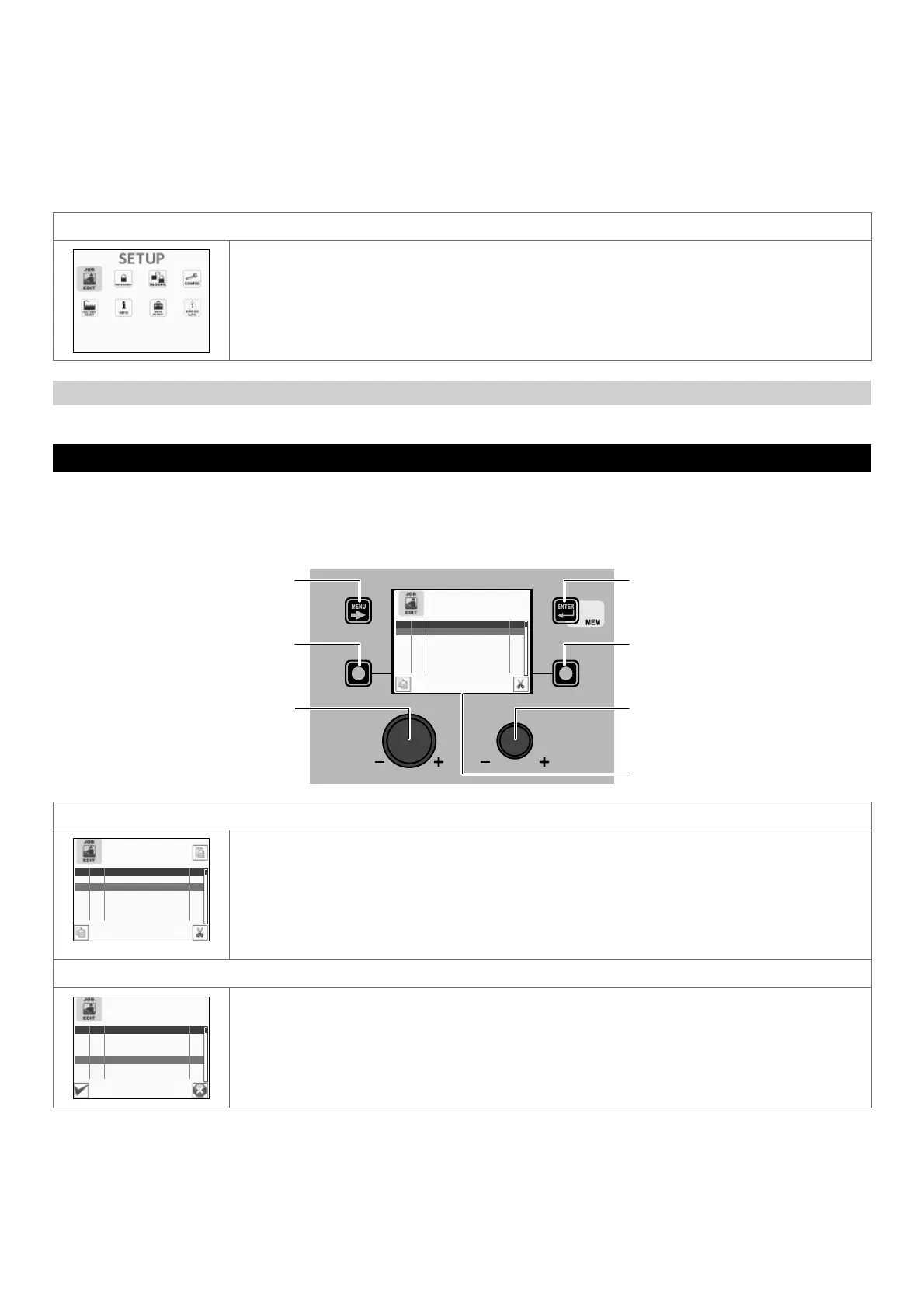
The purpose of this menu is to allow the operator to copy or delete a JOB (automatic welding point) entered previously.
To access the JOB EDIT Menu from the SETUP Menu:
• Turn the ENCODER K
NOB - SX to select the desired icon.
• Push the ENTER/MEM K
EY.
MENU KEY ENTER/MEM KEY
ENCODER KNOB - SX ENCODER KNOB - DX
VISION SCREEN
SX KEY DX KEY
PRG JOB PROCESS I
001 MMA 97
002 0011 MIG/MAG SYNERGIC 211
003 MMA 97
004 --- --- ---
005 --- --- ---
006 --- --- ---
COPYING THE JOB SELECTED
PRG JOB PROCESS I
001 MMA 97
002 0011 MIG/MAG SYNERGIC 211
003 MMA 97
004 --- --- ---
005 --- --- ---
006 --- --- ---
COPY JOB 002
To copy the JOB selected, proceed as follows:
• Select the JOB to be copied by rotating the ENCODER K
NOB - SX.
• Push the SX K
EY.
• Choose the position to which the JOB selected is to be copied (or overwritten *) by rotating the
ENCODER K
NOB - SX.
• Push the ENTER/MEM K
EY to confirm and finalise copying of the JOB selected.
* In the case of overwriting, confirmation will be requested.
DELETING THE JOB SELECTED
PRG JOB PROCESS I
001 MMA 97
002 0011 MIG/MAG SYNERGIC 211
003 MMA 97
004 0011 MIG/MAG SYNERGIC 211
005 --- --- ---
006 --- --- ---
DELETE JOB 004?
To delete the JOB selected, proceed as follows:
• Select the JOB to be deleted by rotating the ENCODER K
NOB - SX.
• Push the DX K
EY.
• Push the SX K
EY to confirm and finalise deletion of the JOB selected.
• To cancel the operation of deleting the JOB selected, push the DX K
EY.
To exit the JOB EDIT Menu and go back to the SETUP Menu:
• Push the MENU K
EY.











 To Next Page