Page 60 FF6300 Operating Manual
Using a different HPU than the one specified in this manual will require a
separate evaluation.
Do the following to operate:
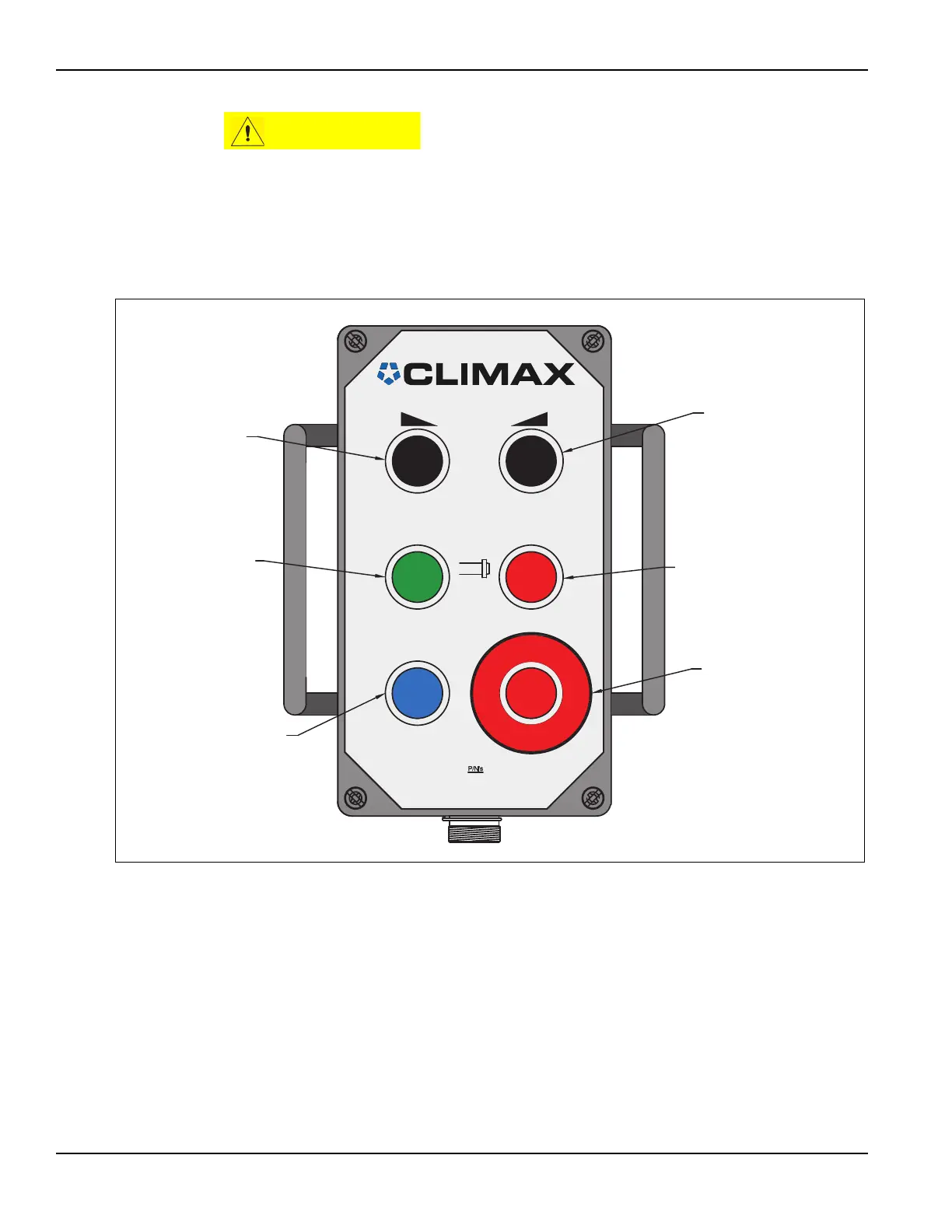
1. On the HPU controller, turn the emergency stop button clockwise to reset the
emergency stop.
FIGURE 4-3. LOCATION OF HYDRAULIC POWERED ROTATION CONTROLS
2. Press the start button to start the HPU motor.
3. Press the speed control slower button until it is at the minimum.
4. Press the hydraulic on button.
5. Press the speed control faster button to reach the desired speed.
6. Turn the feed rate adjustment knob to the minimum feed or to the desired set-
ting, if known (Figure 4-2 on page 59).
7. Turn on the feed and adjust the feed rate for the desired cut (Figure 4-2 on
page 59).
MAIN
O
BAR
(-) (+)
RPM
I
I
PENDANT 65028
20' CABLE 53432
30' CABLE 62729
50' CABLE 53433
100' CABLE 53434
SPEED CONTROL
FASTER
SPEED CONTROL
SLOWER
HYDRAULIC ON
(Turns on hydraulic
flow to flange facer)
HYDRAULIC OFF
(Turns off hydraulic
flow to flange facer)
START (System reset)
(Starts main electric
drive motor on HPU)
EMERGENCY STOP
(Rotate clockwise to
reset)
(Stops electric drive
motor and oil flow)



 To Next Page