Maintenance Manual SP 40
Rev. 005
29
Chapter 2
Removals
2.9 Ribbon Sensor Assy
DANGER : To prevent serious personal injury from electrical shock always turn the printer off and unplug
the power cable before to remove the paper motor assy.
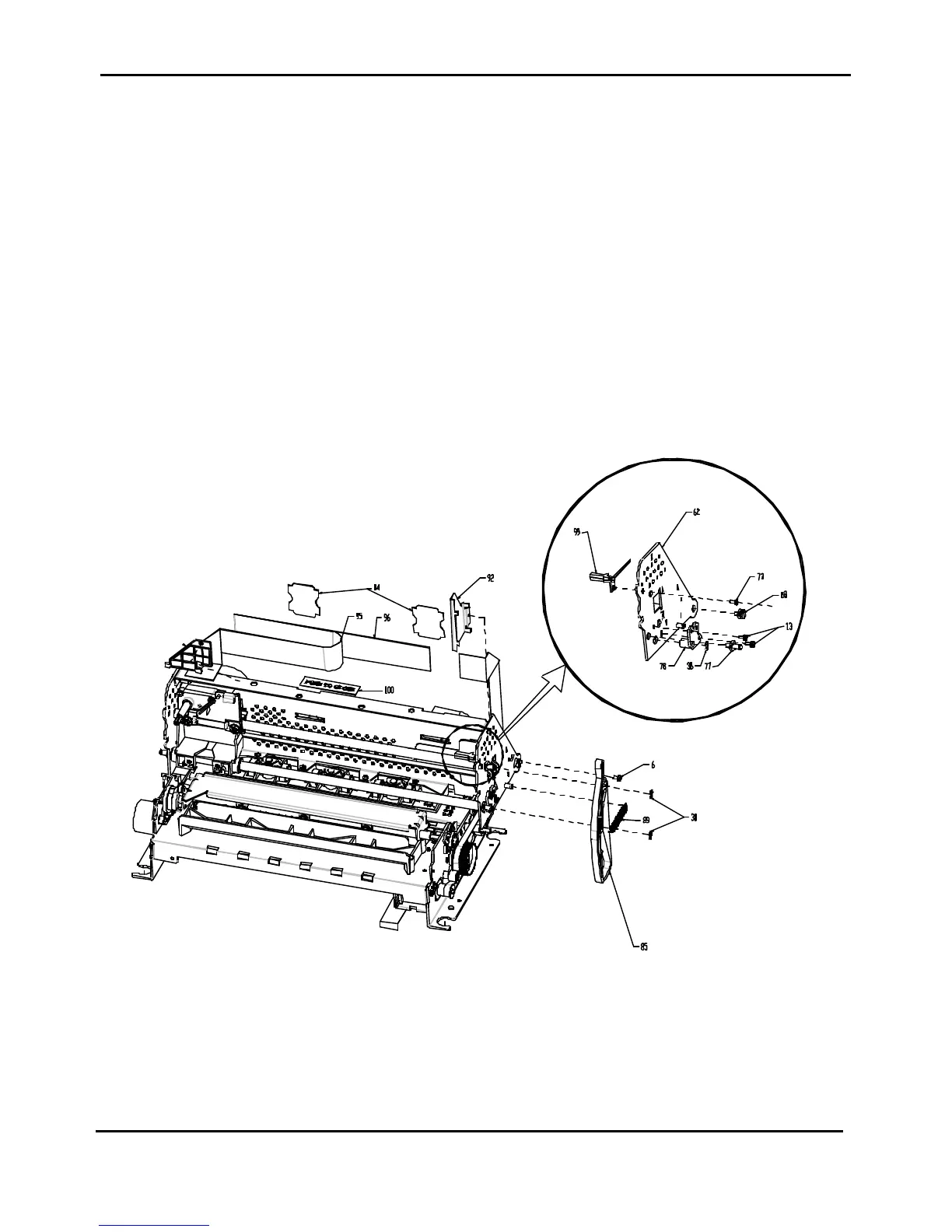
Ribbon sensor assy is item 99 of figure 2.12 and is fixed on the upper side of the right frame of the printer.
To Remove:
1) Remove the top and the main cover assy (see chapter 2.2).
2) Push the green levers to rise the upper side of the mechanical assy and remove the inked ribbon.
3) Unplug the connector cable from the engine board (the 2
nd
starting from the right side).
4) Remove the metal cable retainer (item 92 of figure 2.12) from the rear side of the right frame.
5) Unscrew the screw (item 73 of figure 2.12) fixing thr sensor on the right frame.
6) Remove the ribbon sensor assy being careful to slip off the connector cable through the vertical frame
toward the front side.
To Install:
To install, follow the removal step in reverse order.
Figure 2.12 - Ribbon Sensor Removal



 To Next Page