Maintenance Manual SP 40
Rev. 005
86
Chapter 4
Service Maintenance
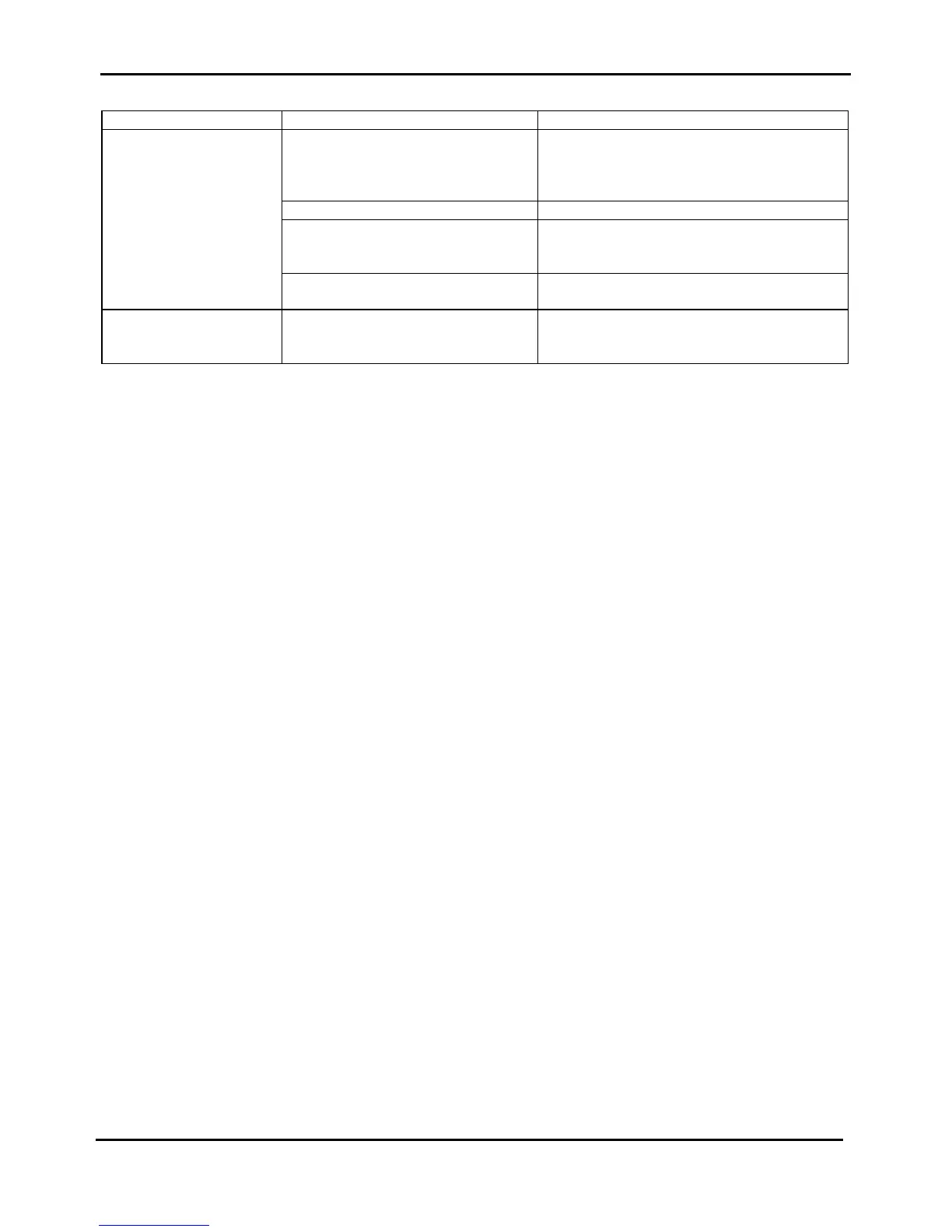
SYMPTOM PROBABLE CAUSE CORRECTIVE ACTION
The paper is not feeder
properly.
The paper path is not free. Check for the paper path to be free.Open the
mechanical assy through the right and the left
green levers and remove residual of paper also
through the paper knob.
The mechanical assy is not closed. Close the mechanical assy.
The selector motor is not correctly
installed.
Check for selector motor connection on engine
board.
The selector motor may be faulty Check for its impedance.
Replace selector motor assy
The printer does not
initializes.
All the leds are lit.
The controller may be faulty or not
properly plugged together the engine
board.
Check for the correct connection between the
boards.
Replace the controller board
Table 4.4 Faulty Probability Guide cont'd
4.11 Reset the consumable parts
Starting from the software release 1.7x, two important parameters for the service has been added and are printed on
the Self Test printout.
Ribbon Life counter
Print Head Life counter
The first item is under User responsability.
The User can reset it in three ways:
1 An item has been added in the Configuration Setup (Ribbon Replaced=no*, yes) in order to reset the ribbon life
counter (see chapter 3.3.2.4).
2 On html Printer Status Page this counter can be displayed and resetted under permission remotely (see
chapter 3.4).
3 It can be resetted also in T&D, when launching the T&D13 (conters reset), see chapter 5 for details.
The second item is under Service responsability.
On html Printer Status Page this counter can be only displayed.
It can be resetted only in T&D, when launching the T&D13 (conters reset), see chapter 5 for details.



 To Next Page