SiEN18-622 Field Setting for SkyAir Indoor Unit
Test Operation 171
4.2 Field Setting
4.2.1 Wired Remote Control
Note: (Field setting must be made from the remote control in accordance with the installation
conditions.)
Setting can be made by changing the “Mode number”, “FIRST CODE NO.”, and “SECOND
CODE NO.”.
Refer to the following procedures for Field setting.
Procedure
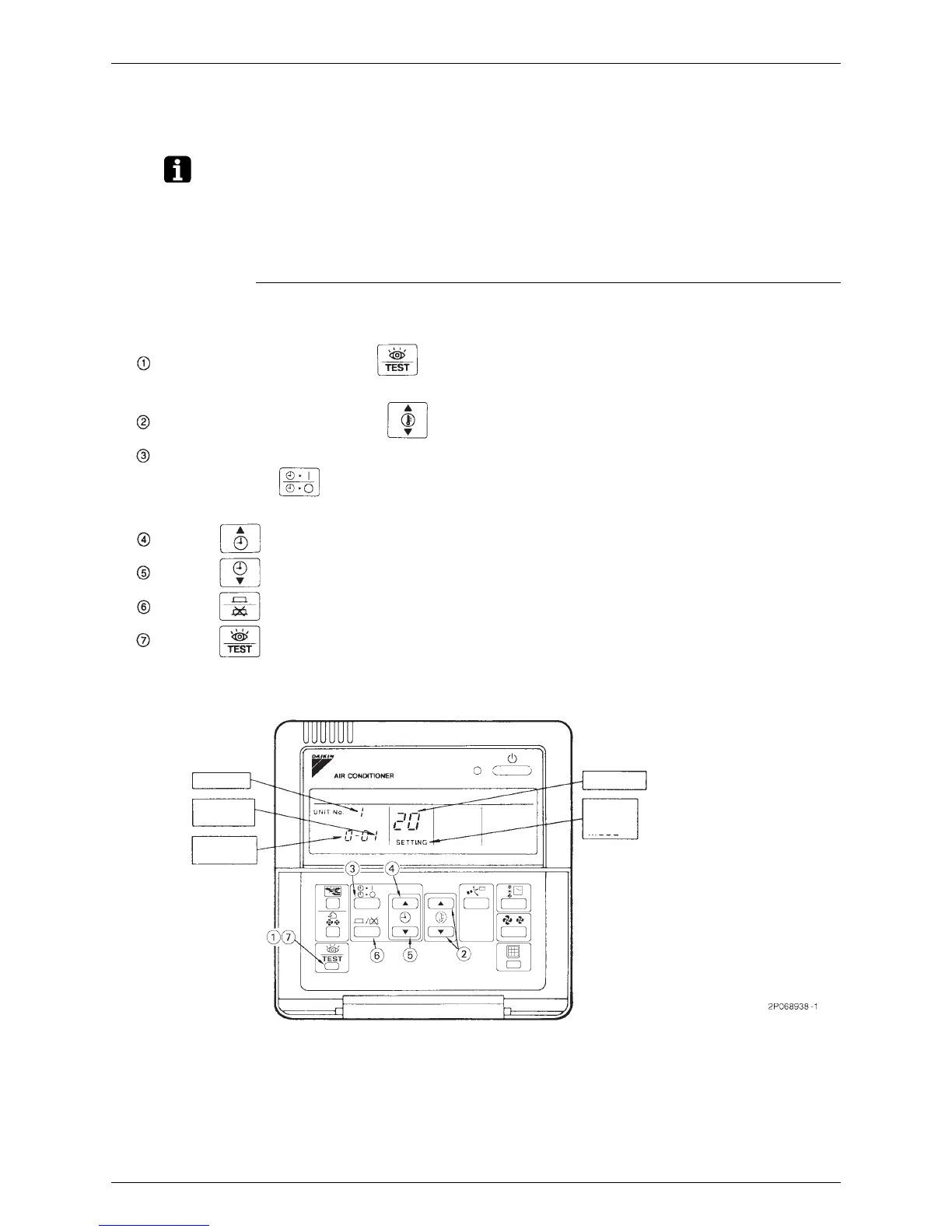
When in the normal mode, press the “”button for a minimum of four seconds, and the FIELD
SET MODE is entered
Select the desired MODE NO. with the “”button.
Push the “”upper button and select FIRST CODE NO.
Push the “” lower button and select the SECOND CODE NO.
Push the “”button once and the present settingsare SET.
Push the “”button for about one second to return to the NORMAL MODE.
(Example) If during group setting and the time to clean air filter isset to FILTER CONTAMINATION -
HEAVY,
SET MODE NO. to “10”, FIRST CODE NO. to “0,”and SECOND CODE NO. to “02”
During group control, when setting by each indoor unit (mode No. 20, 21 and 23 have been
selected), push the “”button and select the INDOOR UNIT NO to be set. (This operation
isunnecessary when getting by group.)
UNIT NO.
FIELD
SET
MODE
MODE NO.
SECOND
CODE NO.
FIRST
CODE NO.






 To Next Page