Instruction SiEN18-622
210 System Configuration
2.2.5 Auto Dry Cool Heat Fan Operation
The air conditioner operates with the operation mode of your choice. From
the next time on, the air conditioner will operate with the same operation
mode.
To start operation
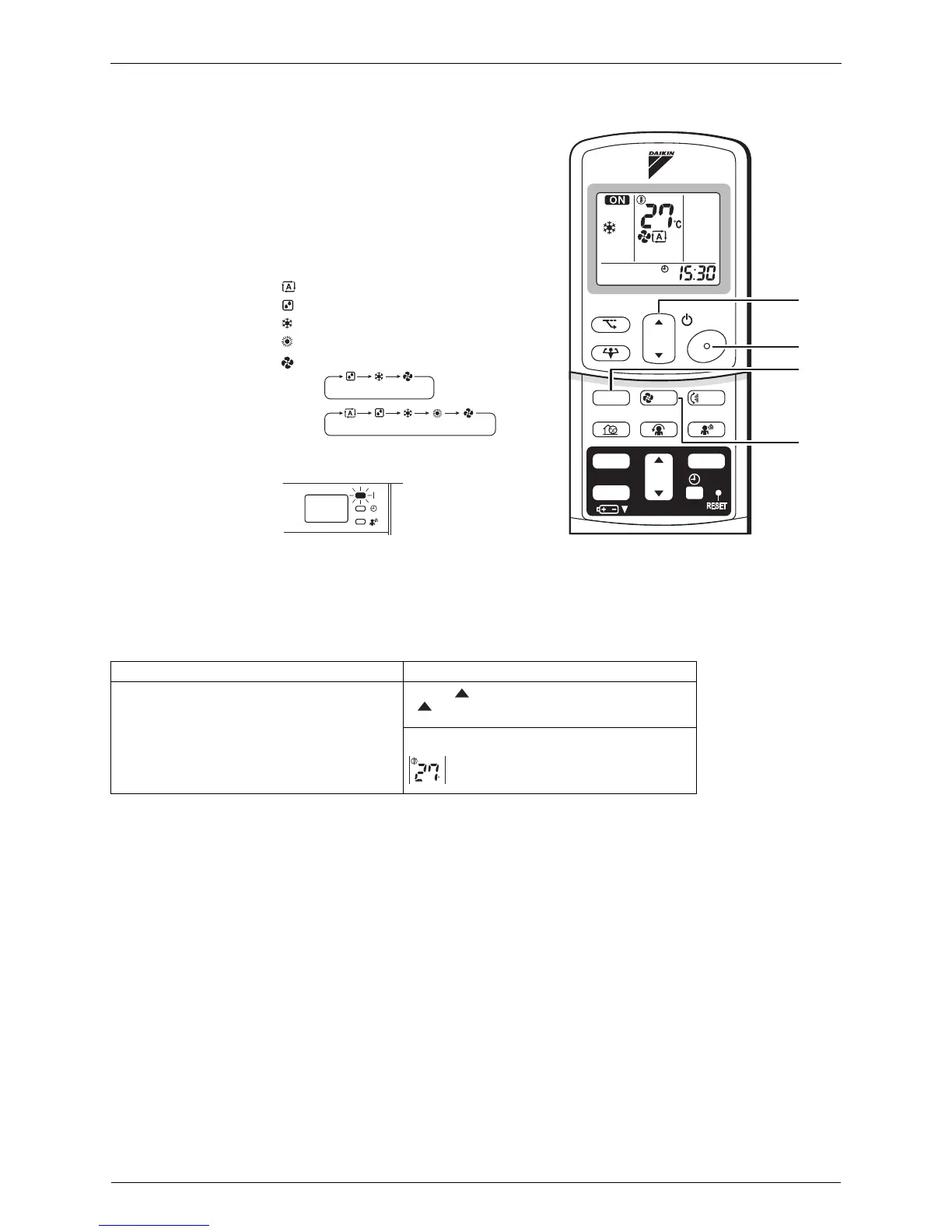
1. Press “MODE” selector button and select
an operation mode.
• Each pressing of the button advances the
mode setting in sequence.
: AUTO
: DRY
: COOL
: HEAT
: FAN
<FTK>
<FTX>
2. Press “ON/OFF” button .
• The OPERATION lamp lights up.
To stop operation
3. Press “ON/OFF” button again.
• Then OPERATION lamp goes off.
To change the temperature setting
4. Press “TEMPERATURE adjustment
button”.
DRY or FAN mode AUTO or COOL or HEAT mode
The temperature setting is not variable.
Press “ ” to raise the temperature and press
“”
to lower the temperature.
Set to the temperature you like
TEMP
ON/OFF
POWERFUL
MODE
FA N
SWING
SILENT
SENSOR
ECONO
COMFORT
TIMER
ON
CANCEL
OFF
2, 3
1
4
5
C






 To Next Page