SiEN18-622 Field Setting for SkyAir Indoor Unit
Test Operation 179
4.7 Maintenance Mode Setting
Procedure 1. Enter the field set mode.
Continue to push the inspection / test operation button for a minimum of 4 seconds.
2. Enter the maintenance mode.
After having entered the field set mode, continue to push the inspection / test operation
button for a minimum of 4 seconds.
3. Select the mode No.
Set the desired mode No. with the up/down temperature setting button.
4. Select the unit No.
Select the indoor unit No. set with the time mode START/STOP button.
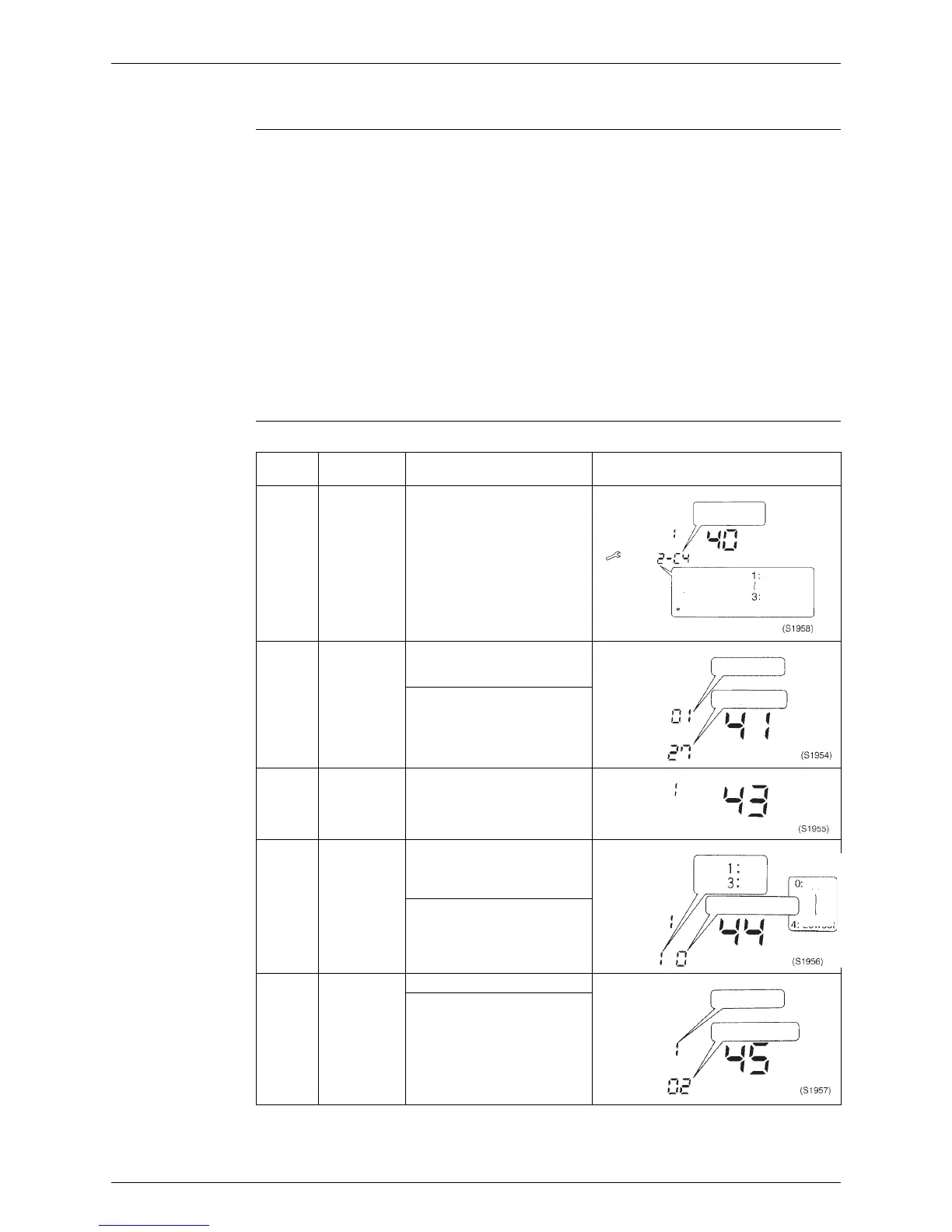
5. Carry out the necessary settings for each mode. (Modes 41, 44 and 45)
See the table below for details.
6. Enter the setting contents. (Modes 44 and 45)
Enter by pushing the timer ON/OFF button.
7. Return to the normal operation mode.
Tap the inspection / test operation button one time.
Table
Operation is not reset by malfunction code reset for inspection.
(Cannot be reset because the count is updated each time a malfunction occurs.)
Mode
No.
Function Content and Operation Method Example of Remote Control Display
40 Malfunction
Hysteresis
You can change the history
with the programming time up-
down button.
41 Sensor Data
Display
Select the display sensor with
the programming time up-
down button
Display sensor
00 Remote control sensor
01 Suction (R1T)
02 Heat exchange(R2T)
03 Heat exchange(R3T)
43 Forced Fan
ON
Turns the fan ON for each unit
individually.
44 Individual
Setting
Sets fan speed and air flow
direction for each unit
individually when using group
control.
Settings are made using the
“air flow direction adjust” and
“fan speed adjust” buttons.
45 Unit No.
Change
Changes unit No.
Set the unit No. after changing
with the programming time up-
down button.
UNIT No.
CODE
SETTING
Malfunction
hysteresis
Newest
Oldest
Past malfunction
code
“00” displayed for 4 and subsequent.
UNIT No.
Sensor type
Temperature
SETTING
UNIT No.
SETTING
UNIT No.
CODE
SETTING
Upper
Low
Lowest
High
Air flow direction
Fan
speed
UNIT No.
Field set No.
No. after change
CODE
SETTING






 To Next Page