SiEN18-622 Service Check Function
Troubleshooting 311
2.2 SkyAir Indoor Unit INSPECTION/TEST Button
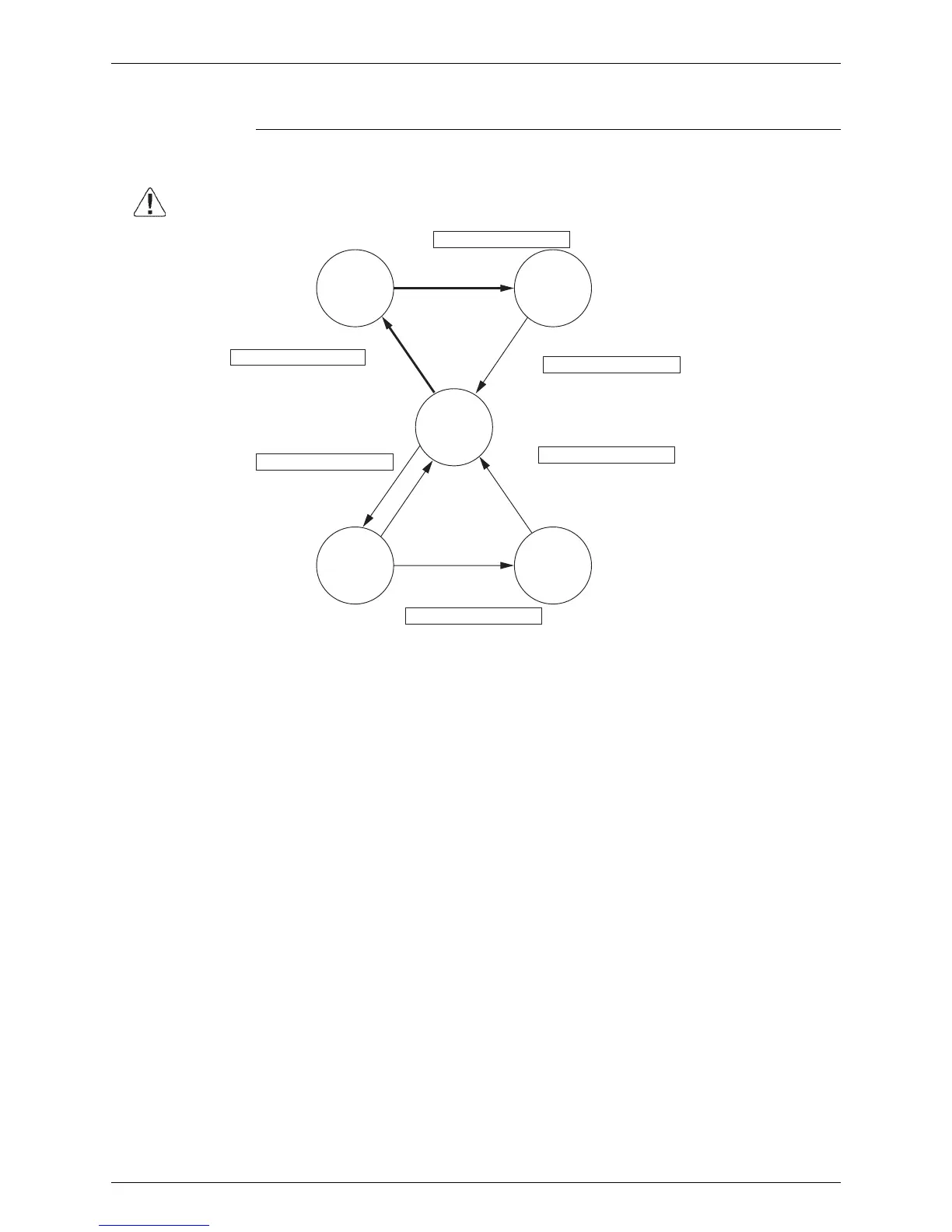
Explanation The following modes can be selected by using the [Inspection/Test Operation] button on the
remote control.
After 10 seconds
(V0815)
Caution
Be sure to turn off power switch before connect or disconnect connector, or
parts damage may be occurred.
Service data can be obtained.
• Malfunction code history
• Temperature data of various sections
Service settings can be made.
• Forced fan ON
• Air flow direction/volume setting
Indoor unit settings can be made
• Filter sign time
• Air flow direction
• Others
Depress Inspection/Test Operation button
for more than 4 seconds.
Press Inspection/Test Operation
button once.
Following codes can be checked.
• Malfunction codes
• Indoor model code
• Outdoor model code
Press Inspection/Test Operation
button once.
Thermostat is forcibly turned on.
Press Inspection/Test Operation button once.
Or after 30 minutes
Press Inspection/Test Operation button once.
Normal
mode
Local
setting
mode
Service
mode
Inspection
mode
Test
operation
mode
Depress Inspection/Test Operation button
for more than 4 seconds.






 To Next Page