SiEN18-622 Instruction
System Configuration 209
NOTE
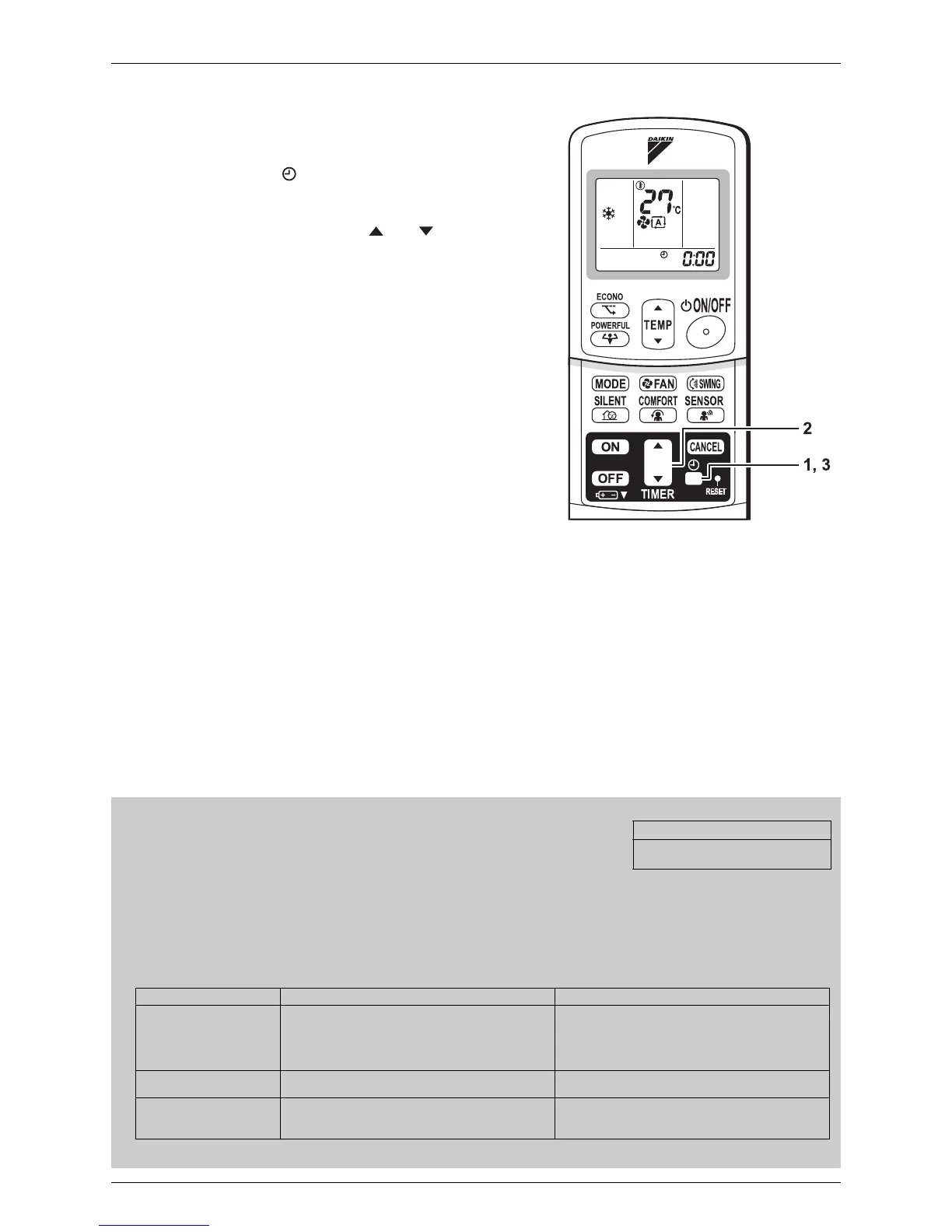
To set the clock
1. Press “CLOCK button”.
0:00
is displayed.
blinks.
2. Press “TIMER setting button” to set the
clock to the present time.
Holding down “ ” or “ ” button rapidly
increases or decreases the time display.
3. Press “CLOCK button”.
:
blinks.
Turn the breaker ON
• Turning ON the breaker opens the flap, then
closes it again. (This is a normal procedure.)
Tips for saving energy
• Be careful not to cool (heat) the room too much.
Keeping the temperature setting at a moderate level helps to save energy.
• Cover windows with a blind or a curtain.
Blocking sunlight and air from outdoors increases the cooling (heating) effect.
• Clogged air filters cause inefficient operation and waste energy. Clean them once in about every two weeks.
Please note
• The air conditioner always consumes 15-35 watts of electricity even while it is not operating.
• If you are not going to use the air conditioner for a long period, for example in spring or autumn, turn the breaker OFF.
• Use the air conditioner in the following conditions.
• Operation outside this humidity or temperature range may cause a safety device to disable the system.
Recommended temperature setting
For cooling:26°C – 28°C
For heating:20°C – 24°C
Mode Operating conditions If operation is continued out of this range
COOL Outdoor temperature: 10 to 46°C
Indoor temperature: 18 to 32°C
Indoor humidity: 80% max.
• A safety device may work to stop the operation.
(In multi system, it may work to stop the
operation of the outdoor unit only.)
• Condensation may occur on the indoor unit and
drip.
HEAT Outdoor temperature: 10 to 20°C
Indoor temperature: 10 to 30°C
• A safety device may work to stop the operation.
DRY Outdoor temperature: 10 to 46°C
Indoor temperature: 18 to 32°C
Indoor humidity: 80% max.
• A safety device may work to stop the operation.
• Condensation may occur on the indoor unit and
drip.






 To Next Page