Instruction SiEN18-622
238 System Configuration
Filters
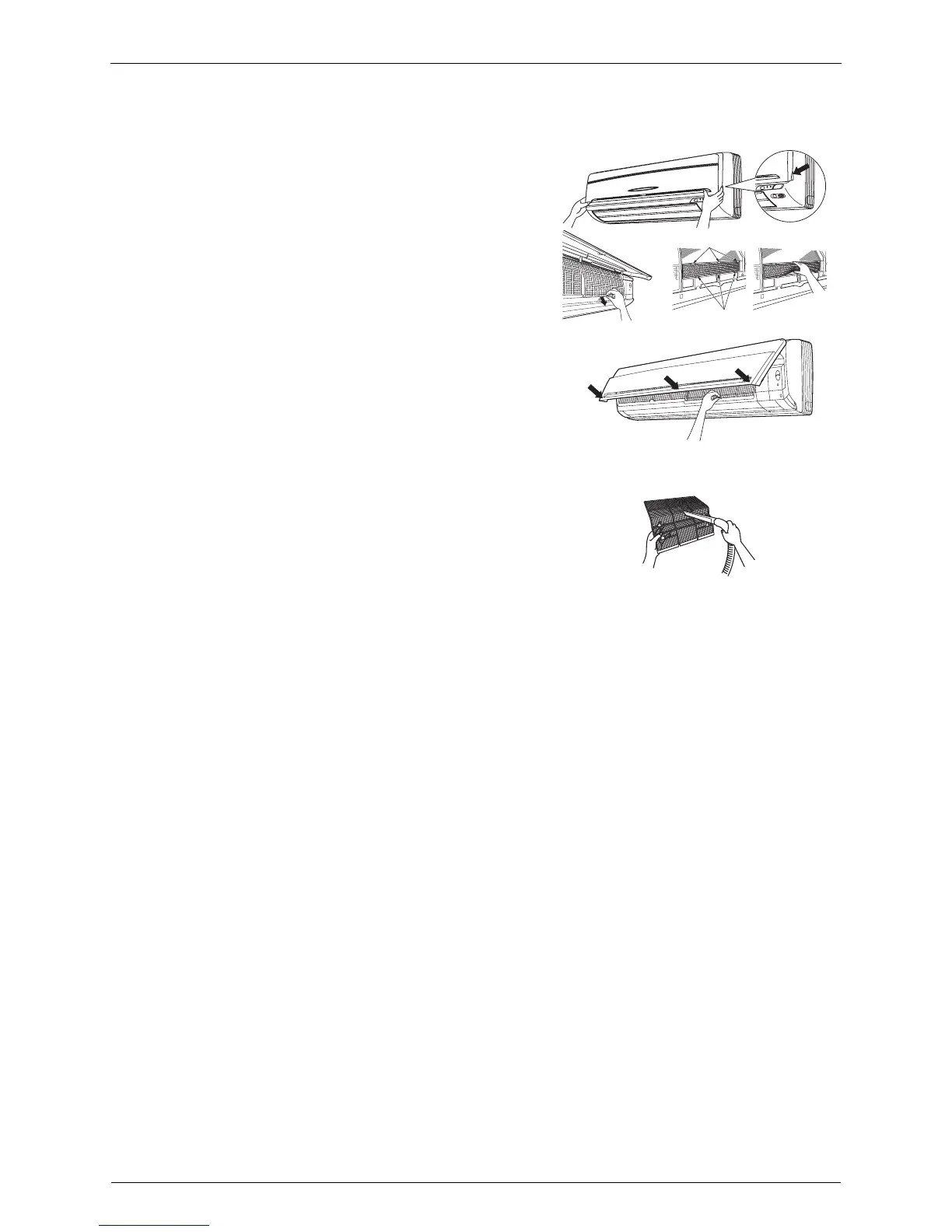
1. Open the front panel.
2. Pull out the air filters.
• Push a little upwards the tab at the center of
each air filter, then pull it down.
3. Take off the Titanium Apatite Photodcatalytic
Air-Purifying Filter.
• Press the top of the aircleaning filter onto the
tabs (3 at top). Then press the bottom of the
filter up slightly, and press it onto the tabs
(3 at bottom).
4. Clean or replace each filter.
• See figure.
5. Set the air filter and the Titanium Apatite
Photocatalytic Air-Purifying filter as they
were and close the front panel.
• Press the front panel at both sides and the
center.
Air Filter
1. Wash the air filters with water or clean them
with vacuum cleaner.
• If the dust does not come off easily, wash them
with neutral detergent thinned with lukewarm
water, then dry them up in the shade.
• It is recommended to clean the air filters
every two weeks.
Titanium Apatite Photocatalytic Air-purifying Filter
The Titanium Apatite Photocatalytic Air-Purifying Filter can be renewed by washing it with water once
every 6 months. We recommend replacing it once every 3 years.
[Maintenance]
1. Remove dust with a vacuum cleaner and wash lightly with water.
2. If it is very dirty, soak it for 10 to 15 minutes in water mixed with a neutral cleaning
agent.
3. After washing, shake off remaining water and dry in the shade.
4. Since the material is made out of paper, do not wring out the filter when removing
water from it.
[Replacement]
1. Remove the tabs on the filter frame and replace with a new filter.
• Dispose of the old filter as flammable waste.
tabs (3at top)
tabs






 To Next Page