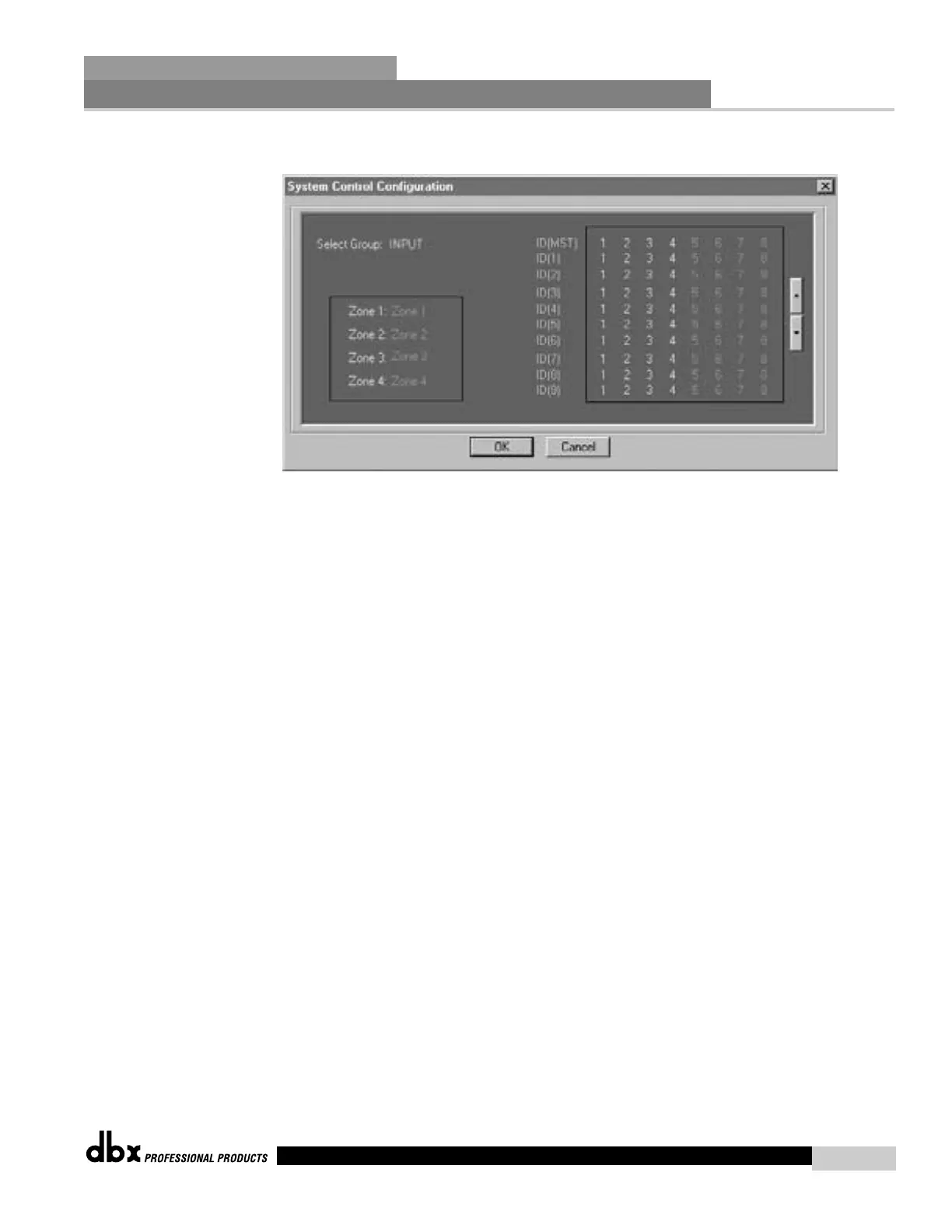
This opens a widow for System Control Configuration.
Select Group: Right click on highlighted area to bring up Group selections. There is one INPUT
group and 32 Output groups arranged in 4 Zones of 8 Groups each.
INPUT:
Input group for assigning Input channels of network devices.
Zone1 G1:Group1 – G8:Group8;
Zone2 G9:Group9 – G16:Group16;
Zone3 G17:Group17 – G24:Group24;
Zone4: G25:Group25 – G32:Group32;
Output groups for assigning output channels of network devices.
Changing Group Name:
Double clicking on the group name (INPUT, Group1-32) opens a dialog box where you can
rename the group.
Zone Area: Indicates which zone the current selected group belongs to. Double clicking on the
Zone name opens a dialog box to change the Zone name.
Assignment Area: This area lists all the Inputs or Outputs that can be assigned to any group.
The column to the right of this area indicates the ID of the network box. Numbers highlight-
ed in white indicate a device that is online. Numbers highlighted in green indicate Inputs or
Outputs assigned to the selected group. To assign Inputs or Outputs to the selected group, left
click on the desired channel number. The buttons to the left of this area allow the user to scroll
to other devices.
Assignments do not take place until the OK button has been pressed.
Network Functions
SECTION 7
DriveRack
™
81
DriveRack™ User Manual



 To Next Page