VPanel Window and Functions
17
Chapter 1 Operation Screen
Intelligent Tool Control (ITC) Function Settings
This machine is equipped with an Intelligent Tool Control (ITC) function. If you set the ITC function, when the milling bur being used
approaches its replacement time, it is automatically switched with the next milling bur. This makes it possible to continue milling for a
long time without any loss in milling quality. Use this dialog box to group together the milling burs that will be switched automatically.
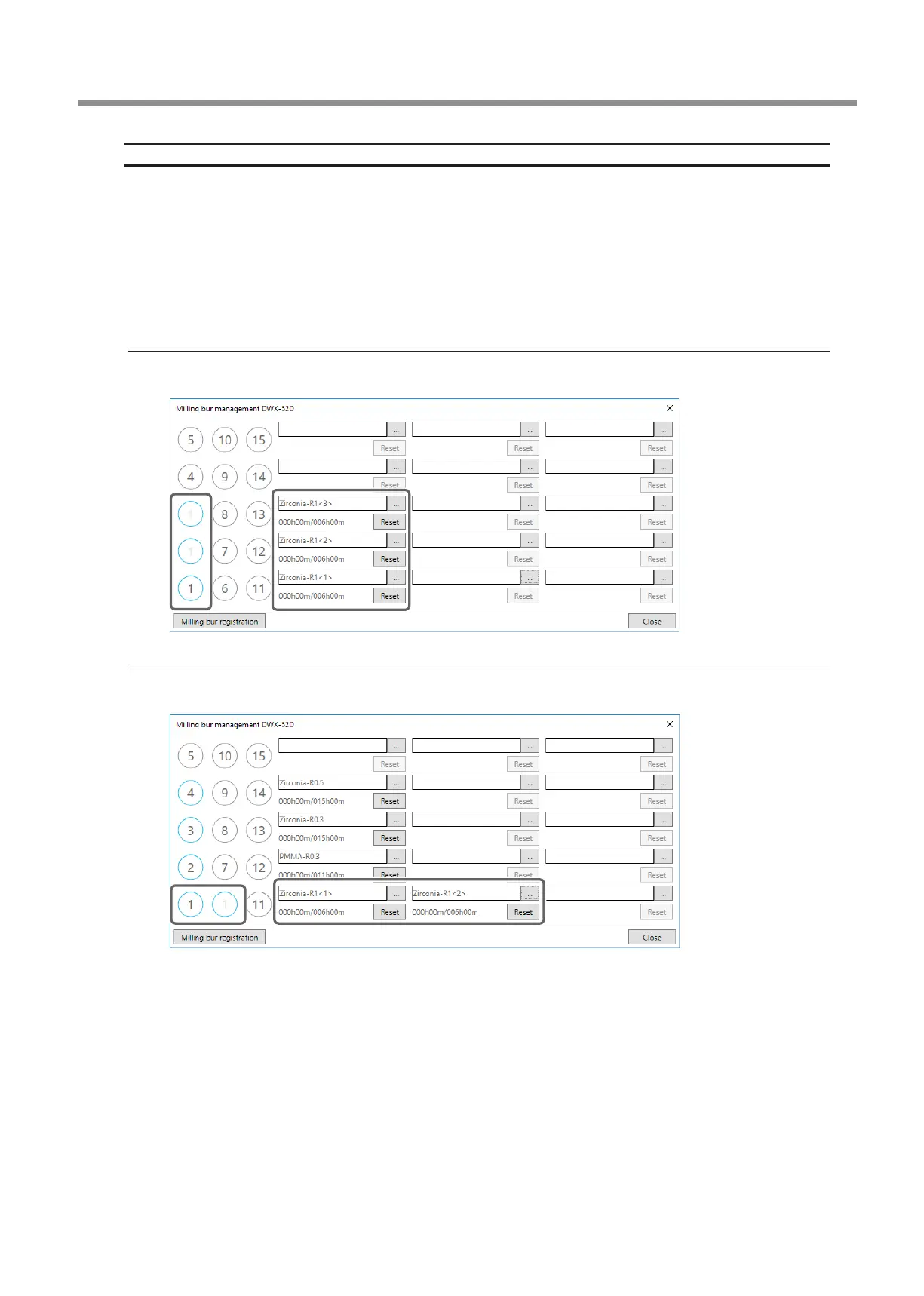
Register milling burs with the same name to set them as a single unit. For milling burs that are the same type, you can set a maximum
of three milling burs and a minimum of two milling burs.
When setting three milling burs as a single unit
Set three milling burs with the same name in the milling bur stocker.
(In the example in the following gure, (1) to (3) are set to the same name.)
When setting two milling burs as a single unit
Set milling burs with the same name in the milling bur stocker.
(In the example in the following gure, (1) and (6) are set to the same name.)



 To Next Page