73
Chapter 4 Troubleshooting
Installation Problems
Installing the Driver Separately
Procedure
Before installation, conrm that the machine and the computer are not connected with the USB cable.
Log on to Windows as the computer's administrator (or as an "Administrators" account).
Insert the DGSHAPE Software Package CD into the computer's CD drive.
When the automatic playback window appears, click [Run menu.exe]. If a [User Account Control] window appears, click
[Allow] or [Yes], and then continue with the installation. The setup menu screen appears automatically.
If the driver is already installed, uninstall it.
" P. 78 "Uninstalling the Driver"
If the driver is not installed or if it has been uninstalled, go to step
.
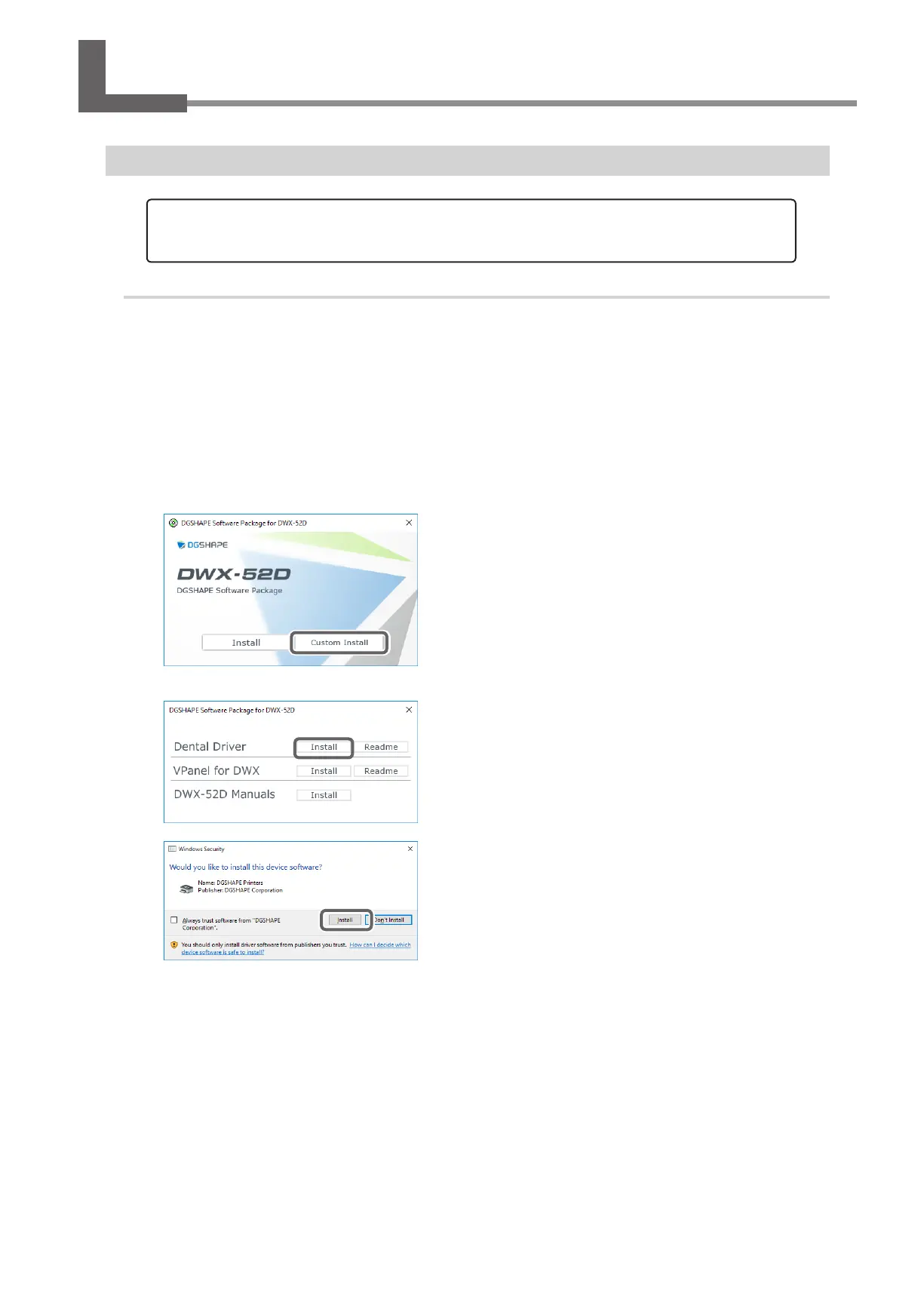
Click [Custom Install].
Click [Install] for the "Dental Driver."
When the window shown in the gure appears, click [Install].
With this machine, you can also install the driver, software, and electronic-format manuals all at once. To install them all
at once, see the "Setup Guide" ("Installing the Software").



 To Next Page