DuraLabel.com | 800.788.5572
11.1 Status Indicators | 23
LABEL CANVAS DISPLAY
The content status box displays other relevant information about the content. For
instance, for a text field, the content status box communicates if the text is currently set
to underlined, bolded, or italicized, amongst other information.
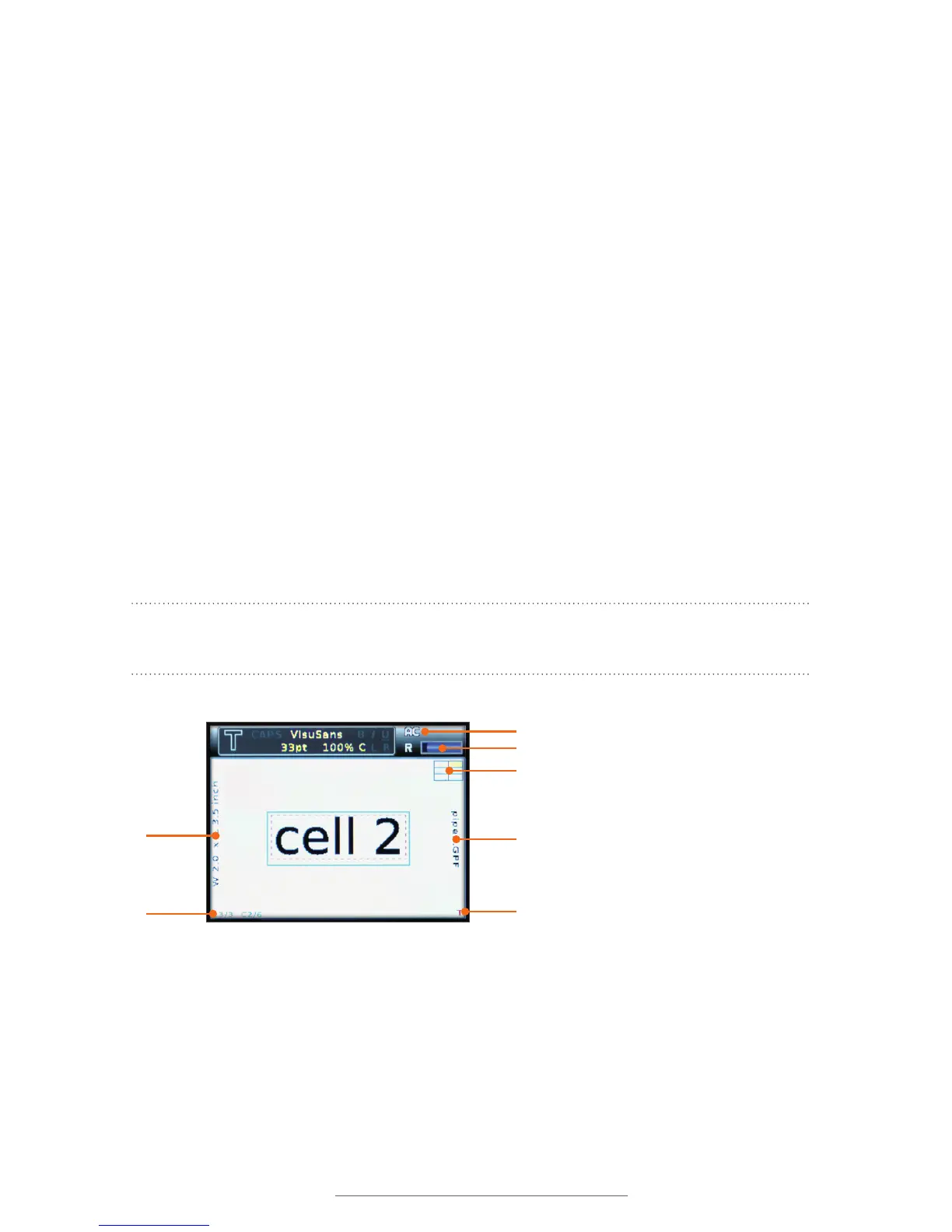
A. Label size indicator: The current size of the label is displayed on the left side of the
label canvas. W indicates the width of the label, as determined by the label supply
in the current cartridge. L indicates the length of the label, which will change based
on the content that you place.
B. Label/cell position indicator: The current label (out of those in the current project)
and the current cell (out of those in the current label) are shown in the lower left.
C. Vertical/horizontal orientation indicator: The small T in the lower right-hand
corner of the display screen indicates the orientation of the current cell. When the T
is oriented normally, the label is in normal horizontal-entry mode. When a vertically-
oriented layout has been chosen, the T will be rotated to the side.
D. File name indicator: If there is a file name for the label that is currently being
worked on, it will be displayed along the right side of the label canvas. New labels
added to an existing file will not display the new file name until the file has been
saved.
NOTE: The .GPF is a Lobo-specic le sufx that indicates the le was created on the
Lobo. The .GPF sufx is not visible in the le menus.
A
B
C
D
E
G
F



 To Next Page