Maintenance - 2000h
4812165301.pdf2022-09-02
3
6
4 5
2
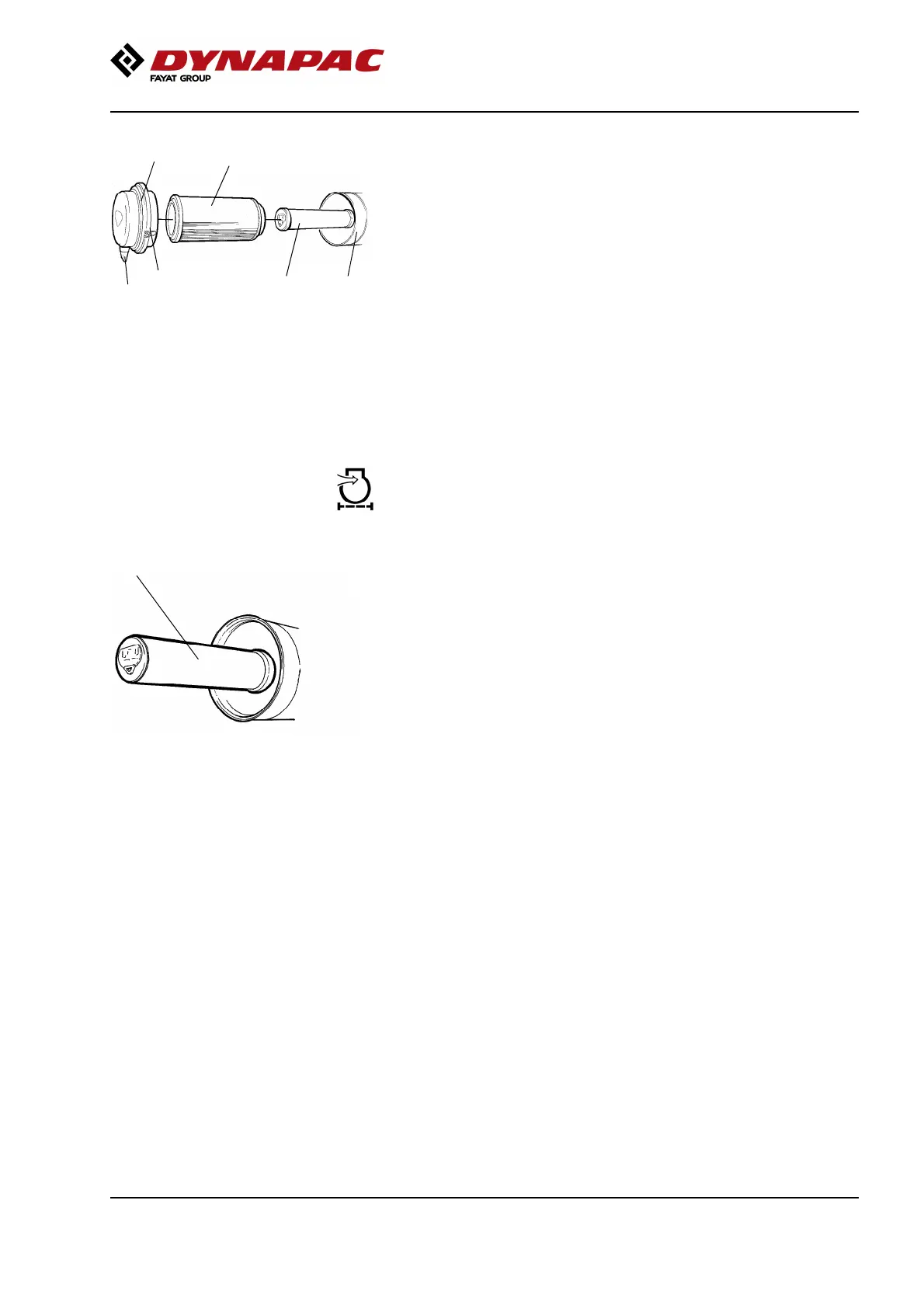
Fig. Air cleaner
1. Clips
2. Cover
3. Main filter
4. Backup filter
5. Filter housing
6. Dust valve
1
Release the clips (1), pull off the cover (2),
and pull out the main filter (3).
Do not remove the backup filter (4).
Clean the air cleaner if necessary.
See section Air cleaner - Cleaning.
When replacing the main filter (3), insert a new filter
and refit the air cleaner in the reverse order.
Check the condition of the dust valve (6).
Replace if necessary.
When refitting the cover, make sure that the dust valve
is positioned downwards.
Backup filter - Change
Fig. Air filter
1. Backup filter
1
Change the backup filter with a new filter after every
second replacement of the main filter.
To change the backup filter (1), pull the old filter out of
its holder, insert a new filter and reassemble the air
cleaner in the reverse order.
Clean the air cleaner if necessary, see section Air
cleaner - Cleaning.
155


 To Next Page