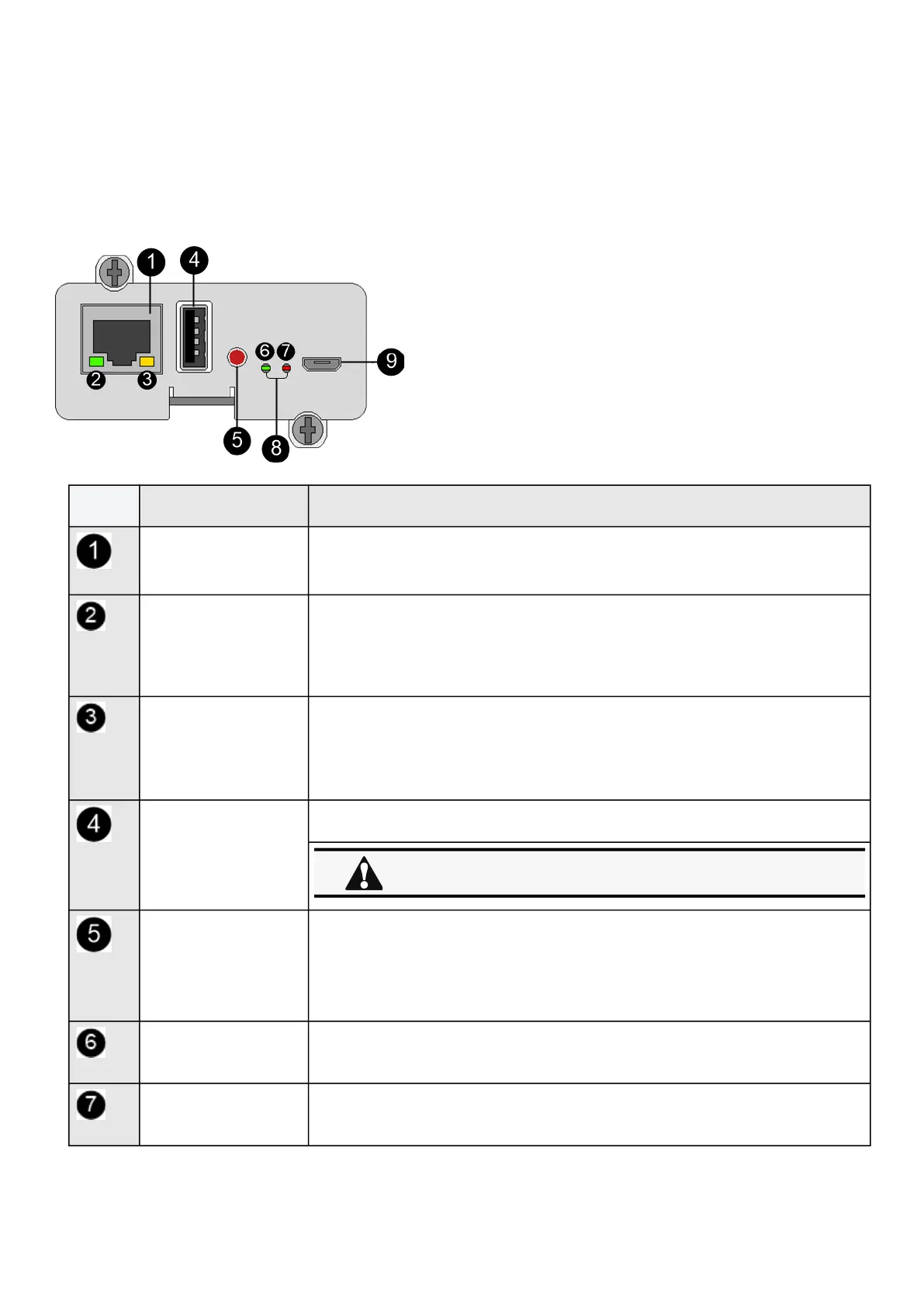
Front panel connectors and LED indicators
•
•
•
•
•
•
•
•
7 Information
7.1 Front panel connectors and LED indicators
Nbr Name Description
Network connector Ethernet port
Network speed LED Flashing green sequences:
1 flash — Port operating at 10Mbps
2 flashes — Port operating at 100Mbps
3 flashes — Port operating at 1Gbps
Network link/activity LED
Off— UPS Network Module is not connected to the network.
Solid yellow— UPS Network Module is connected to the network, but no activity
detected.
Flashing yellow— UPS Network Module is connected to the network and sending
or receiving data.
AUX connector For Network Module accessories only.
Restart button Ball point pen or equivalent will be needed to restart:
Short press (<6s)— Safe software restart (firmware safely shutdown before
restart).
Long press (>9s)— Forced hardware restart.
ON LED Flashing green— Network Module is operating normally.
Warning LED Solid red— Network Module is in error state.
Do not use for general power supply or USB charger.



 To Next Page