Contextual help of the web interface – 73
•
•
•
•
•
•
•
•
•
•
3.6.1.5.1 For other issues
3.6.2 Alarm configuration
3.6.2.1 Temperature
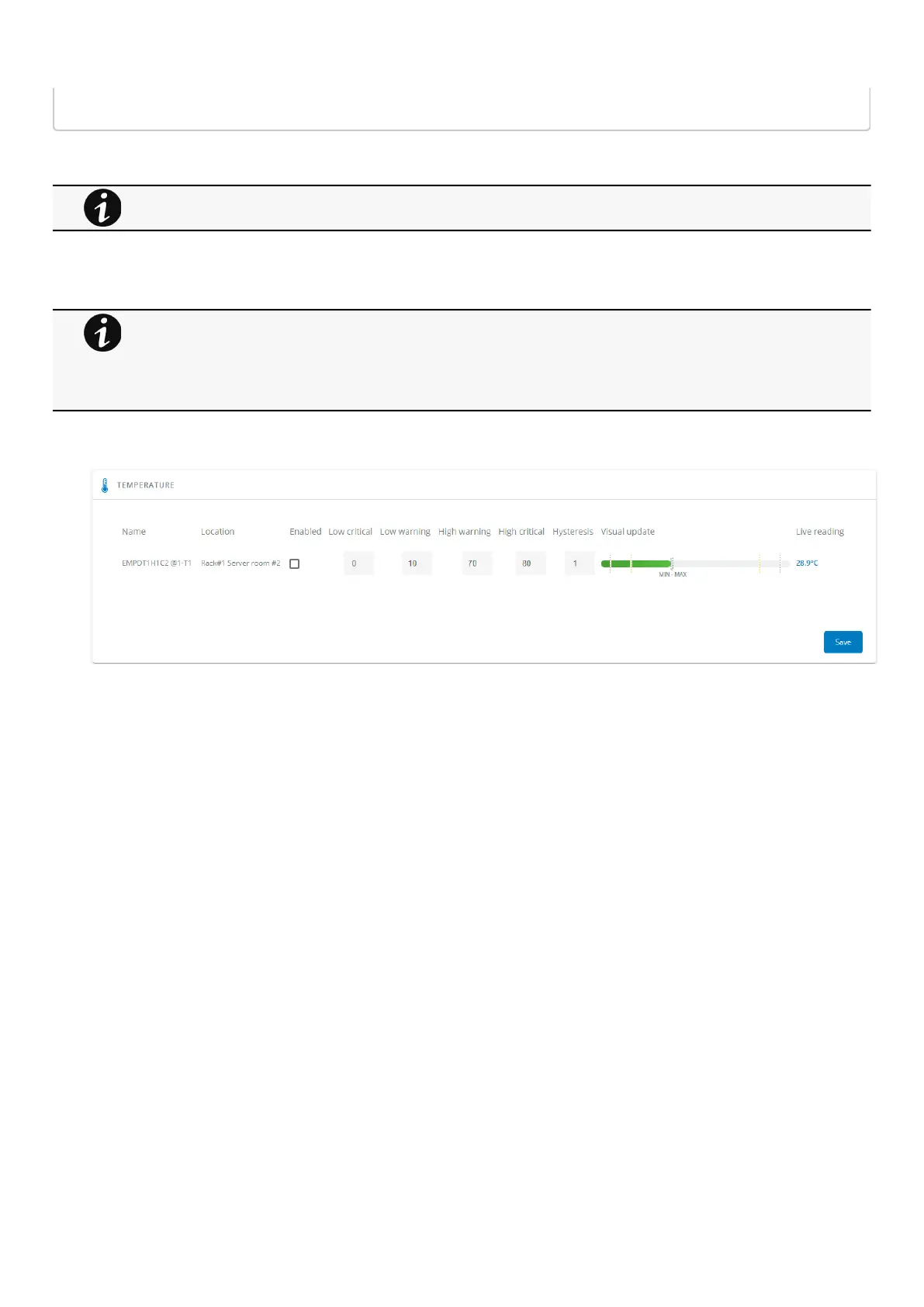
The table shows the following information and settings for each sensor:
Name
Location
Enabled– yes/no
Low critical threshold– xx°C or xx°F
Low warning threshold– xx°C or xx°F
High warning threshold– xx°C or xx°F
High critical threshold– xx°C or xx°F
Hysteresis– x°C or x°F
Visual update
Live reading (MIN-MAX shows the minimal and maximal temperature measured by the sensor)
3.6.2.1.1 Actions
a Set Enabled
Select and directly change the setting in the tableand thenSave.
When disabled, no alarm will be sent.
b Set alarm threshold
Enable the alarm first and then change the setting in the tableand thenSave.
When a warning threshold is reached, an alarm will be sent with a warning level.
When a critical threshold is reached, an alarm will be sent with a critical level.
For details on other issues, see the Troubleshooting section.
•
•
•
Humidity, temperatures or dry contacts deactivated during commissioning are not displayed.
Gauge color code:
Green: Value inside thresholds.
Orange/Red: Value outside thresholds.
Grey: No thresholds provided by the device.



 To Next Page