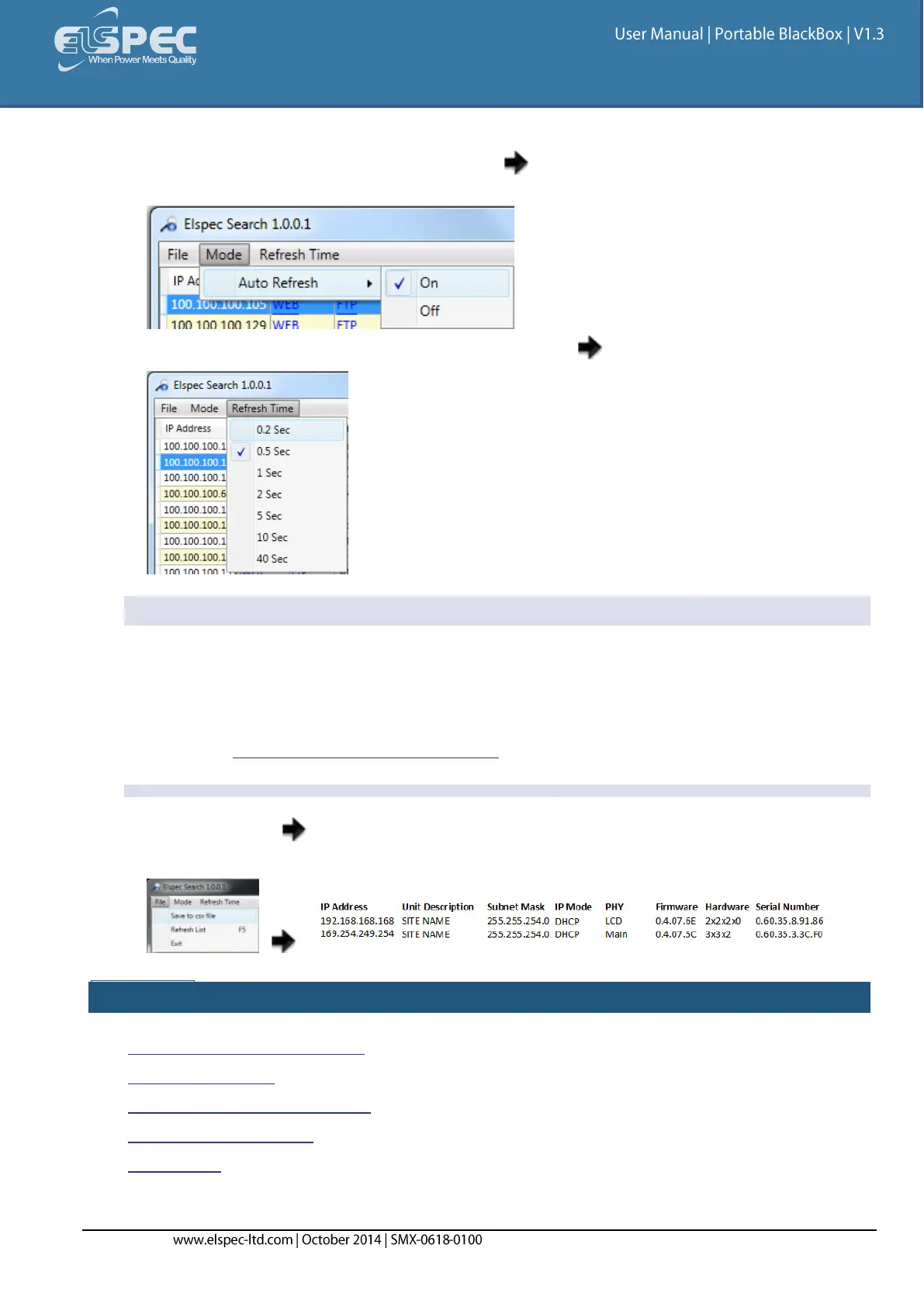
As an alternative, the scan procedure can be configured to automatically refresh each
second. This can be done by setting the Mode AutoRefresh to ON: (The default state is
OFF)
Set the Refresh Time period by selecting Refresh Time Second:
NOTE NOTE NOTE ....
The Elspec Search list shows a variety of important information about every BLACKBOX device
found on network; most of it is helpful to identify devices. It includes the IP Address, Unit
Description, SubnetMask, Gateway IP, IP Mode, Firmware Version & the G3500/G4500's Serial
Number. The most important information being the IP address of each device. This access
allows you to Establish a 1st Time Connection.
By selecting File Save to csv file will allow you to export all the information appearing in
the utility regarding BLACKBOX devices in your network for further reference:
SEE ALSO:
About Elspec's Search Utility
Obtain the Utility
BLACKBOX Unit & FTP Access
New Device Indication
Limitations


 To Next Page