Plug & Play - Voltage & Current Probes
The Portable BLACKBOX houses 5 x AC Voltage, 4 x AC Current & 1 x AC/DC Current Sockets. In
addition the G4500 houses 2 x VDC Sockets. It is a simple matter of plugging in the Voltage &
Current Probes into the device & it will be automatically recognized.
The BLACKBOX is designed to serve in virtually any power topology configuration, see Circuit
Topologies in order to interface your device with your circuit topology.
NOTE NOTE NOTE
Current Clamps: The Portable BLACKBOX is certified to measure currents only when using
Certified 61010-2-032 Third Edition Current Clamps.
Voltage Clamps: The Portable BLACKBOX is certified to measure voltage only when using
Certified to 61010-031 Third Edition Voltage Clamps.
plug in the ac voltage probes:
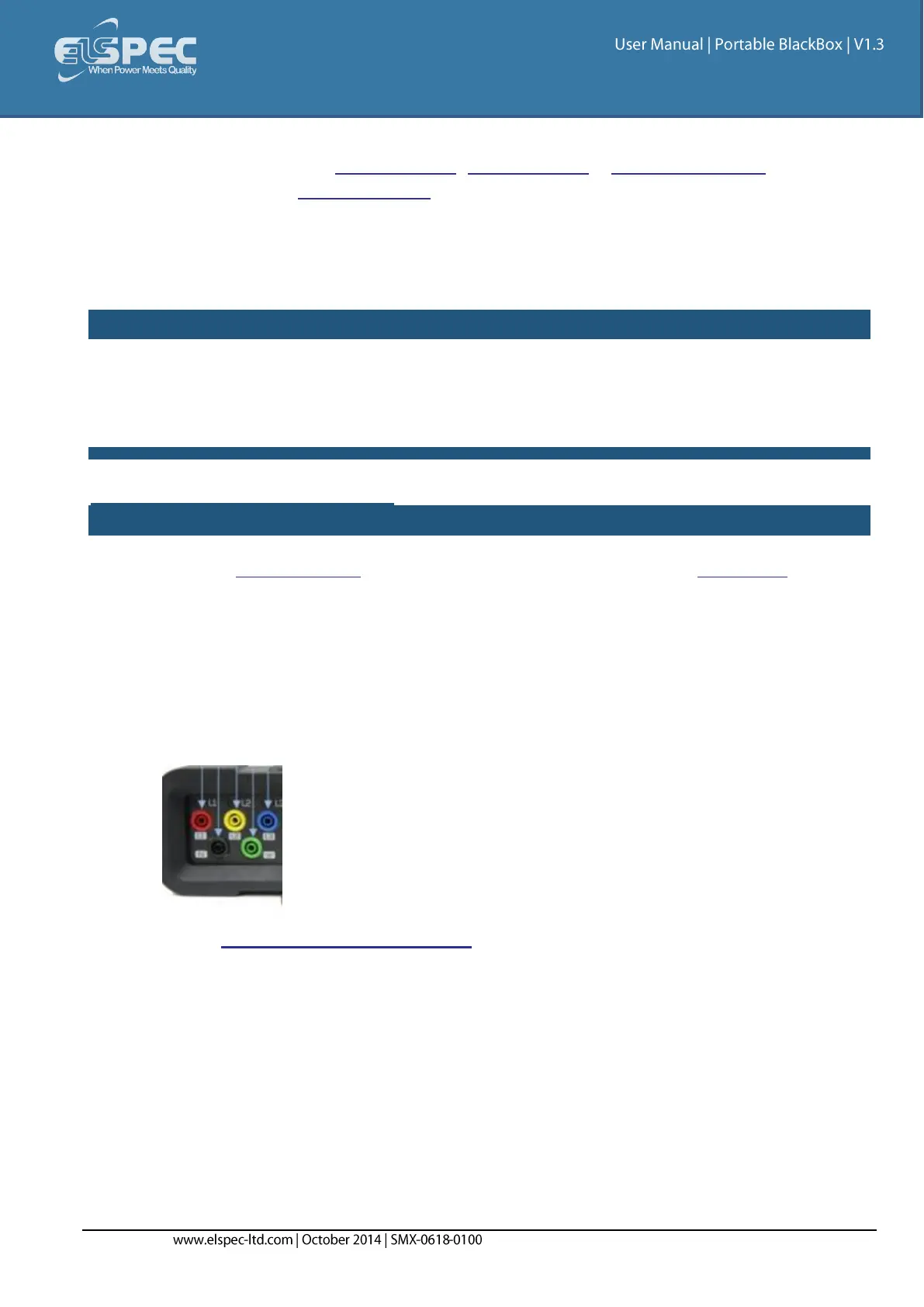
Plug in the Voltage Probes into the applicable sockets located on the Rear Panel. Plug the
phase & ground cables in as:
L1 to L1 (Red to Red)
L2 to L2 (Yellow to Yellow)
L3 to L3 (Blue to Blue)
Ground to Ground (Green to Green)
Earth to Earth (Black to Black)
Attached Crocodile Ends of the Probes to the Measured Power Source:


 To Next Page