110
Reference Manual
00809-0100-4026, Rev KC
Configuration
October 2018
Configuration
5.3.8 ATC
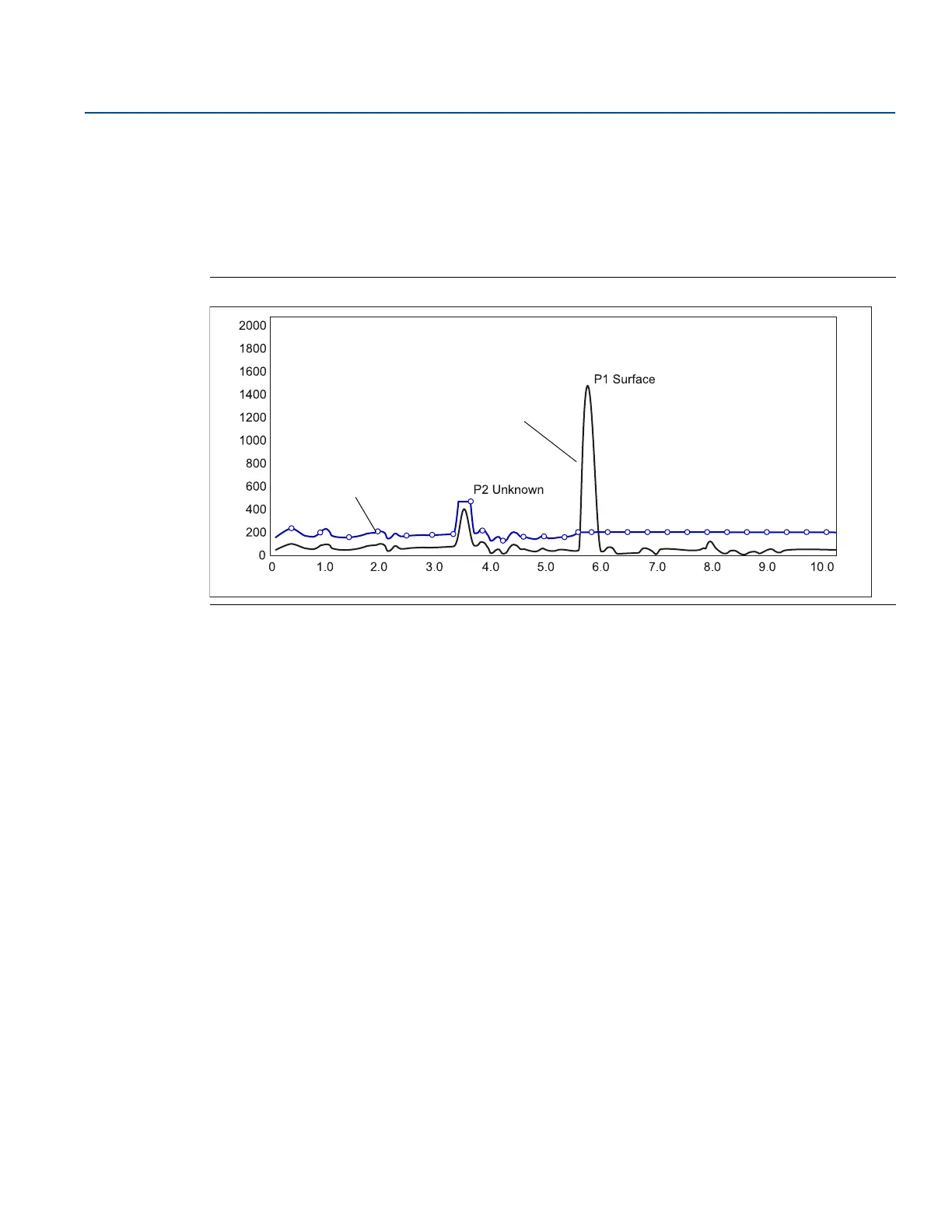
Setting up an ATC makes tracking of the product surface more robust in the presence of noise and weak
disturbing echoes. The ATC is normally used for filtering out disturbances with an amplitude smaller than
the amplitude of the product surface echo.
The ATC is designed as a number of individually adjustable amplitude threshold points.
Figure 5-9. Weak Disturbing Echoes can be Filtered Out by Creating an Amplitude Threshold
To create an ATC, the Measure and Learn function is available in the RRM program.
5.4 Basic configuration using RRM
The RRM is a user-friendly software tool that allows configuration of the Rosemount 5400 transmitter.
Choose either of the following methods to configure a Rosemount 5400 transmitter with RRM:
Guided Setup, if you are unfamiliar with the Rosemount 5400 (see “Guided setup” on page 117)
Setup functions, if you are already familiar with the configuration process, or for changes to the
current settings (see “Using the Setup functions” on page 128)
5.4.1 System requirements
Hardware
COM Port: one serial COM port or one USB port
Graphical Card (minimum/recommended): screen resolution 800 x 600/1024 x 768.
Hard drive space: 100 MB
Software
Operating Systems supported:
Windows XP
Windows 7
ATC
Measurement signal
Amplitude, mV
Distance, m













 To Next Page