134
Reference Manual
00809-0100-4026, Rev KC
Configuration
October 2018
Configuration
5.7 Configuration using DeltaV
The following description shows how to configure a Rosemount 5400 using DeltaV with the AMS Device
Manager. The corresponding F
OUNDATION Fieldbus parameters are also shown. The Rosemount 5400
supports DD Methods for DeltaV in order to facilitate transmitter configuration.
1. Select DeltaV > Engineering > DeltaV Explorer from the Start menu.
2. Navigate through the file structure to find the Rosemount 5400.
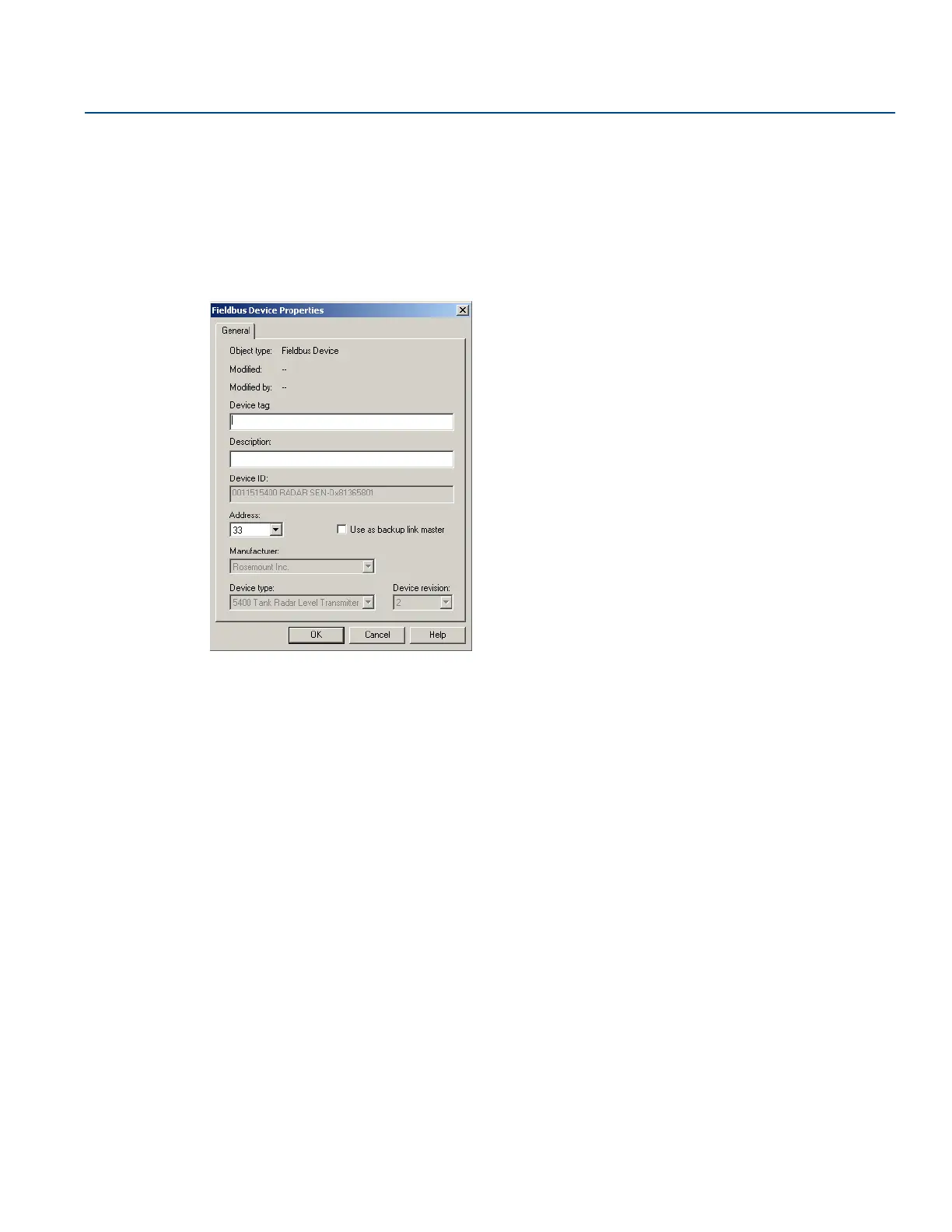
3. The Fieldbus Device Properties window lets you enter Device Tag and Description. This information is
not required for the operation of the transmitter and can be left out if desired.
General information, such as device type (5400), manufacturer, device ID are presented. The
Rosemount 5400 Series device ID consists of the following components:
Manufacturer ID-Model-Serial Number.
Example: 0011515400-EPM-0x81365801.
Check that the information complies with the ordering information.
4. Select the desired transmitter in the DeltaV Explorer and select the Configure option.






 To Next Page