Emerson Process Management GmbH & Co. OHG 6-7
X-STREAM XE
Instruction Manual
HASXEE-IM-HS
10/2012
6
Software Menus
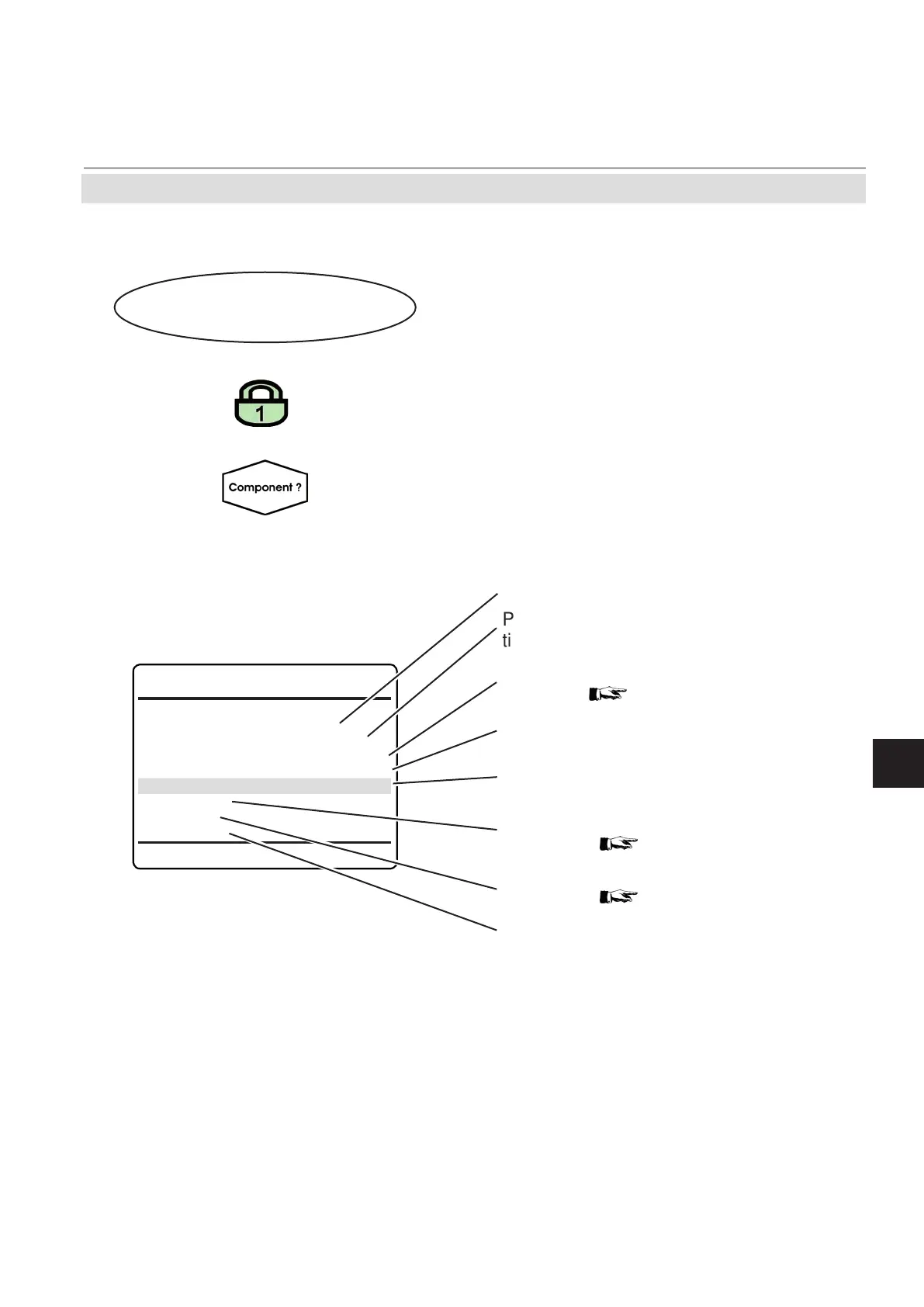
Span Calibration
Cancel!
Start!
Span Gas 0.000 ppm
Concentration 0.000 ppm
Flow 0.00 l/min
Status..
Results..
Restore..
6.2.2.2 Span Calibration Menu
Multi-channel unit:
In SELECT COMPONENT, select the chan-
nel to be calibrated.
6.2.2 Control Menu
Press enter in this line to cancel any ongoing
calibration
Press
enter in this line to start a span calibra-
tion
Nominal span gas concentration (can be set
in SETUP
6-24)
Currently measured gas ow, if a ow sensor
is installed.
Open a submenu to see calibration status
information
6-12
Open a submenu to see calibration results
information
6-14
Press enter in this line to restore calibration
data to the last known good data set.
A confirmation screen appears, before the
function is executed.
Currently measured gas concentration.
Control..
Span Calibration..
Multi-channel unit:
Press left to enter SELECT COMPONENT,
to calibrate another channel.
If the system is setup accordingly, the access
code for level 1 must be entered to gain ac-
cess to this menu.














 To Next Page