XTP CrossPoint Series • HTML Operation 126
Configuration Tab
System Settings Page
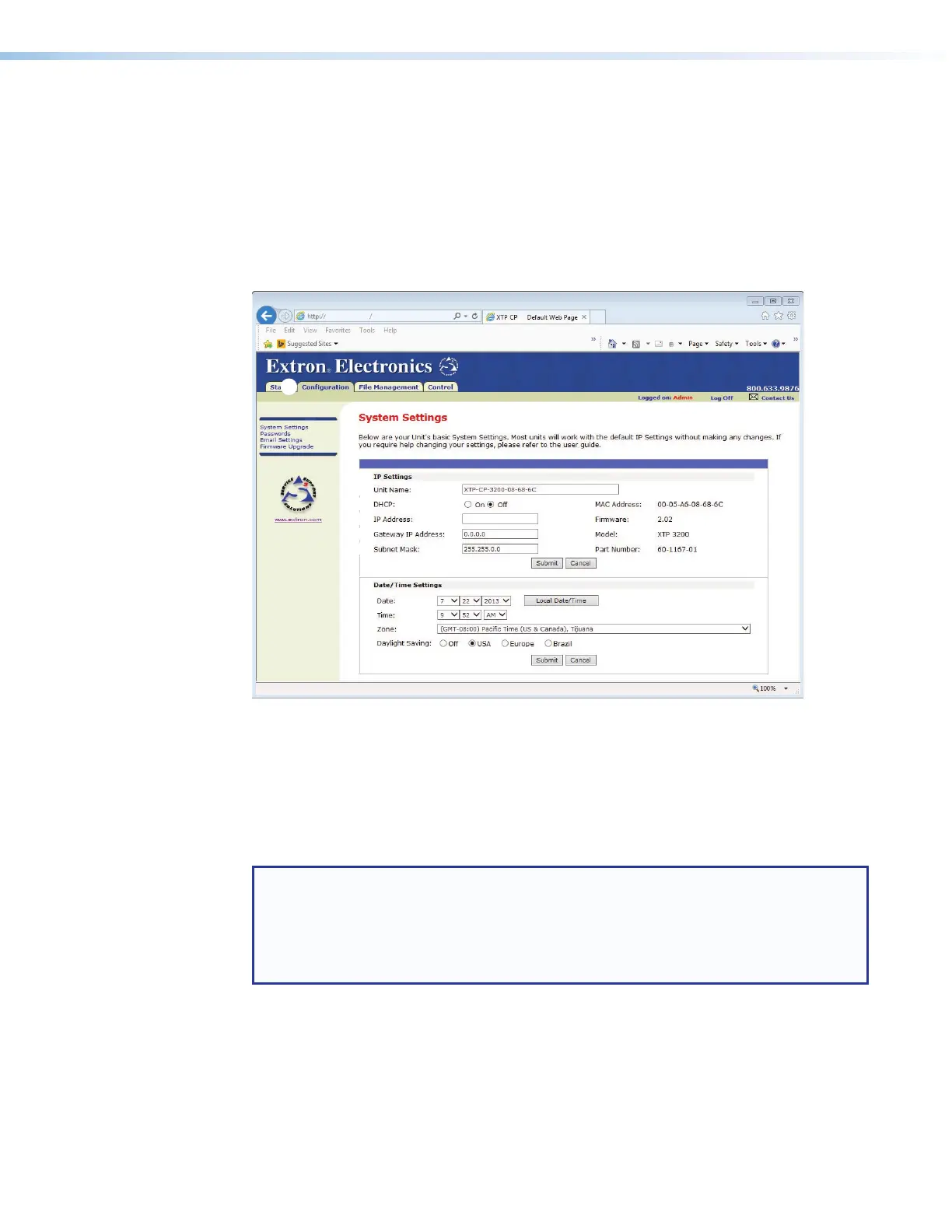
The XTP CrossPoint Series matrix switcher downloads the System Settings page (see
figure 59) when you click the Configuration tab (
1
). The screen consists of fields in
which you can view and edit IP administration and system settings. You can access the
Email Settings and Passwords pages by clicking the appropriate link (see Ethernet Link
on page 152 for basic information about IP addresses and subnetting).
192.168.254.254
32
22
11
33
44
55
66
77
88
99
¢¢
££
Figure 59. System Settings Page
On password-protected connections, there are two levels of protection: administrator and
user. Administrators have full access to all switching capabilities and editing functions. Users
can create ties, create and recall presets, set audio mutes, and view all settings with the
exception of passwords.
IP Settings panel
NOTE: Editing variables in the IP Settings panel can immediately disconnect the
user from the matrix switcher. Extron recommends editing these settings using SIS
commands (see SIS Command and Response Table for IP- and Remote Port-
Specific Commands, starting on page 119) and protecting the Ethernet access to
this screen by assigning an administrator password to qualified and knowledgeable
personnel only.
The IP Settings panel (
2
) provides a location for viewing and editing settings unique to
the Ethernet interface. After editing any of the settings on this page, click the Submit button
at the bottom of the page to save the changes.



 To Next Page