XTP CrossPoint Series • Operation 48
5. Mute outputs: One at a time:
a. Press and hold the Output 3 button for approximately 2 seconds until the button
returns to its previous state. The output 3 video and audio signals are unmuted.
b. Press and hold the Output 4 button for approximately 2 seconds until the button
returns to its previous state. The output 4 video and audio signals are unmuted.
3
4
3
4
Unmute outputs one at a time.
2 seconds
2 seconds
Press and hold the Output 3 button.
Press and hold the Output 4 button.
The button returns to its previous indication
(either lit, background illuminated, or unlit)
to indicate that the output is unmuted.
The button returns to its previous indication
(either lit, background illuminated, or unlit)
to indicate that the output is unmuted.
NOTE: If both video and audio are selected, the unmute action toggles both
the video and audio outputs. If either the video output or the audio output is
already unmuted, the muted output is unmuted and the unmuted output is
muted.
6. Exit View-only mode: Press and release the View button.
All input buttons and output buttons
return to unlit or background illumination.
VIEW
Press the button.
The View button returns to unlit or background illumination.
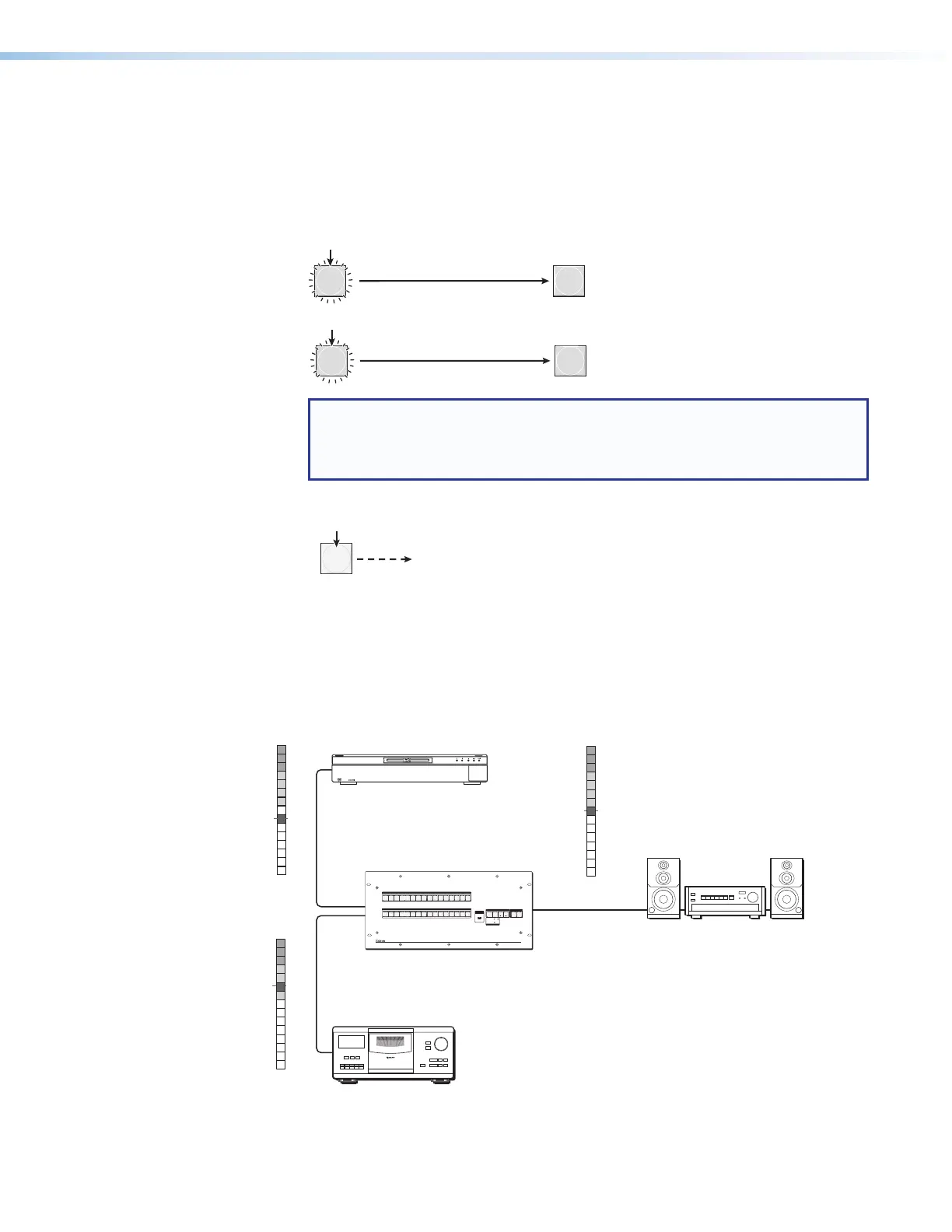
Viewing and Adjusting the Input Audio Level
The level of each analog audio input can be displayed and adjusted through a range of
-18 dB to +24 dB to ensure that there is no noticeable volume difference among sources
(see figure 35). The audio level can be adjusted from the front panel or under remote control.
The default audio level is 0 dB.
Local Audio
Inputs
Local Audio
Inputs
Blu-Ray Player
No noticeable
volume differences
between sources
Audio System
XTP CrossPoint 1600
0
-3
-6
-9
-12
-15
Low Audio
vel
+4
+1
-2
-5
-8
-12
-18
-21
-15
-18
3+7
6+10
9+13
12+16
15+19
18+21
21+24
0
-3
-6
-9
-12
-15
High Audio
vel
+4
+1
-2
-5
-8
-12
-18
-21
-15
-18
3+7
6+10
9+13
12+16
15+19
18+21
21+24
VUdBu
0
-3
-6
-9
-12
-15
Output
Level
+4
+1
-2
-5
-8
-12
-18
-21
-15
-18
3+7
6+10
9+13
12+16
15+19
18+21
21+24
AUDIO
PRIMARY 1 2
REDUNDANT
VIDEO
I/O
POWER
CONTROL
ENTERPRESET
VIEW
ESC
INPUTS
OUTPUTS
1
2
3
4
5
67
8
9
10
11
12
14
15
16
13
1
2
3
4
5
67
8
9
10
11
12
14
15
16
13
XTP CROSSPOINT 1600
XTP SERIES DIGITAL MATRIX SWITCHER
CONFIG
TM
FULL HIGH DEFINITION 1080P VIDEO OUTPUT
BLU-RAY DISC PLAYER
Figure 35. Audio Gain and Attenuation



 To Next Page