XTP CrossPoint Series • HTML Operation 132
Firmware Upgrade Page
NOTE: The Firmware Upgrade page is only for replacing the matrix switcher firmware
To insert your own custom HTML pages, see File Management Page on page 136.
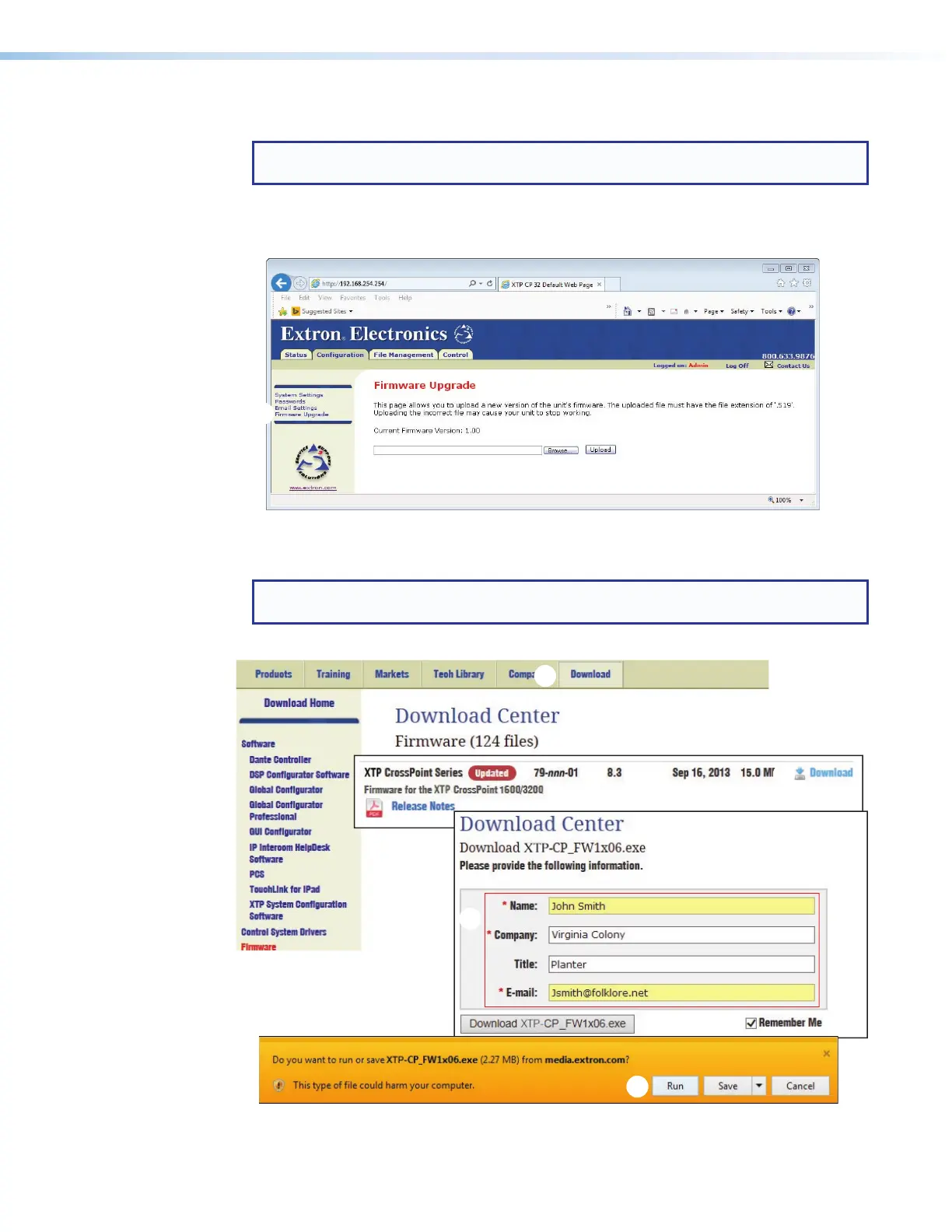
The Firmware Upgrade page is for replacing the matrix switcher firmware. Access the
Firmware Upgrade page by clicking the Firmware Upgrade link (see figure 63,
1
) on the
left of the System Settings, Passwords, or Email Settings page.
Figure 63. Firmware Upgrade Page
Update the matrix switcher firmware as follows:
NOTE: This procedure was written using Windows Explorer. Depending on the browser
you use, some steps or indications may be different.
1. Visit www.extron.com, and click the Download tab (see figure 64,
1
).
11
33
44
55
66
Figure 64. Downloading a Firmware Package



 To Next Page