XTP CrossPoint Series • HTML Operation 138
Input Adjustments Page
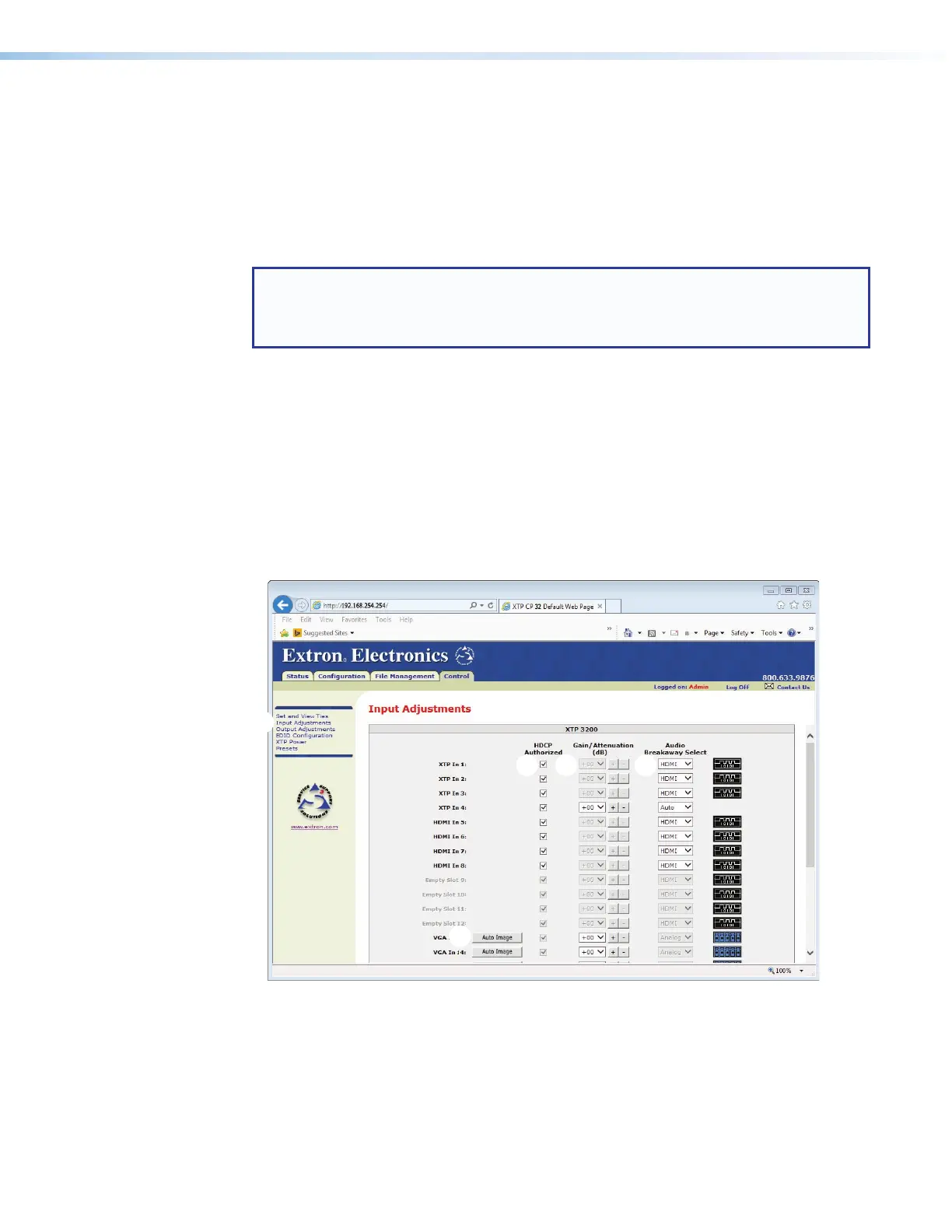
The Input Adjustments page is a central location for changing how input video and audio
are processed and switched. Access the page by clicking the Input Adjustments link
(see figure 69,
1
) on the left of the Set and View Ties, Output Adjustments, EDID
Configuration, XTP Power, or Presets page.
The page tailors the options available for selection for the input boards installed. Options that
are not compatible with an input type are unavailable for selection.
NOTE: All options are available for selection for XTP CP 4i and XTP CP 4i 4K (XTP input)
boards. If the input to an endpoint connected to the XTP board is compatible with the
option, the adjustment is made. The Input Adjustments page indicates the change
regardless.
Possible adjustments include:
• Auto Image (
2
) — Available for inputs on XTP CP 4i VGA (analog video) boards.
• HDCP Authorized (
3
) — Available for inputs on XTP CP 4i, XTP CP 4i 4K,
XTP CP 4i Fiber 4K, XTP II CP 4i HD 4K PLUS, XTP CP 4i HDMI, XTP CP 4i HDMI DMA,
and XTP CP 4i DVI Pro boards.
• Gain/Attenuation (
4
) — Available for inputs on all boards. Unavailable if HDMI is
selected in the Audio Breakaway Select drop-down list.
• Audio Breakaway Select (
5
) — Available for inputs on XTP CP 4i, XTP CP 4i 4K,
XTP CP 4i Fiber 4K, XTP II CP 4i HD 4K PLUS, XTP CP 4i HDMI, XTP CP 4i HDMI DMA,
and XTP CP 4i DVI Pro boards.
33
22
5544
Figure 69. Input Adjustments Page



 To Next Page