XTP CrossPoint Series • Operation 73
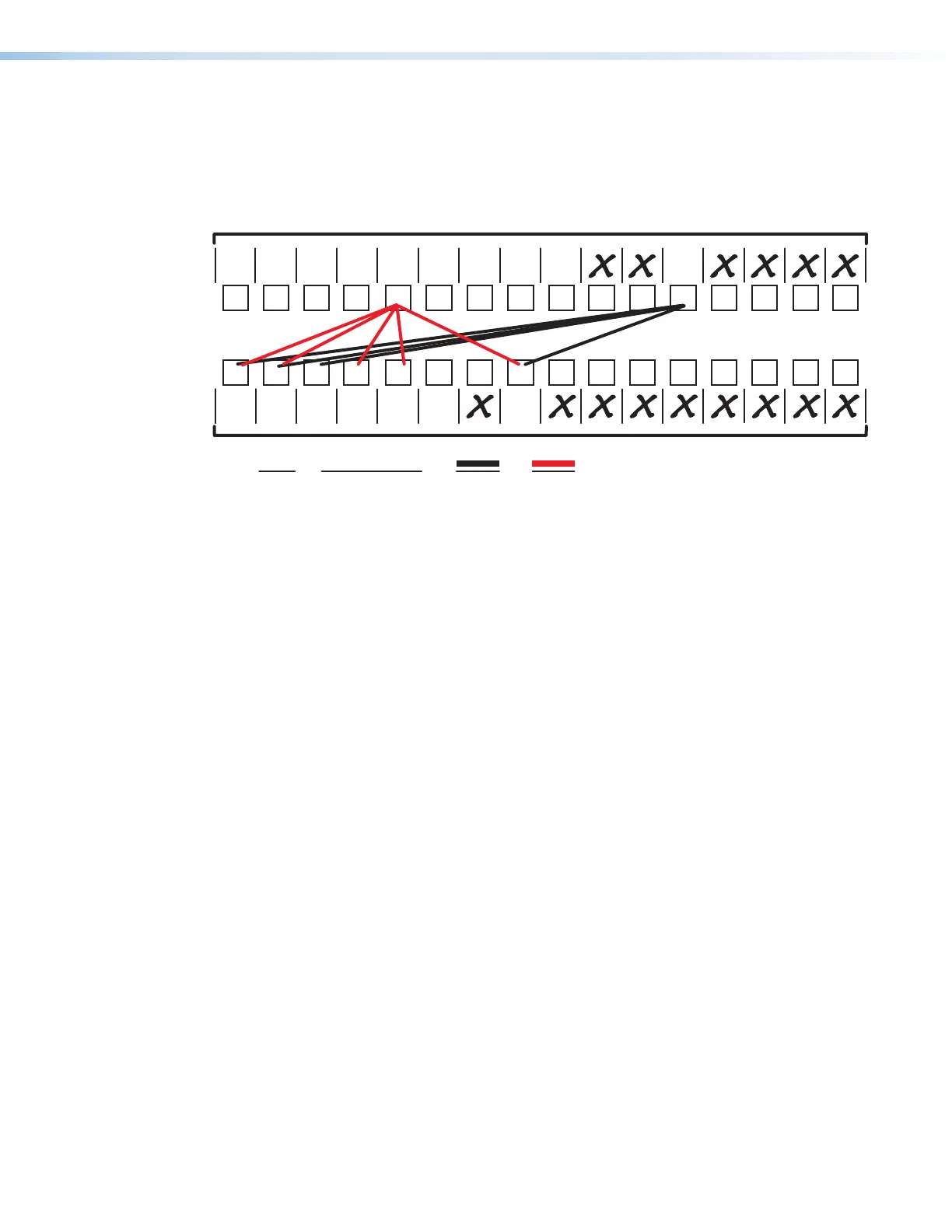
Worksheet Example 3: Test Configuration
The AV system in our fictional organization needs to be fine tuned on a regular basis.
Figure 54 shows a typical test configuration, with an Extron video test generator (input 12)
generating a test pattern to all monitors (outputs 1, 2, 3, and 8). Sound checks are run from
the CD player (input 5) to all audio systems (outputs 1, 2, 4, 5, and 8).
1 2345678
1
9101112
13
Output destinations
Preset # Title: Video: Audio:
Fill in the preset number and use colors, dashes, etc., to make connecting lines.
Indicate if the configuration is for video, audio, or both.
Weekly status mtg 3
Camera
#2
Camera/
mic - Main
podium
Main hall
FP #1
Main hall
FP #2
Podium
monitor
Sound
system
#1
Sound
system
#2
VCR
(VSC 500)
DA 6
VTG 400
14 15
16
2345678910 11 12
13
14 15
16
Classroom
#1 BluRay
DVS 605
Audio
CD
PC 2
RGB-HDMI
300A
PC 1
RGB-HDMI
300A
Classroom
#2 BluRay
DVS 605
Laptop Streaming
(DVS 605)
Figure 54. Worksheet Example 3: Test Configuration



 To Next Page