XTP CrossPoint Series • HTML Operation 130
Email Settings Page
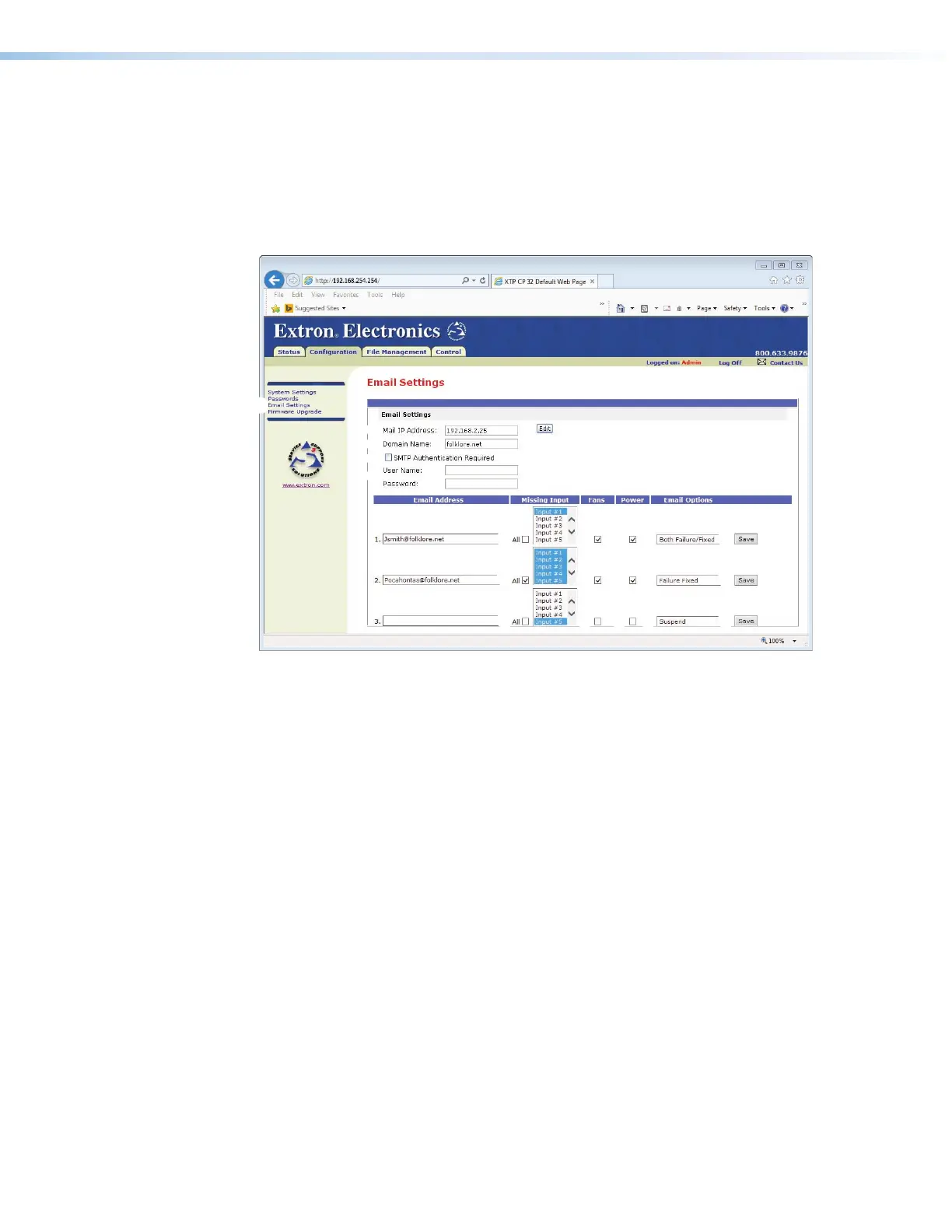
Reach the Email Settings page by clicking the Email Settings link (see figure 62,
1
)
on the left of the System Settings, Passwords, or Firmware Upgrade page. The Email
Settings page has fields for setting up the e-mail notification capabilities of the matrix
switcher. For the e-mail settings and for each row of the e-mail notification settings, click the
Edit button (
2
) to make the fields available for editing. The button changes to Save. After
editing the settings associated with the Edit/Save button, click the Save button.
192.168.254.254
32
22
22
22
11
22
33
88
88
88
99
99
99
¢¢
¢¢
¢¢
££
££
££
44
55
66
77
77
77
Figure 62. Email Settings Page
Email Settings pane
The Email Settings panel displays the Mail IP Address (
3
) and the Domain Name
(
4
) of the mail server that handles the e-mail for the facility in which the matrix switcher is
installed.
Valid IP addresses consist of four 1-, 2-, or 3-digit numeric octets separated by dots
(periods). Each field can be numbered from 000 through 255. Leading zeroes, up to three
digits total per field, are optional. Values of 256 and above are invalid.



 To Next Page