XTP CrossPoint Series • HTML Operation 142
EDID Configuration Page
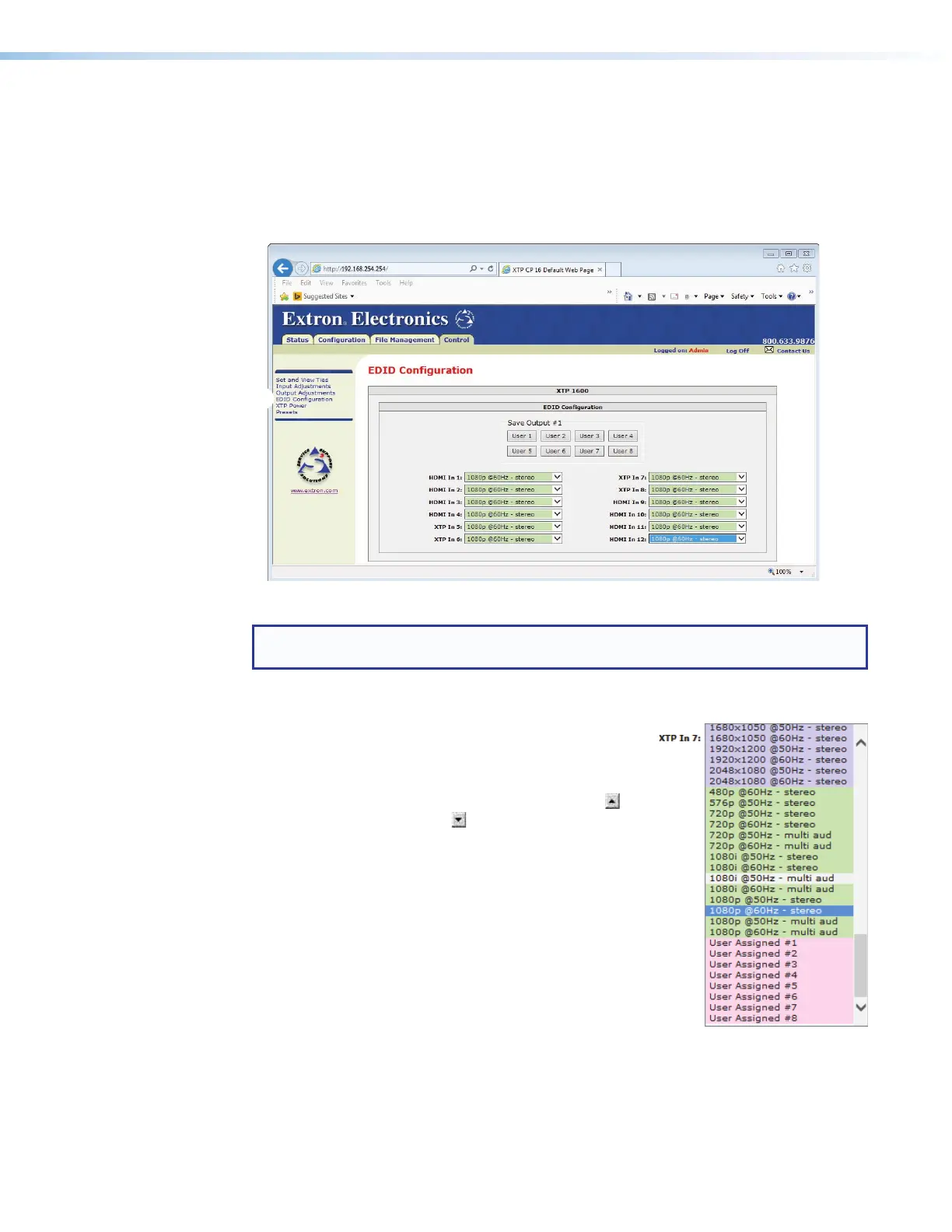
The EDID Configuration page allows you to select the EDID for each installed input and
save the output 1 EDID to one of the user locations. Access the page by clicking the EDID
Configuration link (see figure 71,
1
) on the left of the Set and View Ties, Input
Adjustments, Output Adjustments, XTP Power, or Global Presets page.
The page displays the EDID drop boxes for inputs on installed boards only.
Figure 71. EDID Configuration Page
NOTE: The page displays the EDID drop boxes for inputs and outputs on installed
boards only.
Changing the EDID setting
Select the EDID for an input as follows:
1. Click the drop-down list for the desired input (
1
, right).
A drop-down list appears.
2. Click and drag the slider or click on the scroll up
button or the scroll down button until the desired
value is visible.
3. Click the desired value (
2
).
11
22



 To Next Page