XTP CrossPoint Series • HTML Operation 129
Passwords Page
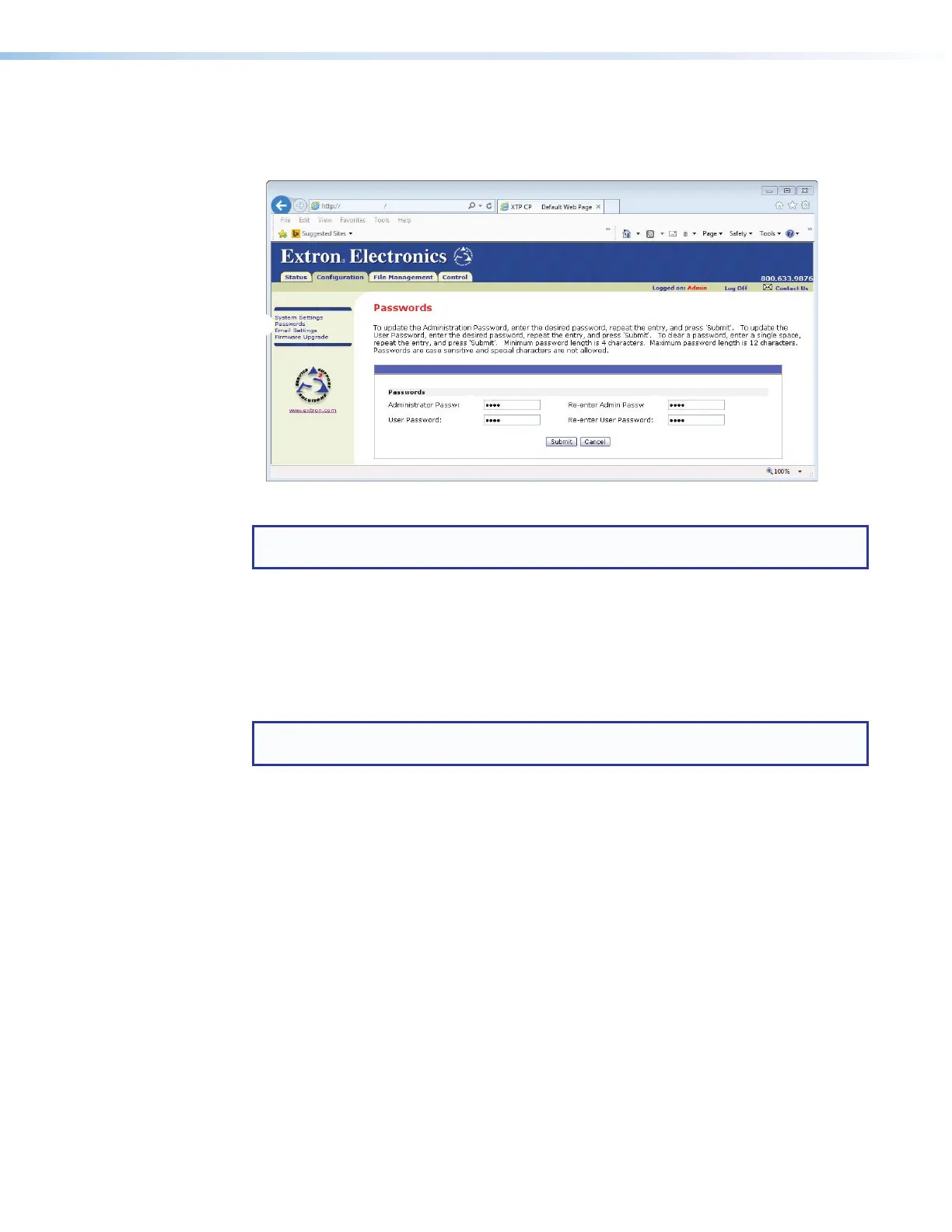
Access the Passwords page (see figure 61) by clicking the Passwords link (
1
) on the left of
the System Settings, Email Settings, or Firmware Upgrade page.
192.168.254.254
32
192.168.254.254
32
22
11
22
33
Figure 61. Passwords Page
NOTE: If the matrix switcher is password-protected, fields on this page can be edited
only by people logged in as administrators.
The fields on the Passwords page are for entering and verifying administrator and user
passwords. Passwords are case sensitive and are limited to as many as 12 upper-case
and lower-case alphanumeric characters. Each password must be entered twice; once
in the Password field and then again in the Re-enter Password field (see figure 61,
2
).
Characters in these fields are masked by asterisks (*****). If you do not want to password
protect an access level, leave the Password field and the Re-enter Password field blank.
After entering the password in both fields, click the Submit button (
3
).
NOTE: An administrator password must be created before a user password can be
created.
Resetting a password
Reset an existing password so that no password is required as follows:
1. Replace any existing password by entering a single space character in the Password
and Re-enter Password fields (see figure 61,
2
).
2. Click the Submit button (
3
).



 To Next Page