XTP CrossPoint Series • HTML Operation 144
Global Presets Page
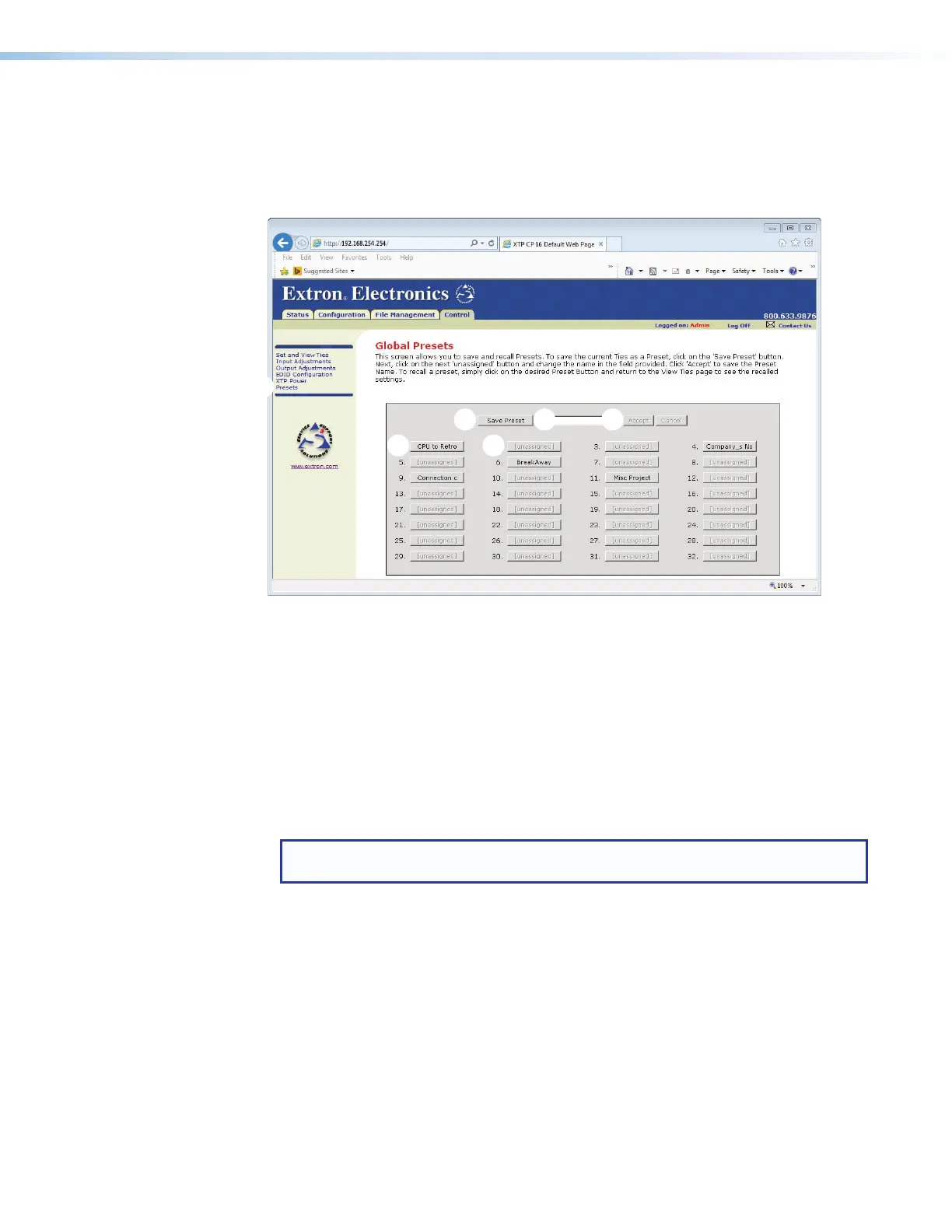
You can save and recall global presets from the Global Presets page. Access the Global
Presets page by clicking the Presets link (see figure 73,
1
) on the left of the Set and
View Ties, Input Adjustments, Output Adjustments, EDID Configuration, or XTP
Power page.
Figure 73. Global Presets Page
Saving a preset
Save the current configuration (configuration 0) as a preset as follows:
1. Click the Save Preset button (
2
).
2. Select the desired preset by clicking on one of the presets listed (
3
). To create a new
preset, click one of the [unassigned] buttons (
4
). Overwrite an existing preset by
clicking an already existing preset.
3. If desired, type over the current name in the box adjacent to the Save Preset button
(
5
).
NOTE: The HTML language reserves certain characters for specific functions (see
Special Characters on page 120.
If you do not rename an unassigned button, the XTP CrossPoint Series matrix switcher
names the preset as Preset <next available number>.
If you do not rename an existing preset when it is overwritten, the
XTP CrossPoint Series matrix switcher retains the same name.
4. Click the Accept button (
6
).
Recalling a preset
To recall a global preset as the current configuration, click the button associated with the
desired preset (
2
).



 To Next Page