⚫ Video Payload: select the payload type (ranging from 90-118) to configure
the audio/video configuration file. The default payload is 104.
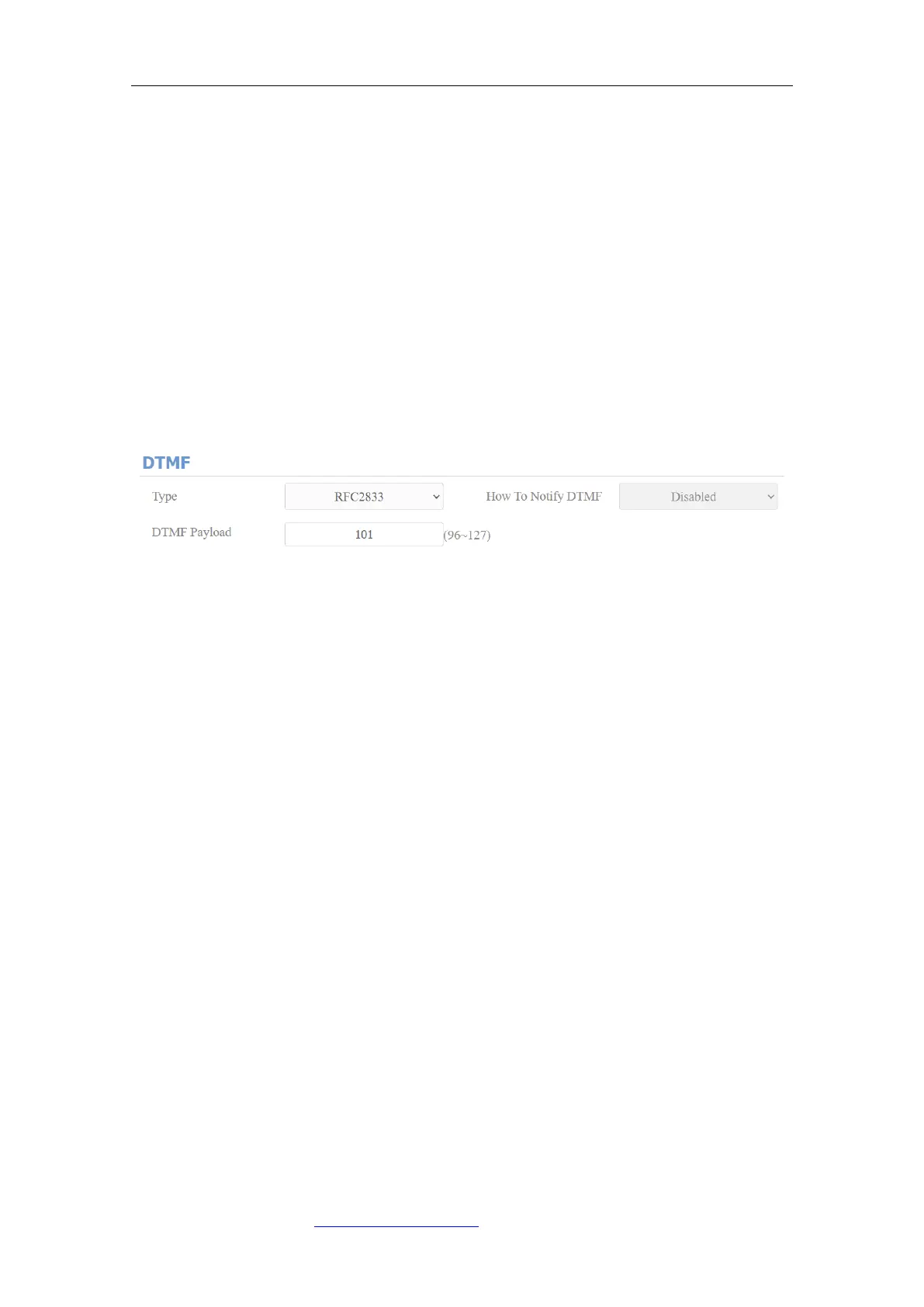
10.4. Configure DTMF Data Transmission
In order to achieve the door access via DTMF code or some other applications,
you are required to properly configure DTMF on web Account > Advanced >
DTMF in order to establish a DTMF-based data transmission between the door
phone and other intercom devices for the third party integration.
Parameter Set-up:
⚫ Type: select DTMF mode among five options: “Inband”, “RFC2833”,
“Info+Inband” and “Info+RFC2833” based on the specific DTMF
transmission type of the third party device to be matched with as the party
for receiving signal data.
⚫ How to Notify DTMF: select among four types: “Disable” “DTMF” “DTMF-
Relay” “Telephone-Event” according to the specific type adopted by the
third party device. You are required to set it up only when the third party
device to be matched with adopts “Info” mode
⚫ DTMF Payload: set the payload according to the specific data transmission
payload agreed on between the sender and receiver during the data
transmission.
11. Relay Setting
11.1. Relay Switch Setting
You can configure the relay switch(es) and DTMF for the door access on the



 To Next Page