01-ECMSI-NT002.Rev B40
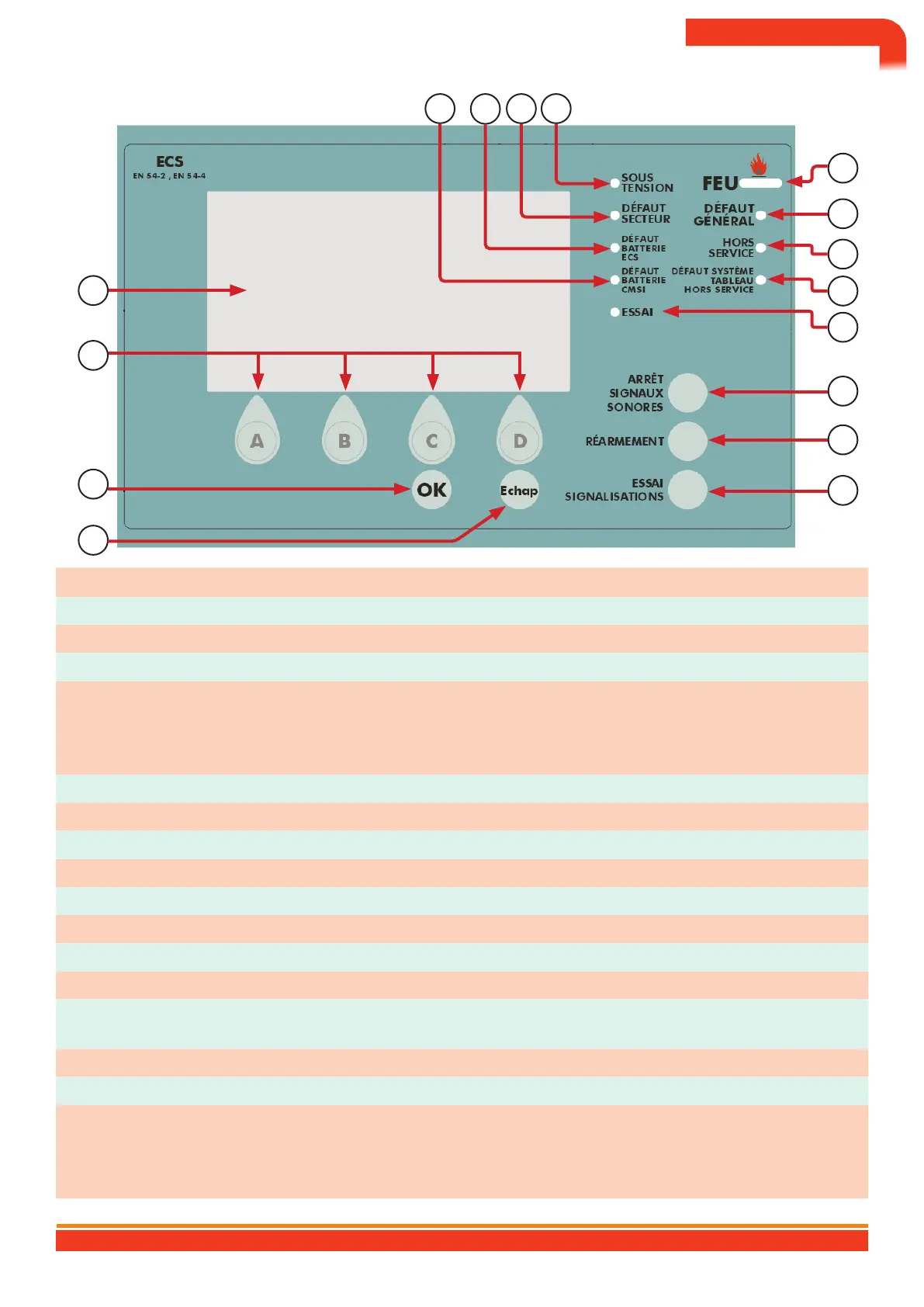
Commands and signaling
16 15 14 10
11
12
7
8
13
9
1
6
5
3
4
2
No. Designation Explanation Level
1 A, B, C and D key Allows access to contextual menus and entry of access codes 1
2 Esc key Allows you to exit contextual menus 1
3 OK key Allows you to validate the data entered 1
Turns on the LCD display, all LEDs and the buzzer
4 Signaling test 1
†
ATdisplays the program version of
the ECS-A8 board on the LCD
5 Reset Reset the DHW 2
6 Stop sound signals Acknowledges the internal buzzer related to the fault or alarm 1
7 out of order (Yellow) Lights up when at least one point or zone is out of service
8 16x40 character LCD display Visualization of SDI data (alarms, fault, etc.)
9 Trial (Yellow) Lights up when at least one zone is in test
10 On (green) Lights up when the system is powered on.
11 Red fire) Lights up when at least one FIRE has been detected
12 General fault (Yellow) Lights up when at least one fault is present on the ECS or the CMSI
System fault / panel out of
service (Yellow)
13 Lights up during a system fault (software fault, reset)
14 Mains fault (Yellow) Lights up in the event of a mains fault on the internal or external power supply
15 DHW battery fault (Yellow) Lights up in the event of a battery fault on the DHW internal power supply
Lights up in the event of a fault on the CMSI internal power supply
16 CMSI battery fault (Yellow)
†
Ssignaling not present on
Baltic 512 ECS (ref: ECSAD002)
BALTIC 512 TYPE A WALL OR RACK BOX CONTROL AND SIGNALING EQUIPMENT 512 POINTS
10


 To Next Page