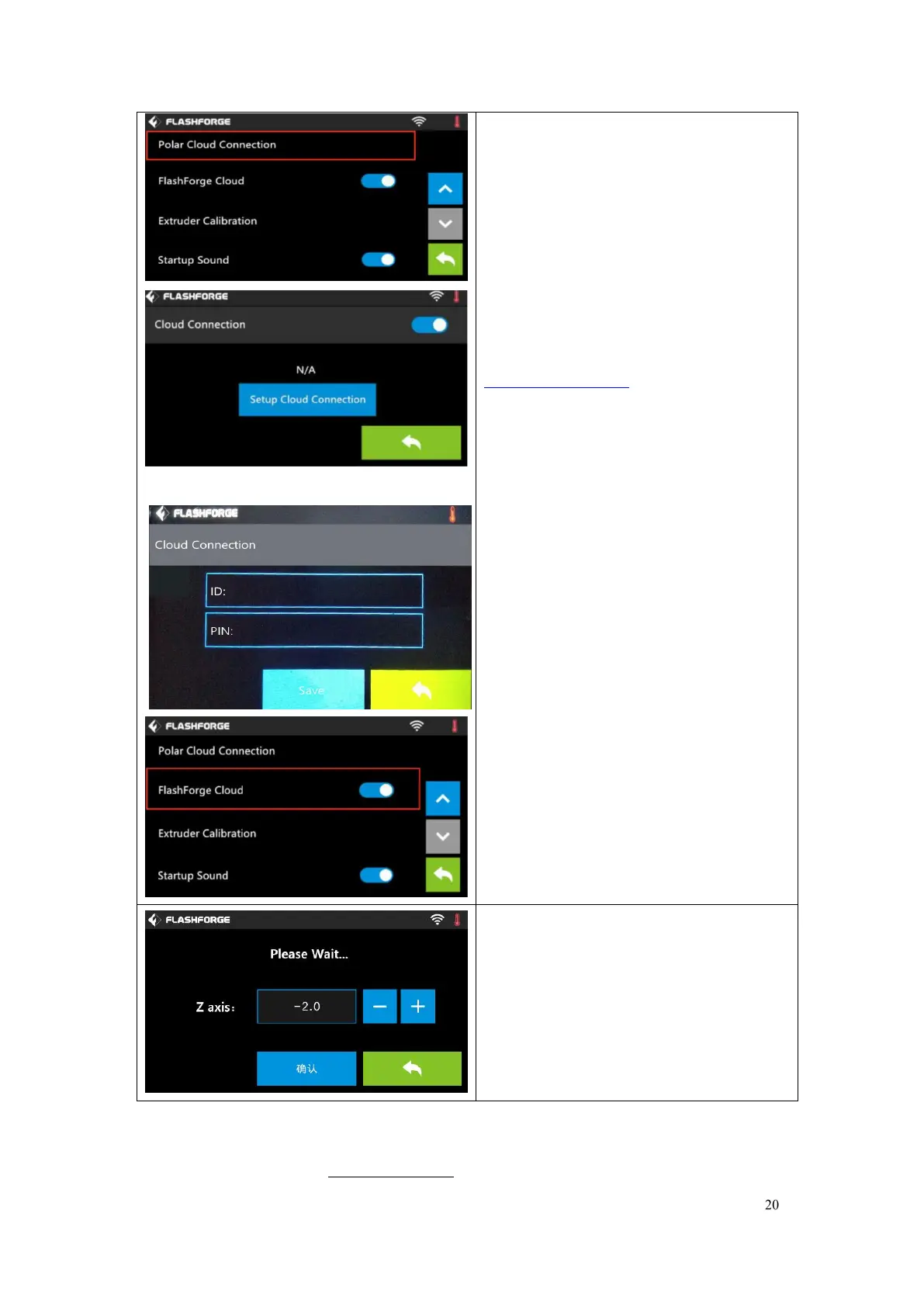
Polar Cloud Connection:
Cloud Connection: To turn on/off the
polar cloud connection.
Setup Cloud Connection: To set cloud
connection ID and PIN which have
already been registered on:
https://polar3d.com
ID: The email address of your Cloud
account.
PIN: The PIN code of your Cloud
account.
Save: To save the setting.
Back
(Note: To use polar cloud printing
function, you need to connect the printer
to internet with WiFi or Ethernet Cable
first)
Turn on/off [FlashForge Cloud]:
Tap to turn on/off the FlashForge Cloud
Connection.
Details instruction please refer to7.2.6
Turn on/off [Startup Sound]:
Tap to turn on/off the sound when
restart the printer.
Extruder Calibration:
(not recommended for customers to
operate)
To adjust the initial distance between the
extruder and the build plate by tapping
[-]and[+]. The proper distance may be one
ordinary paper
’
s thickness.















 To Next Page