Using the ScanSnap in Various Ways (for Windows Users)
164
■ Scanning Documents Larger Than A4/Letter Size
The ScanSnap is able to scan documents larger than A4/Letter size, such as A3, Double Let-
ter, and B4 sizes, using the Carrier Sheet. Fold the document in half, scan it in Duplex mode,
and then merge both front and back images to make a double-page spread image data. You
can also scan and merge both front and back images of a document smaller than A4/Letter
size to output a double-page spread image data.
To scan documents larger than A4/Letter size, change the settings by following the procedure
below.
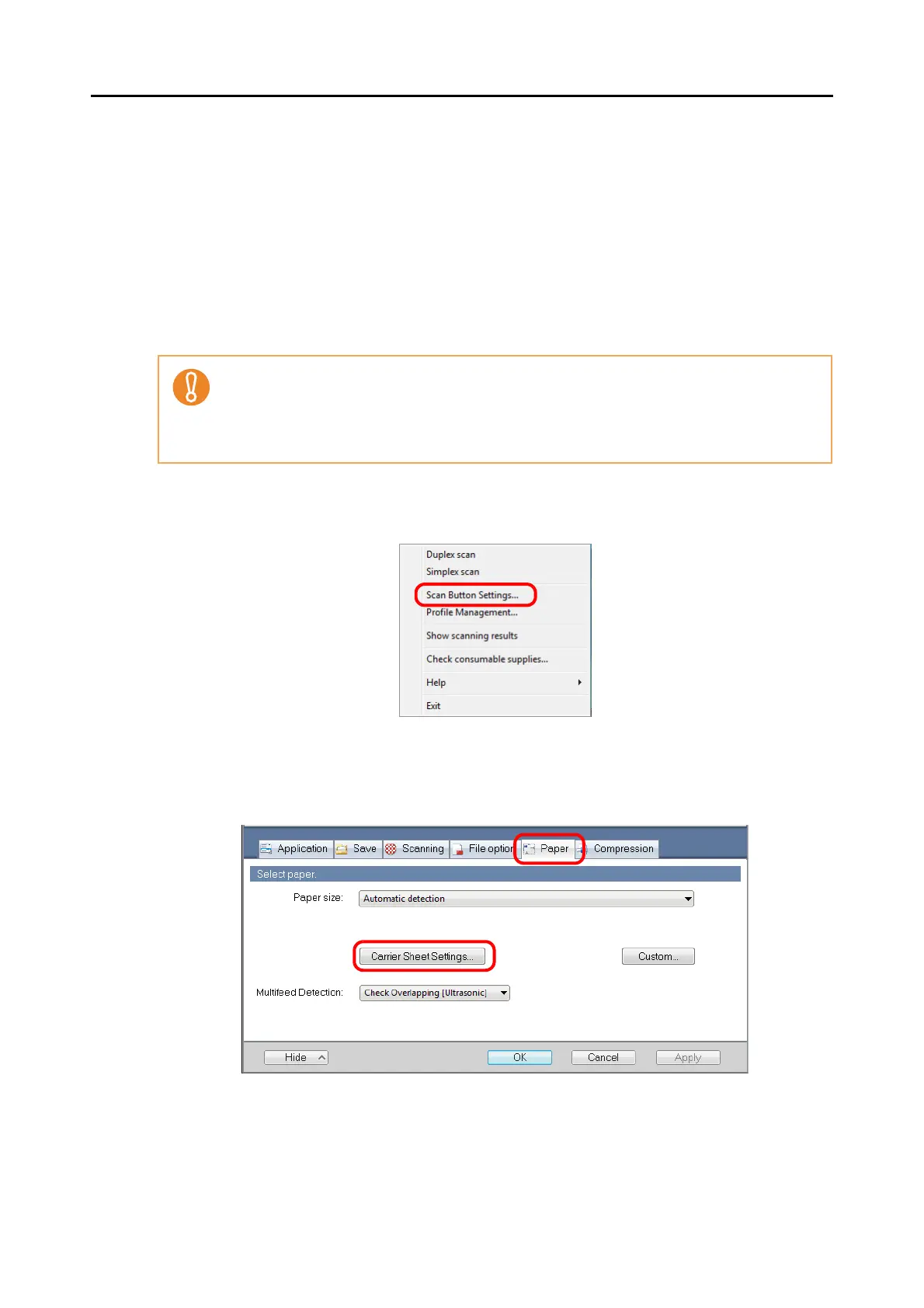
1. From the Right-Click Menu, select [Scan Button Settings].
⇒ The ScanSnap setup dialog box appears.
2. Click the [Carrier Sheet Settings] button on the [Paper] tab.
⇒
The [Carrier Sheet Settings] dialog box appears.
• When you scan documents using a Carrier Sheet, a detection error may occur in the folded
portion, and some parts of the image data may be lost. Therefore, it is not recommended for
scanning where accuracy is crucial.
• The [Correct skewed character strings automatically] check box in the [Read mode option]
dialog box displayed by pressing the [Option] button on the [Scanning] tab, is disabled.



 To Next Page
 Loading...










