EasyManua.ls Logo

HITEC OPTIC 6 - Transmitter Displays and Messages; Warning Displays

HITEC OPTIC 6
60 pages
Print Icon
To Next Page IconTo Next Page
To Previous Page IconTo Previous Page
Loading...
For more information - www.modelflight.com.au
Transmitte
r
Dis
p
la
y
s
an
d
Messa
g
es
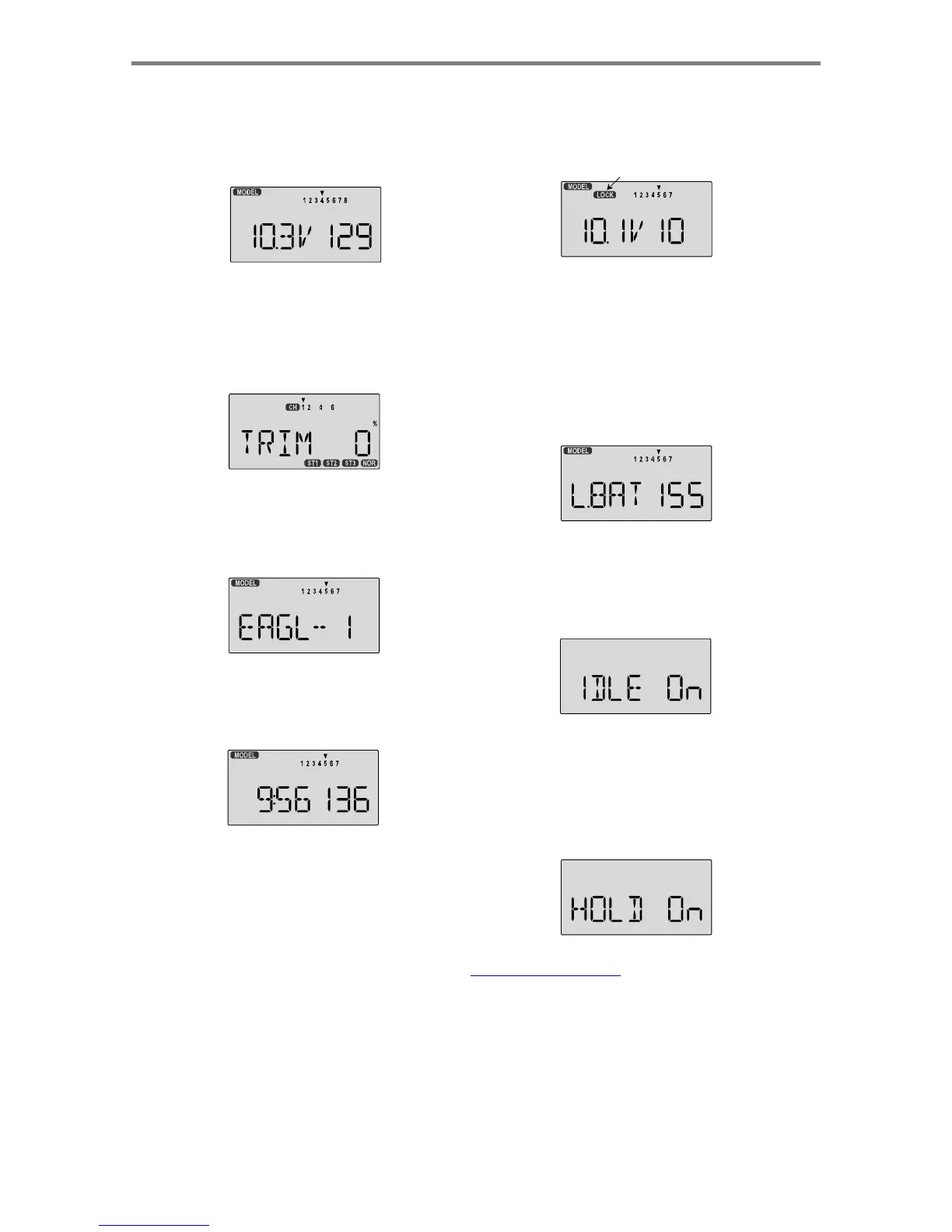
This
screen
appears
at
startup.
The
model
memory
number
is
shown
by
the
small
down-arrow.
Battery
voltage
is
shown
in
the
bottom
left,
and
operating
time
is
on
the
lower
right.
You
can
reset
the
operating
time
display
by
hitting
the
Clear
button
(the
one
on
the
farthest
right).
Do
this
after
each
charge
to
keep
track
of
your
operating
time
on
a
single
charge.
Pressing
the
Lock
button
locks
the
throttle
servo
and
holds
it
where
you
last
commanded
it.
This
is
a
safety
feature
to
be
used
when
you
are
carrying
the
model
and
transmitter
to
ensure
you
don't
accidentally
give
throttle.
The
LOCK
indicator
shows
when
the
Lock
switch
has
been
engaged.
LOCK
indicator
Pressing
the
Up
button
gives
the
Trim
display
(different
numbers
may
appear
depending
on
the
model
type).
To
see
where
the
trim
for
a
certain
channel
is,
you
have
to
move
it!
Be
sure
to
move
it
back
to
where
it
was.
Note
that
the
CH3
trim
only
moves
downward,
so
if
you
need
more
engine
RPM,
set
up
idle
with
the
trim
at
-25%
so
you
can
increase
it
if
needed.
Warning Displays
The
LOW
BATTERY
warning
is
displayed
when
the
transmitter
battery
voltage
drops
below
9.3
volts,
and
a
beeper
sounds.
The
operating
time
is
still
shown
on
the
right.
If
you
reset
this
each
time
you
charge
the
system,
you
will
have
a
good
idea
of
how
long
you
can
safely
operate.
WHEN
THE
BEEPER
SOUNDS,
LAND
YOUR
MODEL
AS
SOON
AS
POSSIBLE
BEFORE
LOSS
OF
CONTROL
DUE
TO
A
DEAD
TRANSMITTER
BATTERY.
Pressing
the
Up
button
again
gives
the
Model
Name
display.
If
you've
named
your
model,
it
will
appear
here
so
you
can
be
sure
you
have
recalled
the
correct
memory.
If
you
do
not
name
the
model,
you'll
have
to
remember
which
model
memory
it's
stored
within
by
the
memory
number.
The
IDLE
ON
warning
is
displayed
when
the
transmitter
is
powered
up
with
the
Idle
switch
on
in
the
helicopter
mode
only.
You
can
turn
this
off
by
moving
the
Flt.
Mode
(SW-4)
switch
FORWARD.
For
your
safety,
the
transmitter
will
not
broadcast
until
this
alarm
is
ended
Pressing
the
Right
button
gives
the
Timer
display,
with
a
stopwatch
display
on
the
left,
and
operating
time
on
the
right.
This
also
starts
the
timer,
so
hit
the
Right
key
again
to
stop
it.
Hitting
the
Cursor
Left
(Off)
button
resets
the
timer.
The
HOLD
ON
warning
is
displayed
when
the
transmitter
is
powered
up
with
the
Throttle
hold
switch
(SW-1)
on
in
the
helicopter
mode
only.
You
can
turn
this
off
by
moving
the
SW-1
switch
AFT
(ELEV
RUDD
D/R
switch).
If
you
then
get
the
IDLE
ON
alarm
(see
above),
you
must
move
the
Flt.
Mode
switch
fully
FORWARD.
For
your
safety,
the
transmitter
will
not
broadcast
until
this
alarm
is
ended.
Transmitter
Dis
p
la
ys
an
d
Messa
g
es
-
Pa
g
e
10

Table of Contents

Other manuals for HITEC OPTIC 6

Related product manuals