EasyManua.ls Logo

HITEC OPTIC 6 - Simple Transmitter Setup - Aerobatic Airplane (ACGL Menu); Programmable mixers

HITEC OPTIC 6
60 pages
Print Icon
To Next Page IconTo Next Page
To Previous Page IconTo Previous Page
Loading...
For more information - www.modelflight.com.au
Sim
p
le
Transmitter
Setu
p
-
Aerobati
c
Air
p
lane
(
ACGL
Menu
)
65.
Programmable
mixers:
now
take
advantage
of
your
system's
advanced
custom
programming
capabilities.
You
may
use
one
or
both
of
the
two
programmable
mixers
(
PMX1,
PMX2
)
to
get
rid
of
unwanted
tendencies
(for
example,
rolling
or
tucking
during
knife-edge
flight.
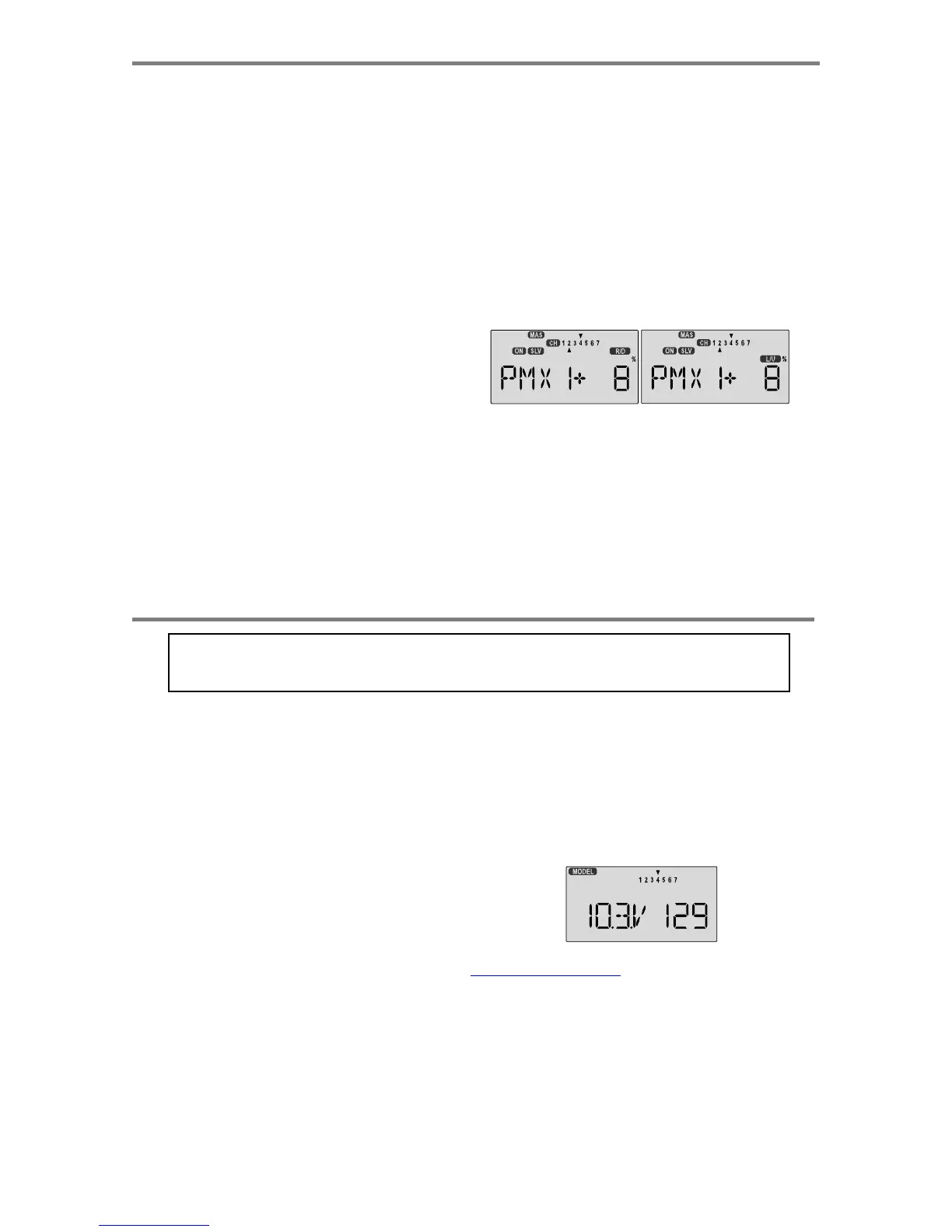
66.
For
tucking
during
knife-edge,
you
want
to
apply
a
little
up
elevator
when
you
are
using
full
rudder
to
sustain
knife-
edge.
Thus,
we
want
the
master
channel
to
be
rudder,
and
the
slave
to
be
elevator.
67.
To
program
this
mixing,
first
get
to
the
PMX1
window.
Press
one
of
the
Edit
Up/Down
keys
until
you
see
PMX1
displayed.
Then
press
the
Active/Inhibit
(Clear)
key
to
activate
it
(a
flashing
ON
or
OFF
will
appear,
depending
on
the
position
of
the
selected
ON-OFF
switch,
which
turns
mixer
#1
on
and
off).
68.
Next,
press
the
Cursor
Right
key
once
to
select
the
master
channel
(
MAS
flashes
on
and
off),
then
press
the
Data
+Increase
key
until
the
little
arrow
moves
over
the
numeral
4
,
indicating
CH4
(rudder)
is
the
master
channel.
Press
the
Cursor
Right
key
once
(
SLV
flashes
on
and
off),
then
press
the
Data
+Increase
key
until
the
little
arrow
is
under
the
numeral
2
,
indicating
CH2
(elevator)
is
the
slave
channel.
69.
Now,
you'll
define
the
mixing
percentage.
Notice
that
the
mixer
starts
with
100%
on
both
sides,
which
is
WAY
too
much.
Move
the
rudder
stick
to
one
side
and
press
the
Clear
button,
zeroing
the
percentage.
Move
it
to
the
other
ide
and
repeat.
Now
both
sides
are
set
to
zero
percent.
70.
If
your
model
tucks
during
knife-edge,
you'll
want
to
input
up
elevator
for
rudder
going
both
directions.
Move
the
rudder
stick
to
the
right
and
press
the
Data
+Increase
until
you
can
see
which
way
the
elevator
moves;
if
incorrect,
press
the
Data
-Decrease
key
until
the
plus
sign
changes t
o
a
minus
sign.
Repeat
this
by
moving
the
rudder
stick
to the
other
side.
You'll
end
up
with
a
plus
sign
for
one
rudder
direction,
and
minus
for
the
other
direction.
Start
with
only
5-10%
mixing
on
both
sides
until
you
know
how
much
you
need
from
actual
test
flying.
71.
Be
sure
you
understand
how
to
set
the
switch
to
turn
PMX1
on
and
off,
since
you
won't
want
this
mixing
on
during
normal
flight,
only
during
knife-edge.
Later,
after
you
fly
the
model
you
may
fine-tune
the
amount
of
elevator
travel
so
that
the
pitching
tendency
is
eliminated.
You
can
use
the
other
mixer
to
handle
adding
aileron
corrections
during
knife-edge.
In
this
case,
you'll
have
the
same
percentage
sign
on
both
sides
of
the
rudder.
This
introduction
just
scratches
the
surface
of
the
capabilities
of
your
Optic
system.
Please
read
the
manual
so
you'll
know
what
other
features
you
can
take
advantage
of.
The
sky's
the
limit
-
we
know
you'll
enjoy
using
your
Optic
system!
Simple
Transmitter
Setup
-
Electric
A
irplane,
5
-Channel
Receiver
(
ACGL
Menu
)
The
aircraft
setup
procedure
presented
below
uses
an
electric
model
as
an
example
and
assumes
that
there
are
two
aileron
servos,
one
in
each
wing.
It
also
assumes
that
you
are
using
a
micro
five-channel
receiver.
It
will
take
you
step-by-step
through
the
setup
process
for
an
electric
airplane
in
the
ACGL
menu,
including
the
setup
for
airbrakes.
FIVE
-
CHANNEL
ELECTRI
C
A
IRCRAF
T
SETUP INSTRUCTIONS
1.
Be
sure
that
all
of
your
servos
are
plugged
into
the
proper
receiver
channels:
CH1
-
Right
aileron
CH2
-
Elevator
CH3
-
Electronic
speed
control
CH4
-
Rudder
(if
used)
CH5
-
Left
aileron
2.
We
recommend
that
you
do
this
programming
exercise
with
the
servos
installed
in
the
model
and
connected
to
the
respective
control
surfaces.
This
will
enable
you
to
immediately
see
the
effect
of
each
programming
step.
You
should
remove
the
propeller
for
safety.
3.
Follow
steps
3-10
in
the
Aerobatic
Airplane
setup
instructions
to
do
the
initial
setup
for
your
electric
model.
4.
Now,
you
will
customize
the
ACGL
settings
for
your
model.
Switch
transmitter
power
OFF
,
then
turn
power
ON
.
the
transmitter
should
display
the
model
number
and
battery
voltage
as
shown.
The
number
on
the
right
is
the
elapsed
time,
which
will
vary
depending
on
how
long
the
transmitter
has
been
left
on.
Sim
p
le
Transmitter
Setu
p
-
A
erobatic
A
ir
p
lane
(
ACGL
Menu
)
-
Pa
g
e
2
2

Table of Contents

Other manuals for HITEC OPTIC 6

Related product manuals