EasyManua.ls Logo

HITEC OPTIC 6 - Connectors; Using the Aileron Extension; Vibration and Waterproofing; Charging the Optic Ni-CD Batteries

HITEC OPTIC 6
60 pages
Print Icon
To Next Page IconTo Next Page
To Previous Page IconTo Previous Page
Loading...
For more information - www.modelflight.com.au
Radio
Installation
Notes
Connectors
Be
sure
the
alignment
of
a
servo
or
battery
connector
is
correct
before
inserting
it
into
the
receiver.
To
remove
a
connector
from
the
receiver,
try
to
pull
on
the
connector's
plastic
housing
rather
than
pulling
on
the
wires.
Pulling
the
wires
can
ruin
the
connector
pins
and
break
wires.
Using
The
Aileron
Extension
If
any
of
your
servos
are
located
too
far
away
to
plug
directly
into
the
receiver
(like
the
aileron
servo),
or
you
need
to
unplug
the
servo
each
time
you
disassemble
the
model,
use
a
servo
extension
cord
to
extend
the
length
of
the
servo
lead.
A
dditional
Hitec
extension
cords
of
varying
lengths
are
available
from
your
hobby
dealer.
V
ibration and Waterproofing
The
receiver
contains
precision
electronic
parts.
Be
sure
to
avoid
vibration,
shock,
and
temperature
extremes.
For
protection,
wrap
the
receiver
in
the
provided
"Flight
Preserver"
foam
rubber,
or
use
some
other
vibration-absorbing
materials.
It's
also
a
good
idea
to
waterproof
the
receiver
by
placing
it
in
a
plastic
bag
and
securing
the
open
end
of
the
bag
with
a
rubber
band
before
wrapping
it
with
foam.
If
you
accidentally
get
moisture
inside
the
receiver,
you
may
experience
intermittent
operation
or
a
crash.
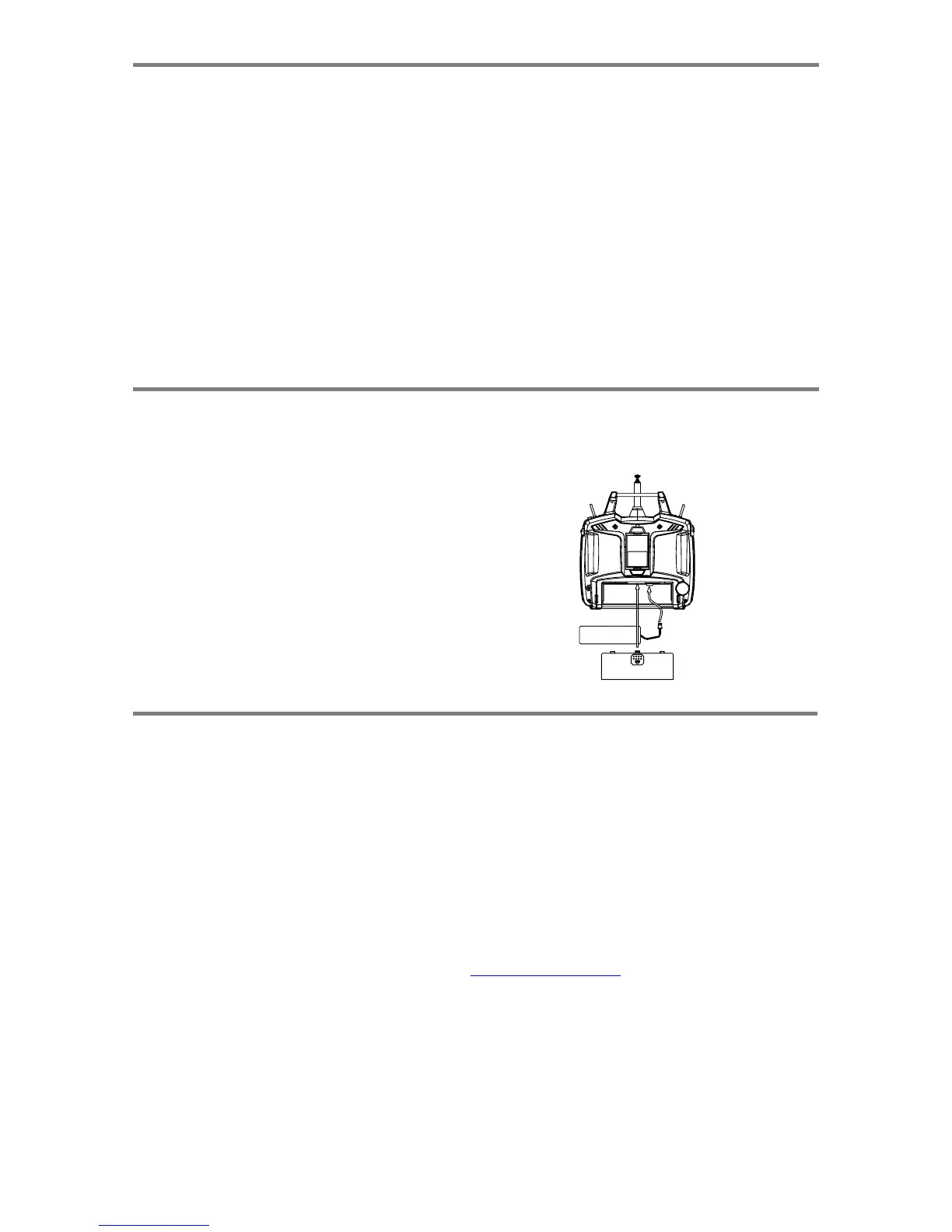
Char
g
in
g
the
O
p
tic
Ni-C
d
Batteries
1.
Connect
the
transmitter
charging
cord
to
the
transmitter's
charging
socket
(on
the
rear
of
the
case,
left
side).
2.
Connect
the
receiver
battery
to
the
receiver
connector
on
the
charging
cord.
3.
Plug
the
charger
into
a
wall
socket.
4.
The
charger's
LEDs
should
light,
indicating
charging
current
is
flowing.
The
batteries
should
be
left
on
charge
for
about
15
hours.
If
either
light
does
not
turn
on,
verify
that
both
power
switches
are
OFF.
Also
be
sure
the
wall
switch
controlling
the
room
lights
does
not
shut
off
the
charger's
electrical
outlet
when
you
leave
the
room.
-
Try
to
charge
the
batteries
with
the
charger
supplied
with
your
system
exclusively.
The
use
of
a
fast-charger
may
damage
the
batteries
by
overheating
and
dramatically
reduce
their
lifetime.
NOTE:
If
you
need
to
remove
or
replace
the
transmitter
battery,
do
not
p
ul
l
on
its
wires
to
remove
it.
Instead,
gently
pull
on
the
connector's
p
lasti
c
housing
where
it
plugs
in
to
the
transmitter.
The
battery
must
be
removed
to
charge
it
properly
with
a
"peak"
charger.
Operatin
g
With
A
Trainer
Cor
d
A
n
optional
training
cord
is
available
from
your
dealer.
The
cord
may
be
used
to
help
a
beginning
pilot
learn
to
fly
easily
by
allowing
a
second
transmitter,
operated
by
an
experienced
instructor,
to
be
connected
to
this
system.
The
instructor
may
override
the
beginning
pilot
at
any
time
to
bring
the
model
back
under
safe
control.
For
training,
the
transmitter
may
be
connected
to
another
Hitec
FM
system
using
the
Hitec
cord
part
#
58310.
To
use
the
trainer
cord:
1.
Set
up
both
the
student's
and
instructor's
transmitters
to
have
identical
trim
and
control
motions.
If
the
instructor's
transmitter
is
on
a
different
frequency
than
the
student's,
use
the
student's
as
the
master
transmitter
and
the
other
as
the
student's.
2.
Collapse
the
student's
antenna,
and
fully
extend
the
instructor's
antenna.
If
the
student's
transmitter
has
a
removable
RF
module,
remove
it
from
the
transmitter.
3.
The
Hitec
cord
is
specifically
marked
at
one
end
as
the
"master"
the
other
end
as
"student".
Plug
it
accordingly
into
each
transmitter,
with
power
switched
off.
The
trainer
jack
is
on
the
back
of
the
transmitter.
Turn
the
connector
until
its
notches
line
up
and
it
fits
without
having
to
be
forced.
Radio
Ins
t
allation
Notes,
Char
g
in
g
the
O
p
tic
Ni
-
Cd
Batteries,
O
p
eratin
g
With
A
Trainer
Cord
-
Pa
g
e
6

Table of Contents

Other manuals for HITEC OPTIC 6

Related product manuals