EasyManua.ls Logo

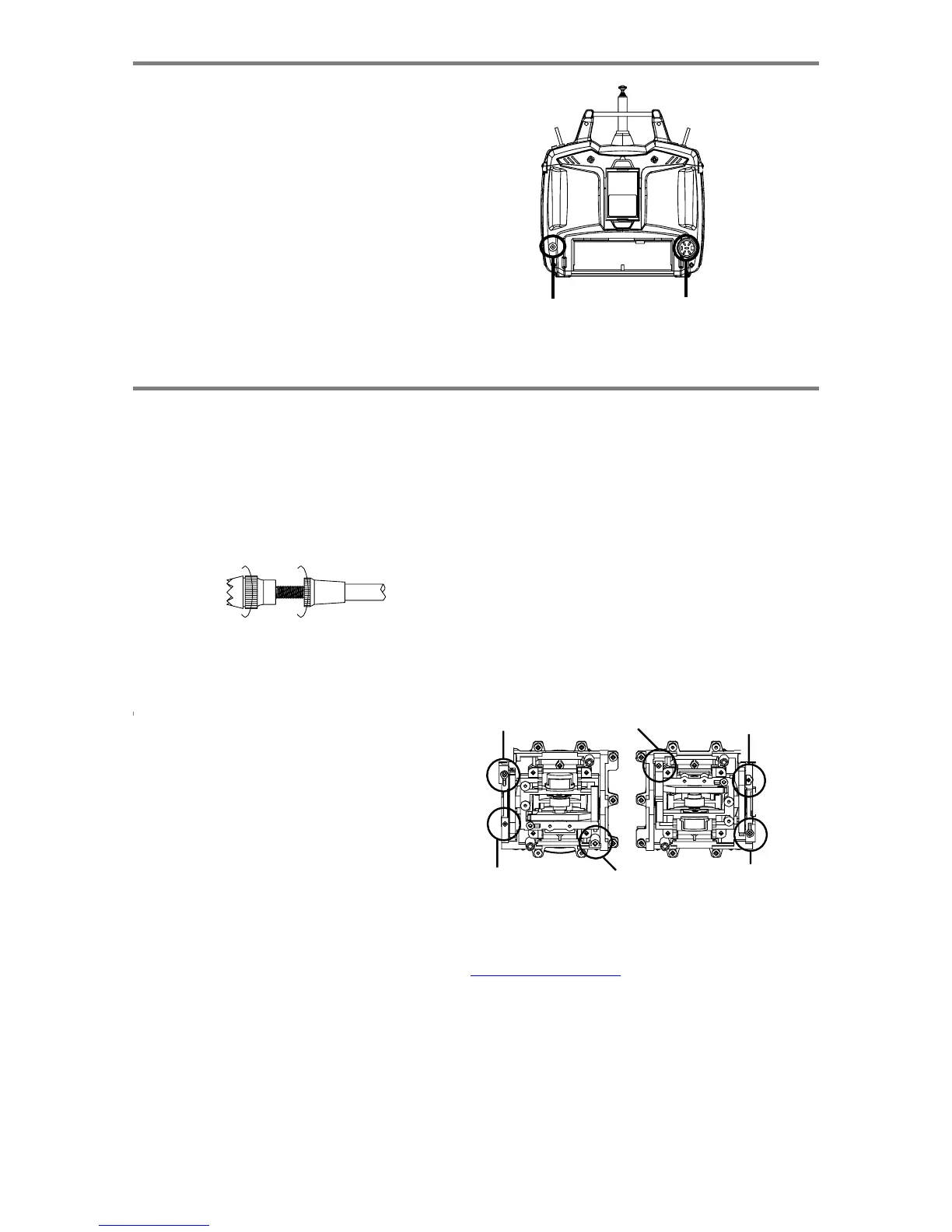
HITEC OPTIC 6 - Other Adjustments; Adjustable Length Control Sticks; Stick Lever Tension Adjustment; Changing the Optic Transmitters Mode

HITEC OPTIC 6
60 pages
Print Icon
To Next Page IconTo Next Page
To Previous Page IconTo Previous Page
Loading...
For more information - www.modelflight.com.au
O
p
eratin
g
With
A
Trainer
Cor
d
4.
Turn
on
the
instructor's
transmitter.
DO
NOT
turn
on
the
student
transmitter
power.
Move
the
controls
on
the
instructor's
transmitter,
and
verify
each
control
moves
the
proper
direction.
Now
verify
that
the
student's
trims
and
control
travels
match
the
instructor's
by
using
the
trainer
switch
(the
momentary
Trainer
switch
on
the
top
left
of
the
transmitter
case)
and
switching
back
and
forth
while
leaving
the
control
sticks
and
trims
alone,
then
moving
the
control
sticks.
5.
The
instructor's
transmitter
has
normal
control
over
the
model
unless
the
trainer
switch
is
pulled,
passing
control
to
the
student's
transmitter.
If
the
student
loses
control,
the
instructor
can
quickly
"take
over"
by
releasing
the
trainer
switch
and
controlling
the
model.
Char
ge
Jac
k
T
rainer
Jac
k
Other
Ad
j
ustments
A
djustable
length
control
sticks
Stic
k
lever tension ad
j
ustment
You
may
change
the
length
of
the
control
sticks
to
make
your
transmitter
more
comfortable
to
hold
and
operate.
To
lengthen
or
shorten
your
transmitter's
sticks,
first
unlock
the
stick
tip
by
holding
locking
piece
B
and
turning
stick
tip
A
counterclockwise.
Next,
move
the
locking
piece
B
up
or
down
(to
lengthen
or
shorten).
When
the
length
feels
comfortable,
lock
the
position
by
turning
locking
piece
B
counterclockwise.
A
B
Changing
the
Optic
transmitter's
mode
If
you
wish
to
change
the
mode
of
the
transmitter,
say
from
Mode
2
to
Mode
1,
switch
the
transmitter
on
while
holding
the
You may adjust the stick tension
of
you
r
sticks
to provide the
"feel"
that
you
like
for
flying.
To
adjust
your
springs,
you'll
have
to
remove
the
rear
case
of
the
transmitter.
Using
a
screwdriver,
remove
the
six
screws
that
hold
the
transmitter's
rear
cover
into
position,
and
put
them
in
a
safe
place.
Unscrew
the
antenna
and
set
it
aside.
Now,
place
some
padding
under
the
front
of
the
transmitter
and
set
it
face-down
on
the
pad.
Gently
ease
off
the
transmitter's
rear
cover.
Now
you'll
see
the
view
shown.
Using
a
small
cross-point
screwdriver,
rotate
the
adjusting
screw
for
each
stick
for
the
desired
spring
tension.
The
tension
increases
when
the
adjusting
screw
is
turned
clockwise,
and
decreases
for
counterclockwise
motion.
When
you
are
satisfied
with
the
spring
tensions,
you
may
close
the
transmitter.
Very
carefully
reinstall
the
rear
cover.
When
the
cover
is
properly
in
place,
tighten
the
six
screws.
TENSION
SPRING
two
EDIT
keys
down.
Then,
scroll
through
the
menus
usin
g
one
of
the
edit
keys
until
you
reach
the
STICK
menu.
Pres
s
one
of
the
cursor
keys
to
switch
between
Mode
1
and
Mode
2.
TO
CLOCKWISE
RATCHET
COPPER
SPRING
LIMIT
BRACKET
SPRING
LIMIT
BRACKET
RATCHET
COPPER
TENSION
SPRING
TO
CLOCKWISE
O
p
eratin
g
With
A
Trainer
Cord,
Other
A
d
j
ustment
s
-
Pa
g
e
7

Table of Contents

Other manuals for HITEC OPTIC 6

Related product manuals