EasyManua.ls Logo

HITEC OPTIC 6 - ADIF - Aileron Differential

HITEC OPTIC 6
60 pages
Print Icon
To Next Page IconTo Next Page
To Previous Page IconTo Previous Page
Loading...
For more information - www.modelflight.com.au
A
ir
p
lane
Model
Function Descri
p
tions
5.
If
the
left
(
CH6
)
flaperon
moves
correctly
wi
t
h
aileron stick,
go
to
the
next
step.
Otherwise,
change
the
its
travel
direction
by
pressing
the
Cursor
Right
key
(the
little
arrow
moves
under
the
6
),
press
the
Active/Inhibit
(Clear)
key
(sets
0%),
then
press
the
Data
-Decrease
key
until
you
reach
-100%.
as 0% down, and the ailerons
will
move
up
only.
This
is
preferred
over
reducing
the
up
travel,
which
reduces
the
roll
rate.
9.
You
must
repeat
this
procedure
for
the
left
flaperon
also.
Press
the
Cursor
Right
key
one
time,
so
the
little
arrow
moves
under
the
6
indicating
the
left
(
CH6
)
flaperon.
Move
the
stick
to
the
Right
and
as
before,
press
the
Data
-Decrease
key
until
you
get
to
50-75%.
6.
Now
you'll
input
the
amount
of
flap
response
on
the
flaperons.
The
flap
motion
is
commanded
by
the
Right
Lever
on
the right
side
of
the
case
(near
your
right-hand
index
finger),
and both
flaperons
should
move
the
same
direction
when
you move
the
lever.
Press
the
Cursor
Right
key
one
time,
so
the little
arrow
moves
over
the
6
indicating
flaps
are
now
the master
channel.
Note
the
arrow
under
the
6
as
well, indicating
left
(
CH6
)
flaperon.
Now
you
may
adjust
the amount
of
left
flaperon
travel
with
the
Data
+Increase
and
-Decrease
keys.
Press
Active/Inhibit
(Clear)
key
if
you
wish
to
reset
to
0%).
You
may
need
to
choose
negative
values
to
get
the
control
to
travel
the
correct
direction.
7.
Now
you'll
input
the
amount
of
flap
lever
response
on
the right
(
CH1
)
flaperon
by
pressing
the
Cursor
Right
key
once. Now
the
little
arrow
moves
under
the
1,
and
you
may
adjust the
amount
of
right
flaperon
travel
with
the
Data
+Increase
and
-
Decrease
keys.
A
DIF
-
A
ileron D
i
f
ferentia
l
Before
we
explain
why
we
use
differential,
please
note
that
this
function
drives
two
aileron
servos
out
of
channels
1
and
5.
So
if
you
have
a
five-channel
receiver,
use
the
ADIF
function
to
set
up
your
model.
A
ilerons
are
used
to
roll
or
bank
the
aircraft's
wing,
but
making a
roll
or
turn
has
a
price.
A
wing
that
generates
lift
also generates
a
drag
component
called
induced
drag,
meaning
that drag
is
induced
as
a
byproduct
of
the
lifting
wing.
This
means that
the
wing
that
is
lifting
more
is
also
dragging
more,
and
the resulting
drag
difference
causes
the
fuselage
of
the
model
to yaw
away
from
the
desired
turn
direction,
exactly
the
wrong thing
to
have
happen.
This
causes
even
more
drag,
which
can really
hurt
an
aircraft's
performance.
There
are
two
ways
to reduce
the
yaw
of
the
fuselage,
differential
(
ADIF
)
and
rudder coupling
(
A->R
).
Both
should
be
used
together.
A
ileron
differential
causes
the
ailerons
to
automatically
move
wi
t
h
more
UP
than
DOWN
motion,
which
helps
to
reduce
induced
drag.
It
helps,
along
with
rudder-coupling,
to
make
the
fuselage
point
straight
into
the
oncoming
air
stream
(this
is
also
called
"coordinating
the
turn").
The
amount
of
differential
is
highly
dependent
on
the
model
configuration.
A
good
starting
point
is
for
the
down
aileron
to
move
50%
to
75%
as
much
as
the
up-moving
aileron.
8.
You
may
wish
to
set
aileron
differential.
Aileron
differential
means
that
each
aileron
has
more
travel
in
the
'up'
direction
than
the
'down'
direction.
Normally
the
down
travel
is
reduced
to
about
half
of
the
up
travel,
especially
on
slower-
flying
models.
Press
the
Cursor
Right
key
two
times,
so
the
little
arrows
move
over
and
under
the
1
indicating
aileron
stick
is
again
the
master
channel.
The
arrow
under
the
1
indicates
the
right
(
CH1
)
flaperon.
Move
the
stick
to
the
LEFT
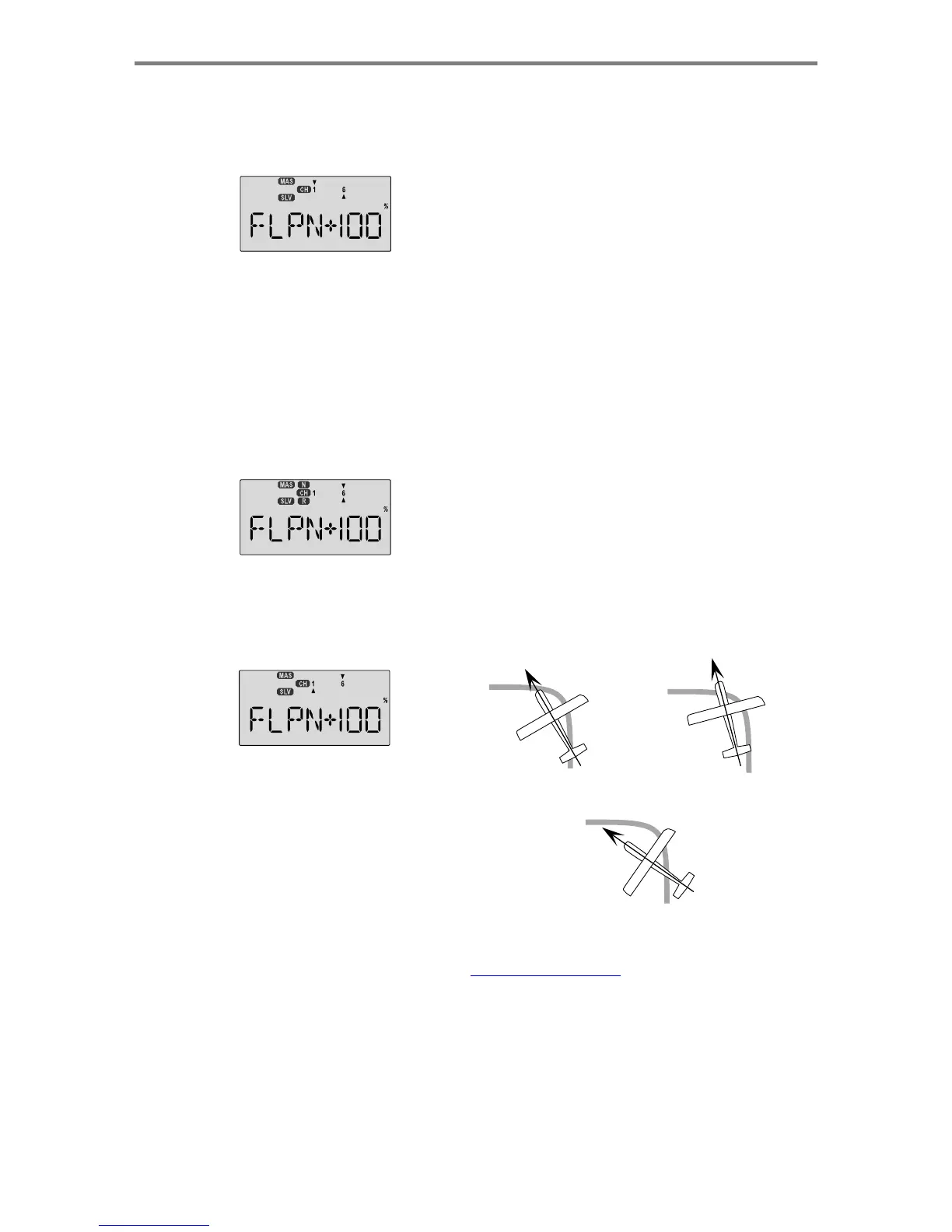
Coordinated turn
fuse
lines
up
with
turn
direction
(
don't chan
g
e an
y
thin
g
!
)
Nose
Points
outside
Circle
increase
coupling
and/or
differential
and
press
the
Data
-Decrease
key
until
you
get
to
50-75%.
If
you
need
even
more
differential,
you
can
choose
as
low
Airplane
Model Function
Descriptions
-
Page
31
Nose Points
inside
circle
Too
much
coupling
or
differential.
Reduce
one
or
both.

Table of Contents

Other manuals for HITEC OPTIC 6

Related product manuals