EasyManua.ls Logo

HITEC OPTIC 6 - S.TRM - Subtrim Settings

HITEC OPTIC 6
60 pages
Print Icon
To Next Page IconTo Next Page
To Previous Page IconTo Previous Page
Loading...
For more information - www.modelflight.com.au
A
irplane
Model
Function Descriptions
3.
Use
the
Data
+Increase
or
-
Decrease
key
to
choose
the
amount
of
dual
rate
for
that
switch
position.
You
may
set
the
travel
for
both
sides
of
the
switch
simply
by
flipping
the
switch
to
the
other
position
(the
arrow
will
also
switch
sides).
If
you
wish
to
return
to
the
original
100%
value,
press
the
Active/Inhibit
(Clear)
key.
4.
Press
the
Cursor
Right
key
to
move
to
another
channel
you
wish
to
input
dual
rate
settings.
5.
Repeat
the
first
three
steps
for
the
dual
rate
settings
on
the
remaining
channels.
Note
that
you
can
leave
one
side
of
the
dual
rate
switches
alone.
This
can
be
used
for
exponential
settings
(see
next
function).
6.
Return
to
the
regular
operating
mode
by
pressing
the
two
Edit
Up
Down
keys
simultaneously.
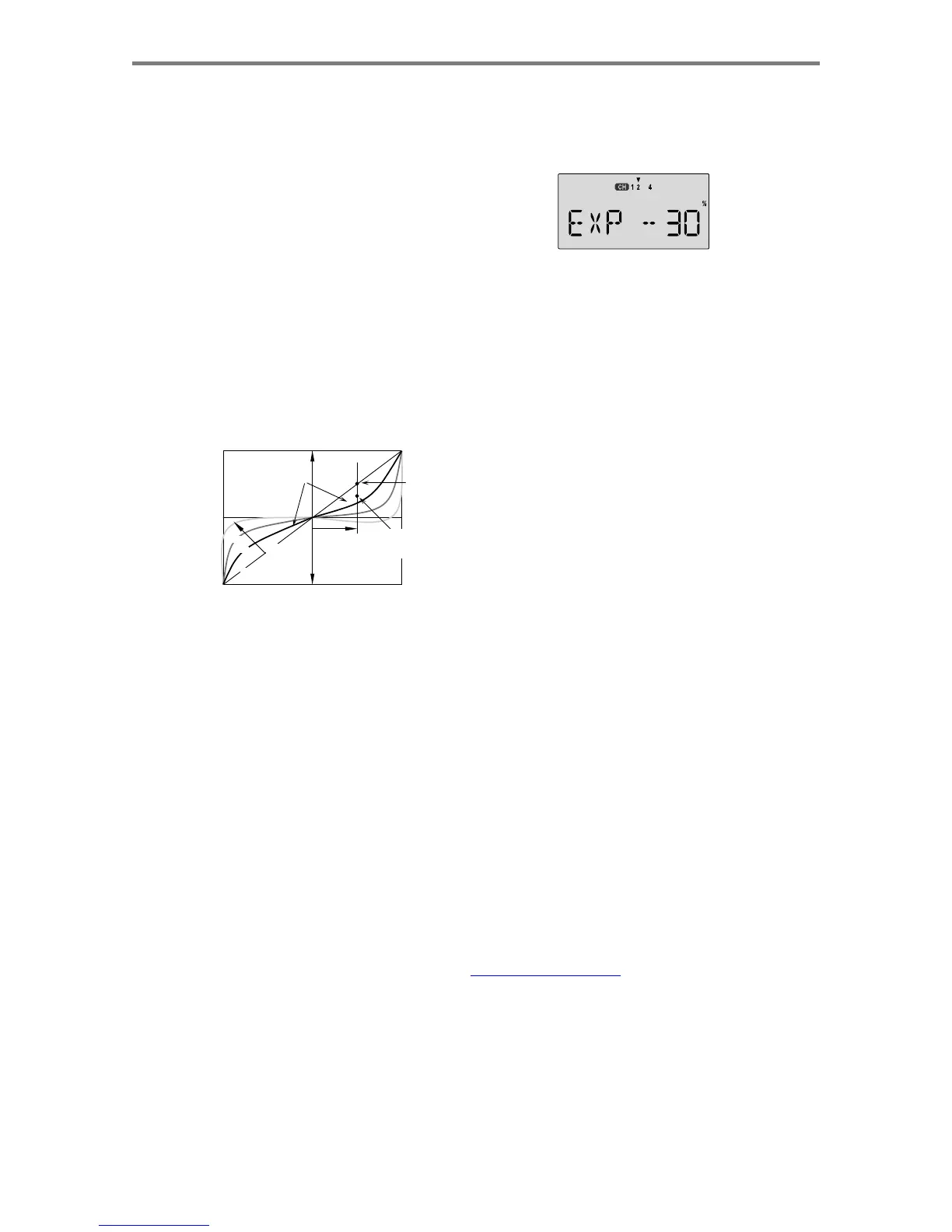
EXP
-
Exponential
You
may
be
new
to
exponential
settings.
"Exponential"
refers
to
a
mathematical
function
where
the
curve
grows
steeper
the
further
away
from
center
it
gets.
Expo
is
a
way
to
get
the
effect
of
dual
rates
without
having
to
flip
a
switch.
The
figure
below
will
help
explain
this
concept.
Servo
Response
Setting Exponentials
1.
Enter
the
programming
mode
by
pressing
the
two
Edit
Up
Down
keys
(the
two
keys
on
the
far
left)
at
the
same
time.
Press
either
Edit
Up
Down
key
until
the
EXP
menu
appears,
as
shown.
2.
To
set
exponential
for
channel
1,
move
the
arrow
by
pressing
the
Cursor
Right
or
Left
keys
repeatedly
until
the
arrow
is
under
or
over
the
channel
number
you
want.
Now
switch
the
appropriate
switch
up
or
down,
noticing
the
position
of
the
arrow.
You
can
set
two
values
of
exponential,
one
for
each
switch
position.
By
pressing
the
Data
+Increase
or
-Decrease
keys,
you
can
add
or
subtract
from
the
numerical
value
displayed.
Note
that
you
may
pick
a
value
anywhere
from
-100%
to
+100%.
If
you
quickly
want
to
get
back
to
the
default
0%,
press
the
Active/Inhibit
(Clear)
key.
You
should
understand
that
you
won't
see
changes
in
your
model's
servo
response
unless
you
move
the
sticks.
To
get
a
feel
for
how
75%
50%
25%
0%
Much
less
response
around
neutral(compare
with
Normal
line)
Increasing
exponential
(shallower
around
neutral)
Normal
linear
response
Stick
Motion
Exponential
gives
smaller
response
for
same
stick
motion
around
neutral
exponential
works,
just
hold
partial
stick
and
switch
the
Exp
o
on
and
off
(one
side
of
the
switch
should
be
set
to
zero
expo)
.
You'll
see
how
it
affects
the
servo
travel.
3.
The
values
you
set
for
exponential
are
highly
dependent
on
both
the
model
and
pilot's
preference.
I
normally
recommend
a
start
value
of
about
-10%
to
-20%,
and
many
test
flights,
(Linear)
You
will
notice
that
exponential
has
a
smooth
curve.
For
this
reason
it
is
possible
to
have
low
sensitivity
at
low
stick
angles
(like
dual
rates),
and
yet
have
full
motion
at
full
stick
deflection.
The
Optic
allows
you
to
have
two
different
values
of
exponential,
chosen
by
the
same
dual
rate
toggle
switches
on
the
transmitter,
described
earlier.
You
might
want
to
set
a
dual
rate
at
one
switch
position
with
zero
exponential,
and
an
exponential
value
with
100%
dual
rate
at
the
other.
Then
you
can
switch
between
them
in
flight
and
decide
which
you
like
better.
Later,
you
can
combine
both
dual
rate
settings
and
exponential
on
a
single
switch
setting.
There
are
really
two
kinds
of
exponential,
"positive"
and
"negative."
Negative
exponential
is
the
one
shown
above,
and
the
type
of
expo
most
commonly
used,
where
servo
movement
is
softer
around
neutral.
Positive
exponential
is
where
the
servos
are
very
sensitive
around
neutral
and
soft
at
extremes.
It
is
sometimes
used
for
helicopter
tail
rotors.
The
Optic
allows
you
to
set
exponential
for
ailerons,
elevator,
and
rudder.
slowly
increasing
the
number
until
things
are
"right".
Obviously
this
depends
on
the
pilot
and
model
so
go
ahead
and
fly
it
with
Expo
only
on
one
side
of
the
switch,
turn
it
on
and
off
during
flight,
and
change
things
to
suit
yourself.
Or
don't
use
it
at
all
if
you
don't
like
it
-
it's
not
for
everyone.
4.
Repeat
this
procedure
for
the
expo
settings
on
the
other
remaining
channels.
5.
Return
to
the
regular
operating
mode
by
pressing
the
two
Edit
Up
Down
keys
simultaneously.
S.TRM
-
Subtrim
Settings
The
Subtrim
window
is
used
to
make
small
adjustments
or
corrections
in
the
neutral
position
of
each
servo,
independent
of
the
digital
trim
buttons.
The
recommended
procedure
is
to
zero
out
both
the
trims
(see
settings
menu)
and
the
subtrims
(this
menu).
Then,
one
mounts
the
servo
arms
and
sets
up
linkages
so
that
the
neutral
position
of
each
control
surface
is
as
close
to
where
it
should
be
as
possible,
with
the
arm
90
°
to
the
pushrod.
Finally,
small
amounts
of
subtrim
are
used
to
make
fine
corrections.
We
recommend
that
you
try
to
keep
all
of
the
subtrim
values
of
as
small
as
possible.
Otherwise,
when
the
A
ir
p
lane
Mode
l
Function
Descri
p
tion
s
-
Pa
g
e
28

Table of Contents

Other manuals for HITEC OPTIC 6

Related product manuals