EasyManua.ls Logo

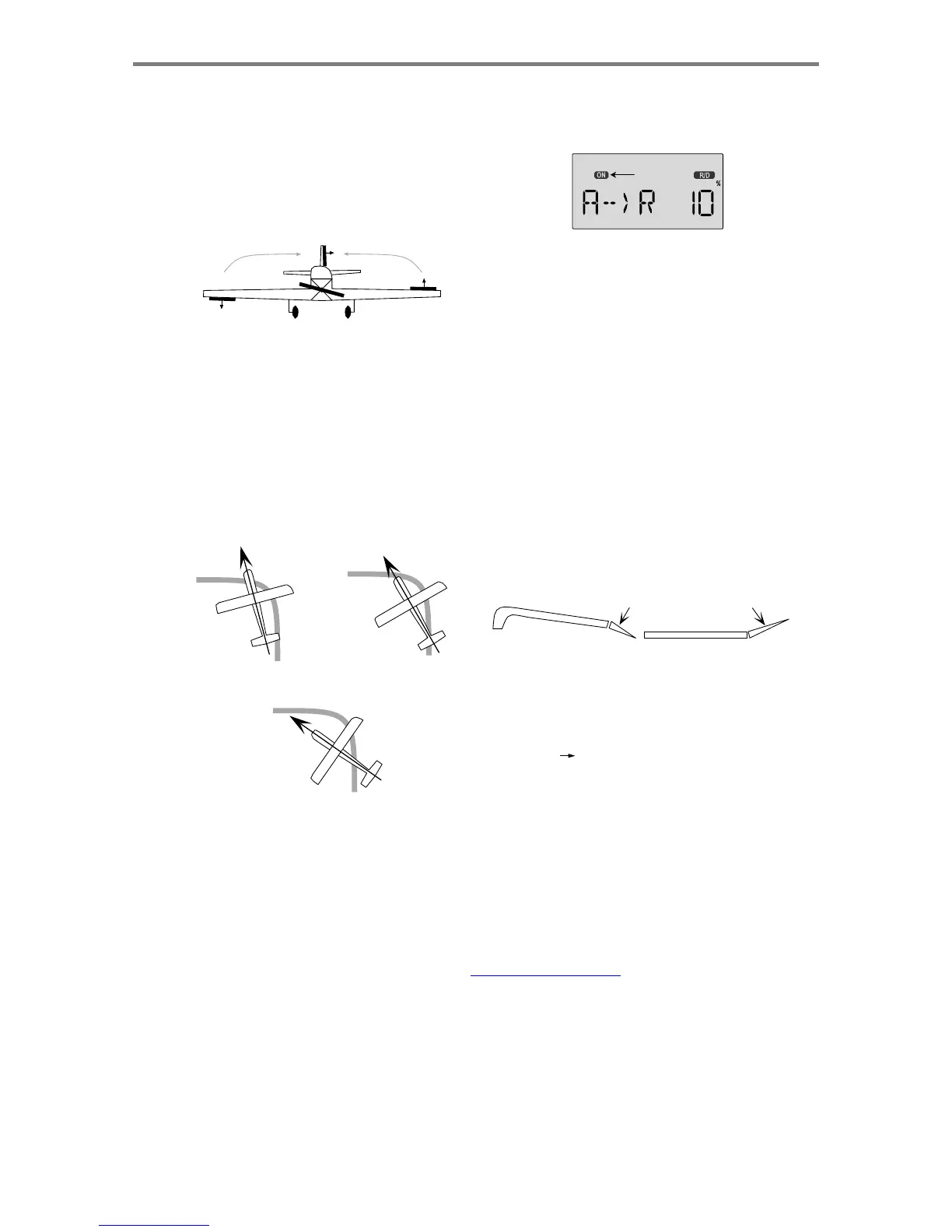
HITEC OPTIC 6 - A->R - Aileron Rudder Mixing

HITEC OPTIC 6
60 pages
Print Icon
To Next Page IconTo Next Page
To Previous Page IconTo Previous Page
Loading...
For more information - www.modelflight.com.au
A
ir
p
lane
Model
Function Descri
p
tions
A
-
>
R
-
A
ileron
Rudder
Mixing
A
ileron-to-rudder
mixing
is
a
function
that
causes
the
rudder
to
move
automatically
with
the
motion
of
the
aileron
stick.
This
is
done
because
when
ailerons
are
used
to
command
a
turn,
the
down-moving
aileron
has
more
drag
than
the
up-moving
one,
so
the
plane's
fuselage
tries
to
yaw
against
the
turn.
Adding
rudder
mixing
cures
this
problem
by
making
the
fuselage
point
straight
into
the
oncoming
air
stream
(this
is
also
called
"coordinating
the
turn").
The
slower
the
model
flies,
the
more
mixing
is
needed,
and
the
faster
it
moves,
the
less
is
needed.
It
is
ideal
to
make
slow-
flying
scale
models
fly
realistically.
The
amount
of
coupling
is
highly
dependent
on
the
model
configuration.
Usually
only
a
small
amount
of
rudder
is
needed.
It
will
also
help
to
set
up
some
aileron
differential
using
the
EPA
menus.
A
good
starting
point
is
to
limit
the
ailerons'
down
motion
to
50%
to
75%
of
the
up-moving
aileron's
motion.
The
aileron-to-rudder
mixing
function
may
be
on
always,
or
may
be
turned
on
and
off
using
Switches
1,
2,
3,
or
4.
You
may
choose
how
in
the
S/W
SEL
menu.
either
the
ON
indicator
or
the
OFF
indicator
will
be
flashing,
depending
on
the
position
of
the
ON-OFF
switch
that
is
selected.
See
the
Switch
Select
instructions
on
P.
39
for
information
on
how
to
select
the
ON-OFF
switch.
Flashing
2.
Press
the
Cursor
Right
key
once,
and
the
Percent
sign
will
be
flashing.
Move
the
aileron
stick
all
the
way
to
the
right,
and
adjust
the
R/D
mixing
amount
by
pressing
the
Data
+Increase
or
-Decrease
key.
You
may
set
any
amount
between
-100
and
100%
(an
initial
value
of
10-20%
is
suggested).
To
return
to
the
initial
0%
value,
press
the
Active/Inhibit
(Clear)
key.
3.
Move
the
aileron
stick
all
the
way
to
the
left,
and
adjust
the
L/U
mixing
amount
in
the
same
way.
To
return
to
the
initial
0%
value,
press
the
Active/Inhibit
(Clear)
key.
E->F
-
Elevator
Flap
Mixing
Elevator-to-flap
mixing
makes
the
flaps
drop
or
rise
wheneve
r
you
pull
on
the
elevator
stick.
It
is
used
to
make
tighter
"pylon
"
turns
or
squarer
corners
in
maneuvers.
Elevator-to-flap
mixin
g
is
set
up
so
that
the
flaps
droop
(are
lowered)
when
up
elevato
r
is
commanded.
DOWN flap o
r
flaperon
UP elevato
r
Nose
Points
outside
Circle
increase
coupling
and/or
differential
Coordinated
turn
fuse
lines
up
with
turn
direction
(
don't
chan
g
e
an
y
thin
g
!
)
Notice
that
this
mixing
function
works
with
the
flaperon
setting
.
If
flaperon
mixing
(FLPN)
AND
E->F
mixing
are
activated,
whe
n
you
pull
up
elevator,
BOTH
ailerons
will
droop.
This
function
i
s
turned
on
with
the
Flt.
Mode
(SW-4)
switch
fully
forward.
Nose
Points
inside
circle
too
much
coupling
or
differential.
Reduce
one
or
both.
Setting
Up
A->R
Mixing
(Rudder
Coupling)
1.
Press
one
of
the
Up
Down
Edit
buttons
until
the
A->R
window
appears,
as
shown.
The
default
is
for
the
function
to
be
inhibited,
as
shown.
To
activate,
press
the
Active/
Inhibit
(Clear)
key.
The
letters
"
INH
"
will
turn
to
"
0
,"
and
Setting Up E F Mixing
1.
Press
one
of
the
Up
Down
Edit
buttons
until
the
E->F
window
appears.
The
default
is
for
the
function
to
be
inhibited.
To
activate,
press
the
Active/Inhibit
(Clear)
key.
This
will
cause
he
INH
display
to
change
to
a
number
display,
and
either
ON
or
OFF
will
be
flashing
either
the
ON
indicator
or
the
OFF
indicator
will
be
flashing,
depending
on
the
position
of
the
ON-OFF
switch
that
is
selected.
See
the
Switch
Select
instructions
on
P.
39
for
information
on
how
to
select
the
ON-OFF
switch.
A
ir
p
lane
Mode
l
Function
Descri
p
tion
s
-
Pa
g
e
36

Table of Contents

Other manuals for HITEC OPTIC 6

Related product manuals