EasyManua.ls Logo

HITEC OPTIC 6 - EPA - End Point Adjust

HITEC OPTIC 6
60 pages
Print Icon
To Next Page IconTo Next Page
To Previous Page IconTo Previous Page
Loading...
For more information - www.modelflight.com.au
A
ir
p
lane
Model
Function Descri
p
tions
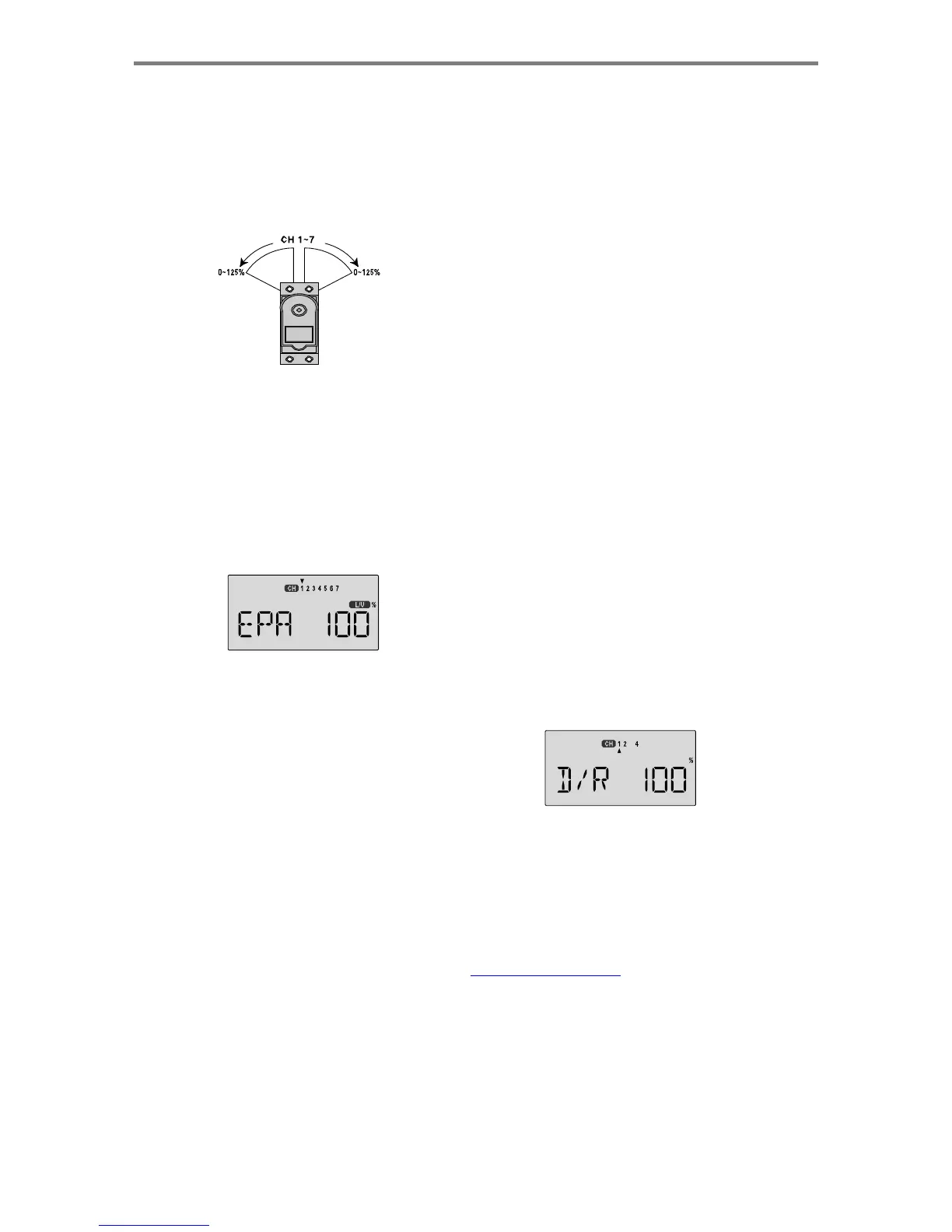
EP
A
-
End
Point
A
djust
The
EPA
function
is
used
to
set
(or
limit)
the
travel
of
each
servo,
and
may
be
set
anywhere
from
0%
and
125%
for
each
travel
direction.
Reducing
the
percentage
settings
reduces
the
total
servo
throw
in
that
direction.
The
EPA
function
is
normally
used
to
prevent
any
servos
from
binding
at
the
ends
of
their
travel.
If
you
change
the
EPA
setting
to
0%,
you
will
not
have
any
servo
response
in
that
direction,
and
will
probably
crash.
4.
To
set
EPA
travel
for
other
channels,
press
the
Cursor
Right
key
to
select
the
channel
you
wish
to
change.
The
little
triangle
moves
and
indicates
the
active
channel.
Repeat
these
steps
with
each
channel
in
sequence,
taking
care
to
set
the
travel
for
both
directions.
You
may
set
each
channel
separately,
anywhere
in
between
0%
and
125%,
and
if
you
wish
to
rapidly
return
to
the
default
100%
setting,
press
the
Active/Inhibit
(Clear)
key.
5.
Return
to
the
regular
operating
mode
by
pressing
the
two
Edit
Up
Down
keys
simultaneously.
Setting
EPA
values
on
your
system:
1.
Enter
the
programming
mode
by
pressing
the
two
Edit
Up
Down
keys
(the
two
keys
on
the
far
left)
at
the
same
time.
You
should
pop
right
into
the
EPA
screen,
but
if
you
do
not,
press
either
Edit
Up
Down
key
until
you
see
EPA
displayed.
The
channel
indicator
is
above
numeral
1
for
ailerons,
the
percent
symbol
will
be
flashing,
and
you'll
notice
that
you
can
change
the
L/U
indicator
to
R/D
(or
vice
versa)
by
moving
the
aileron
(right)
stick.
In
the
next
steps
you
will
see
how
you
set
the
travel
directions
independently
for
each
stick
(or
lever
or
gear
switch)
motion.
D/
R
-
Dua
l
Rates
If
this
is
your
first
computer
radio,
you
may
have
never
been
introduced
to
dual
rates
before.
Dual
rates
are
used
because
most
models
respond
more
rapidly
to
control
inputs
while
they're
flying
at
higher
speeds,
and
it
is
possible
to
be
really
gentle
with
the
controls
and
yet
still
over-control.
Dual
rates
are
used
to
adjust
the
transmitter
so
that
a
control
actuated
at
high
speed
will
not
cause
a
radical
response,
so
they
are
very
useful
for
beginning
pilots
as
well
as
experts.
Dual
rates
are
selected
by
flipping
the
dual
rate
switches
on
the
transmitter.
The
Optic
has
two
dual
rate
switches,
one
for
ailerons
and
one
for
elevator,
and
rudder.
The
aileron
dual
rate
switch
is
located
over
the
right-hand
stick;
the
elevator
and
rudder
dual
rate
switch
is
located
over
the
left-hand
stick.
The
amount
of
travel
reduction
or
increase
may
be
set
anywhere
between
0
and
125%.
Note:
if
you
set
the
dual
rate
amount
to
zero,
you
will
get
no
response
from
that
channel,
which
may
cause
a
crash.
2.
To
set
the
RIGHT
aileron
servo
travel,
move
the
aileron
stick
all
the
way
to
the
right
and
hold
it.
The
letters
"
R/D
"
should
appear
next
to
the
flashing
percent
sign,
meaning
you
are
setting
either
Right
or
Up
travel
(with
ailerons
it's
right
or
left
only,
but
the
display
is
set
up
to
use
the
same
indicators
for
elevator
and
throttle,
thus
the
dual
meanings
for
the
letters).
Now
if
your
servo
is
stalled
or
binding,
you'll
hear
a
buzzing
sound.
Hit
the
Data
-Decrease
key
until
the
buzzing
stops.
If
the
servo
is
not
buzzing,
leave
the
setting
at
100%.
Later,
depending
on
how
rapidly
the
model
rolls,
you
can
use
aileron
dual
rates
to
reduce
the
sensitivity.
3.
To
set
the
LEFT
aileron
motion,
move
the
aileron
stick
all
the
way
to
the
left
and
hold
it.
The
letters
"
L/U
"
should
appear
next
to
the
flashing
percent
sign.
Again
listen
and
hit
the
Data
-Decrease
key
until
the
buzzing
stops.
If
the
servo
is
not
buzzing,
leave
the
setting
at
100%.
Inputting Dual Rate
V
alues
1.
Get
to
the
D/R
screen
with
the
Edit
Up
Down
keys.
2.
The
active
channel
number
is
indicated
by
the
arrow
above
or
below
the
channel
numbers.
The
arrow's
position
depends
on
the
position
of
that
channel's
dual
rate
switch.
In
the
figure,
the
aileron
(CH1)
dual
rate
setting
at
the
D/R
switch's
lower
position
is
being
programmed.
A
ir
p
lane
Mode
l
Function
Descri
p
tion
s
-
Pa
g
e
2
7

Table of Contents

Other manuals for HITEC OPTIC 6

Related product manuals