EasyManua.ls Logo

HITEC OPTIC 6 - AIRCRAFT SETUP INSTRUCTIONS (AEROBATIC PLANE)

HITEC OPTIC 6
60 pages
Print Icon
To Next Page IconTo Next Page
To Previous Page IconTo Previous Page
Loading...
For more information - www.modelflight.com.au
Simple
Transmitter
Setup
-
Aerobati
c
Airplane
(
ACGL
Menu
)
The
following
pages
will
take
you
step-by-step
through
the
setup
process
for
a
sport
or
aerobatic
airplane
in
the
ACGL
menu.
Going
through
this
complete
section
will
help
you
learn
how
to
use
your
system
quickly
and
easily.
If
you
need
to
set
up
a
helicopter,
please
refer
to
the
quick
setup
instructions
in
the
helicopter
section.
A
IRCRAF
T
SETUP INSTRUCTIONS
(
AEROB
A
TI
C
PLANE
)
The
aircraft
setup
procedure
presented
below
uses
an
aerobatic
model
as
an
example
and
assumes
that
there
are
two
aileron
servos,
one
in
each
wing.
You
can
use
a
similar
procedure
to
set
up
your
own
model;
your
setting's
numbers
and
percentages
will
probably
be
different.
If
your
model
only
has
one
aileron
servo,
skip
the
instructions
referring
to
flaperon.
1.
Be
sure
that
all
of
your
servos
are
plugged
into
the
proper
receiver
channels:
CH1
-
Right
aileron
CH2
-
Elevator
CH3
-
Throttle
CH4
-
Rudder
CH5
-
Gear
CH6
-
Left
aileron
2.
We
recommend
that
you
do
this
programming
exercise
with
the
servos
installed
in
the
model
and
connected
to
the
respective
control
surfaces.
This
will
enable
you
to
immediately
see
the
effect
of
each
programming
step.
3.
Turn
on
your
transmitter
while
holding
down
the
two
Edit
keys
(the
two
keys
on
the
far
left).
This
gets
you
into
the
model
select
(
M.SEL
)
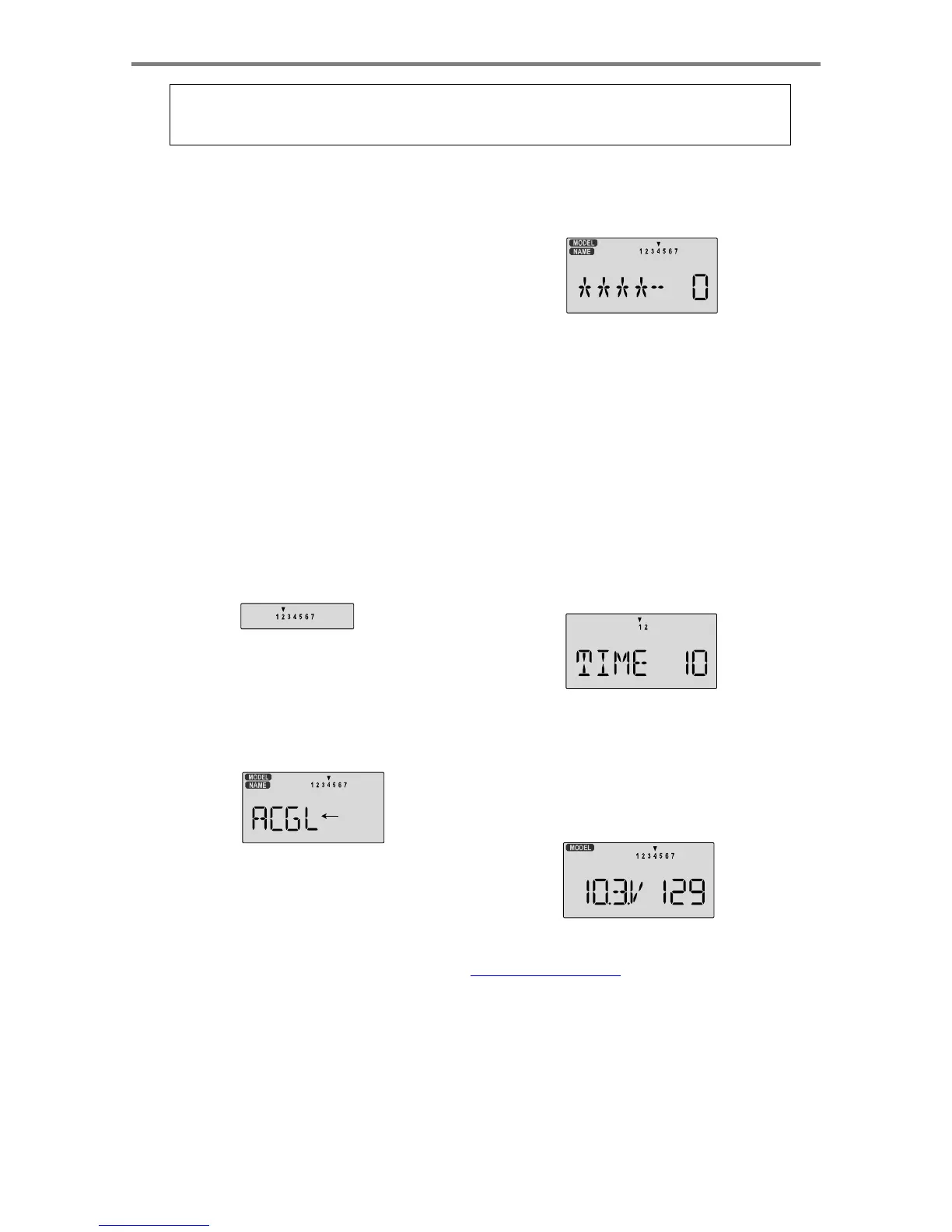
menu.
Press
the
Cursor
Right
button
to
move
to
a
new
model
memory.
The
selected
model
memory
is
indicated
by
the
little
flashing
arrow
pointing
down.
Memory
#2
is
shown
here.
5.
Press
the
Down
arrow
once.
This
gets
you
into
the
model
name
mode
(note
the
words
"MODEL"
and
"NAME"
in
the
upper
left
of
the
display).
6.
Now
you
can
select
four
letters
to
identify
your
model.
Wit
h
the
first
of
the
four
letters
flashing,
press
the
Data
+Increas
e
or
-Decrease
key
to
change
the
letter
that
is
displayed.
Stop
when
the
first
letter
is
the
one
you
want.
7.
Press
the
Right
Cursor
key
once
to
get
to
the
second
letter.
Repeat
the
previous
step
to
choose
the
second
letter.
8.
Repeat
two
more
times
to
fill
out
the
remaining
two
letters.
If
you
like,
you
can
hit
the
right
cursor
button
one
more
time
and
select
a
number
between
0
and
199
for
further
identification.
It
can
be
handy
to
use
this
to
store
the
plane's
channel
number.
9.
Press
the
Down
arrow
four
times.
This
gets
you
into
the
Timer
menu
(
TIME
).
If
you
want,
you
can
use
the
Data
+Increase
or
-Decrease
keys
to
select
the
amount
of
time
you
want
the
stopwatch
to
count
down.
You
can
set
the
second
timer
for
something
else
in
the
same
menu.
4.
Press
the
Up
arrow
until
the
word
ACGL
appears,
flashing
on
and
off.
If
it
does,
you're
ready
to
proceed
on
to
the
next
step.
If
not,
press
the
Left
or
Right
Cursor
keys
until
it
appears.
You
must
press
both
Data
keys
to
"Save"
the
setting,
after
which
the
radio
will
beep
twice.
This
is
how
you
select
the
type
of
model
you
wish
to
use,
either
ACGL
or
HELI
.
Flashing
10.
This
completes
the
initial
part
of
the
setup.
Now,
we'll
go
ahead
and
customize
the
ACGL
settings
for
your
model.
Switch
transmitter
power
OFF
.
11.
Now
turn
power
ON
.
The
transmitter
should
display
the
model
number
and
battery
voltage
as
shown.
The
number
on
the
right
is
the
elapsed
time,
which
will
vary
depending
on
how
long
the
transmitter
has
been
left
on.
WARNING:
selecting
a
different
model
type
will
erase
the
settings
in
the
model
memory.
BE
SURE
you're
in
the
correct
model
memory
before
selecting
a
new
model
type,
or
you
might
accidentally
erase
a
model
you're
using.
(The
other
memories
will
not
be
affected.)
Simple
Transmitter
Setup
-
Aerobatic
Airplane
(ACGL
Menu)
-
Page
16

Table of Contents

Other manuals for HITEC OPTIC 6

Related product manuals