EasyManua.ls Logo

HITEC OPTIC 6 - Modulation - PPM, QPCM; TIME -Timer Function Setup

HITEC OPTIC 6
60 pages
Print Icon
To Next Page IconTo Next Page
To Previous Page IconTo Previous Page
Loading...
For more information - www.modelflight.com.au
Model
Setup
Functions
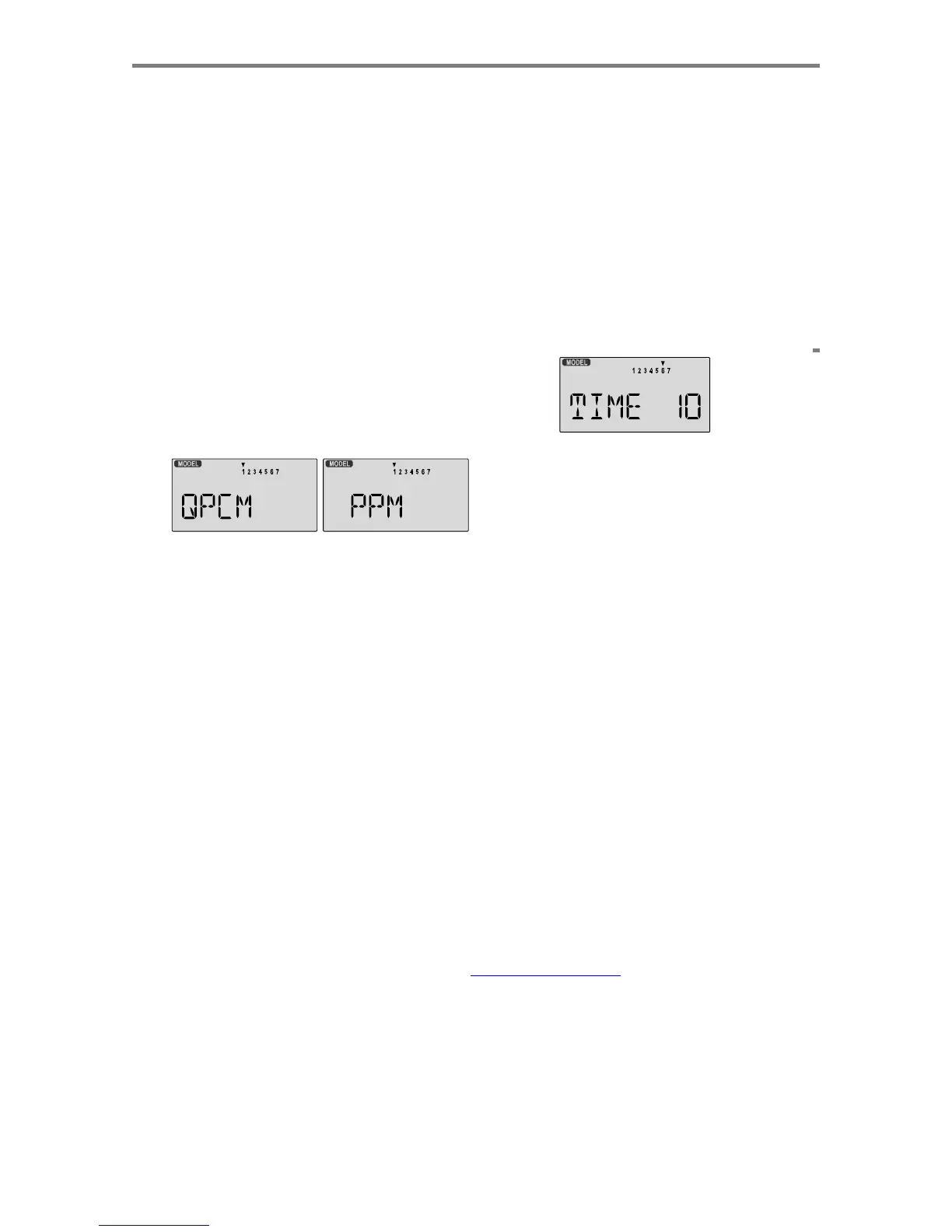
Modulation
-
PPM,
QPC
M
The
Modulation
function
is
used
to
choose
what
type
of
receiver
you
will
be
using
with
your
Optic
system.
Hitec
has
two
types
of
receivers,
PPM
and
QPCM.
PPM
receivers
are
also
referred
to
as
"FM"
receivers.
QPCM
receivers
offer
you
the
option
of
failsafe
which
will
hold
the
last
set
of
positions
received
before
the
interference,
or
allow
you
to
choose
what
positions
the
servos
will
move
to
if
the
signal
is
lost
or
interfered.
Failsafe
will
only
work
with
Hitec
QPCM
receivers.
You
can
have
a
mixture
of
QPCM
and
PPM
receivers,
and
the
Optic
transmitter
will
remember
which
type
of
modulation
you
are
using
for
each
separate
model
memory.
Changing
the
Modulation
1.
With
the
transmitter
switched
off,
turn
on
your
transmitter
while
pressing
both
of
the
two
Edit
keys
(the
two
keys
on
the
far
left).
The
model
select
(
M.SEL
)
menu
will
be
displayed.
2.
Press
the
Up
or
Down
Edit
key
until
you
get
into
the
Modulation
menu.
You'll
see
either
the
flashing
word
PPM
or
QPCM
.
(If
you're
already
in
the
setup
menus,
you
can
just
press
the
Up
or
Down
arrow
key
to
get
here.)
3.
PPM
is
also
known
as
"FM"
and
will
work
with
Hitec
and
other
receivers
that
are
not
PCM.
QPCM
represents
pulse-
code
modulation
and
will
only
work
Hitec
QPCM
receivers.
4.
To
input
your
choice,
press
either
the
Left
or
Right
Cursor
key
one
time.
This
will
change
the
display
from
PPM
to
QPCM
or
vice
versa.
5.
Press
the
Up
or
Down
arrow
keys
to
get
to
another
setup
menu,
or
switch
power
off.
This
setting
will
be
remembered
in
the
current
model
memory
only.
TIME
-Timer
Function
Setup
Your
Optic
system
contains
TWO
special
timer
functions,
helpful
for
keeping
track
of
flight
duration,
engine
run
time,
or
other
things
that
need
to
be
monitored
during
flight.
You
can
set
up
the
timers
to
count
down
from
anywhere
from
0
to
60
minutes.
(In
addition,
the
Optic
has
an
"elapsed
time"
counter
that
continuously
records
how
long
the
transmitter
has
been
operating.)
If
you
select
a
time
from
1
to
60
minutes,
the
timer
will
count
down
the
number
of
minutes
selected
when
you
first
press
the
Right
Cursor
button.
You
may
stop
it
at
any
time
by
pressing
the
Right
Cursor
button
a
second
time.
Beginning
the
last
10
seconds
of
the
selected
time,
the
system
will
beep
every
second to tell you the time has
elapsed.
If
you
wish
to
reset
the
timer,
just
press
the
Left
Cursor
button.
You
may
then
press
the
Right
Cursor
button
to
reset
it
and
count
down
again,
whenever
you
like.
The
above
instructions
apply
to
both
of
the
Optic's
timers.
Setting
up
the
Optic's
Two
Timers
1.
With
the
transmitter
switched
off,
turn
on
your
transmitter
while
pressing
both
of
the
two
Edit
keys
(the
two
keys
on
the
far
left).
The
model
select
(
M.SEL
)
menu
will
be
displayed.
2.
Press
the
Up
or
Down
EDIT
arrow
key
until
you
get
into
the
Timer
(
TIME
)
menu
(if
you're
already
in
the
setup
menus,
you
can
just
press
the
Up
or
Down
arrow
key
to
get
here).
You'll
see
a
display
with
the
word
"
TIME
."
The
numbers
1
and
2
are
shown;
the
small
triangle
indicates
whether
you
are
setting
Timer
1
or
Timer
2.
3.
To
change
the
number
of
minutes
shown,
press
the
+
Increase
and
-Decrease
Data
keys
until
you
see
the
amount
you
desire.
You
may
select
from
1
to
60
minutes.
4.
Press
the
Left
or
Right
CURSOR
key
to
get
to
the
other
timer
setup
menu.
Repeat
instruction
3
for
the
second
timer
if
desired.
5.
Press
the
Up
or
Down
arrow
keys
to
get
to
another
setup
menu,
or
switch
power
off.
6.
Switch
power
back
on.
You
can
view,
start,
and
stop
either
of
the
two
timers
by
pressing
either
DATA
key.
Press
the
Right
Cursor
button
to
start
the
timer,
press
the
Right
Cursor
button
a
second
time
to
stop
it,
and
press
the
Left
Cursor
button
to
reset
the
timer.
REST
-
Data
Reset
The
Reset
function
is
used
to
clear
out
an
existing
set
of
model
data
within
a
single
model
memory,
the
one
currently
selected.
This
function
resets
all
data
to
initial
values,
and
may
be
used
to
get
a
"fresh
start"
so
that
you
may
be
begin
with
a
clear
memory
before
you
input
new
model
settings
into
a
memory
that
had
been
used
for
another
model.
A
safety
feature
allows
you
to
verify
"that
you
wish
to
reset"
before
all
data
is
lost.
Resetting
the
memory
1.
With
the
transmitter
switched
off,
turn
on
your
transmitter
while
pressing
both
of
the
two
Edit
keys
(the
two
keys
on
the
far
left).
The
model
select
(
M.SEL
)
menu
will
be
displayed.
2.
Press
the
Up
or
Down
arrow
key
until
you
get
into
the
Reset
(
REST
)
menu.
This
display
has
the
word
"
REST
"
flashing
on
Mode
l
Setu
p
Function
s
-
Pa
g
e
14

Table of Contents

Other manuals for HITEC OPTIC 6

Related product manuals