EasyManua.ls Logo

HITEC OPTIC 6 - AILV - Ailevator Function

HITEC OPTIC 6
60 pages
Print Icon
To Next Page IconTo Next Page
To Previous Page IconTo Previous Page
Loading...
For more information - www.modelflight.com.au
A
ir
p
lane
Model
Function Descri
p
tions
Master
Slave
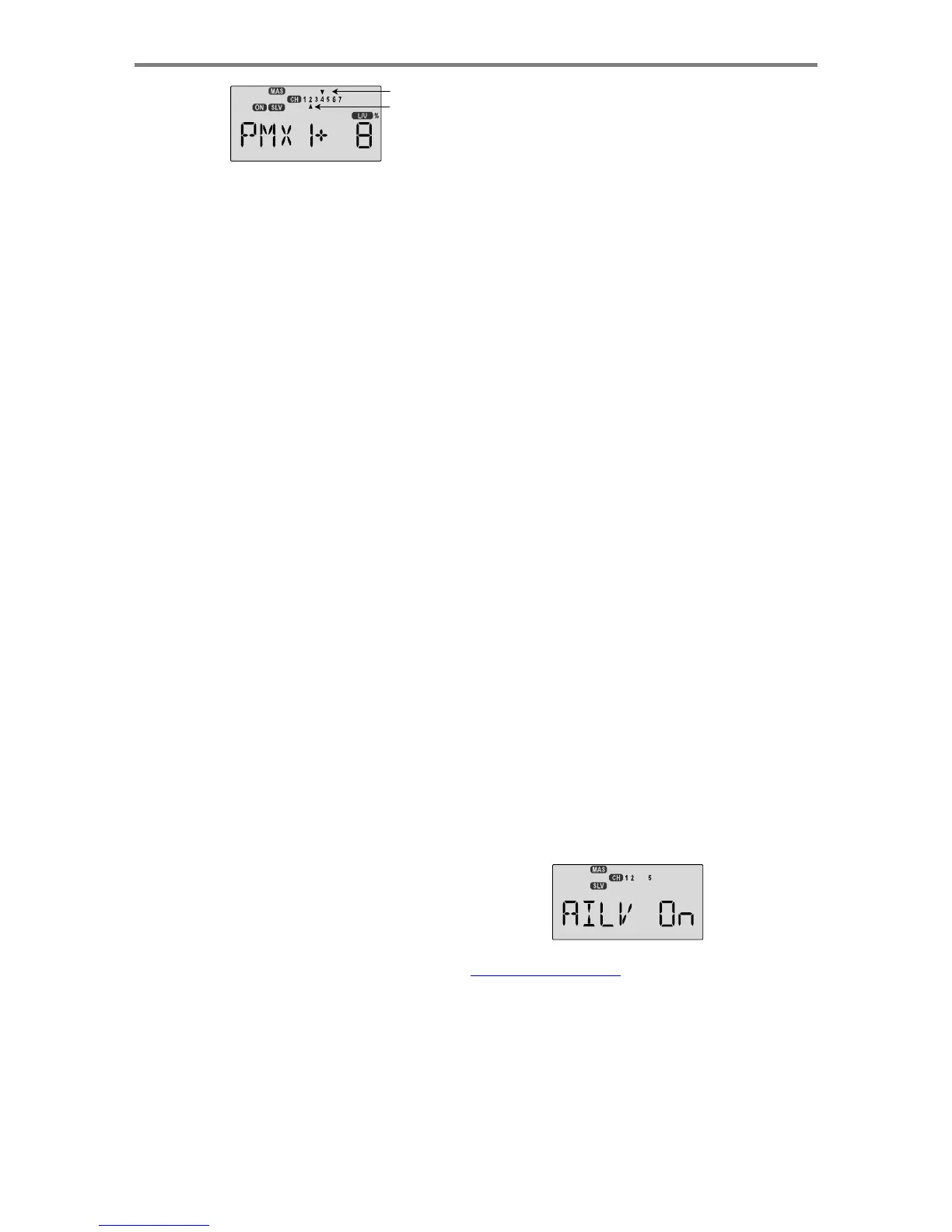
3.
Next
you'll
put
in
the
Slave
channel,
the
one
that
is
affected
by
motion
of
the
master
channel.
Press
the
Cursor
Right
key
to
get
slave
channel
indicator
SLV
flashing
on
and
off,
then
press
the
Data
+Increase
or
-Decrease
keys
to
move
the
bottom
arrow
underneath
the
number
of
the
desired
slave
channel.
4.
Now
you'll
input
the
mixing
percentage,
which
tells
how
much
the
slave
channel
responds
to
the
master
channel.
Press
the
Cursor
Right
key
to
cause
the
percent
(%)
sign
to
the
right
of
the
large
number
to
flash
on
and
off.
Note
that
you
can
set
the
percentage
for
the
mixer
on
each
side
of
the
master
channel's
control's
motion
by
moving
the
master
channel's
control
back
and
forth.
The
motion
of
the
master
channel's
control
is
also
indicated
by
the
R/D
(=
Right/Down)
or
L/U
(=
Left/Up)
indicator
in
the
window.
5.
Hold
the
master
channel's
control
to
one
side,
and
then
use
the
Data
+Increase
or
-Decrease
key
to
change
the
percentage
for
the
mixer.
Verify
that
you
get
the
proper
motion
of
the
slave
channel
when
you
move
the
master.
If
you
don't
get
a
response
to
the
master
movement,
check
that
the
mixer
is
turned
on
with
its
on-off
switch.
Change
the
percentage
if
the
amount
of
travel
is
incorrect.
If
you
want
to
set
the
percentage
to
ZERO,
press
the
Active/Inhibit
(Clear)
key.
6.
Move
the
master
control
to
the
other
side
of
its
travel
and
then
repeat
the
actions
in
the
previous
step
to
set
the
amount
of
mixing
on
the
other
side.
Use
the
Data
+Increase
or
-Decrease
key
to
change
the
percentage
for
the
mixer
until
you
get
the
response
you
want
for
the
second
side.
[
Knife-Edge
Example:
for
a
model
that
tucks
during
knife-edge
flight,
set
up
a
mixer
with
Master
=
4
(Rudder),
and
Slave
=
2
(elevator).
You
want
to
get
up
elevator
mixed
in
for
either
direction
of
full
rudder.
Therefore,
you'll
set
plus
mixing
on
one
side
of
the
rudder
stick,
and
minus
mixing
on
the
other
side.
Normally
only
5%
to
10%
mixing
is
needed
to
solve
this
problem.
S/W
SEL
-
Switch
Selection
For
Auxiliary
Functions
Your
Optic
system
allows
you
to
customize
your
radio
and
choose
what
switches
are
used
to
turn
on
the
following
functions:
A->R,
E->F,
CAMB,
CROW,
LAND,
PMX1,
and
PMX2.
Note
that
each
of
these
functions
may
be
chosen
to
be
turned
on
by
flipping
a
switch,
or
to
be
on
all
the
time.
Choosing The On-Of
f
Switch
For
Certain
Radio Functions
1.
Call
up
the
Switch
Select
screen
by
repeatedly
pressing
one
of
the
Edit
Up
Down
keys
until
the
highlighted
words
S/W
SEL
appear.
The
window
may
appear
with
any
of
the
following
displayed:
A->R,
E->F,
CAMB,
CROW,
LAND,
PMX1,
and
PMX2.
2.
Use
the
Data
+Increase
or
-Decrease
keys
to
select
the
desired
function.
3.
Use
the
Left
Right
Cursor
keys
to
select
from
the
following
on-off
possibilities
for
the
selected
function
a.
On
indicates
the
function
is
ALWAYS
on.
b.
1
represents
Switch
SW-1,
the
"ELEV
RUDD
D/R"
switch.
On
is
down
.
c.
2
represents
Switch
SW-2,
the
"GEAR
AUX"
switch.
On
is
down
.
d.
3
represents
Switch
SW-3,
the
"AIL
D/R"
switch.
On
is
down
.
e.
4
represents
Switch
SW-4,
the
"FLT
MODE"
switch.
The
FLT
MODE
switch
has
three
positions
to
select
from:
i.
NOR
=onat
forward
position
ii.
ST1
=onat
middle
position
iii.
ST2
=onat
aft
position
4.
Repeat
Steps
2-3
for
any
additional
functions
you
wish
to
set.
AILV
-
Ailevator
Function
Your
Optic
system
contains
special
programming
to
allow
you
to
fly
a
model
with
two
independent
elevator
servos
which
respond
together
to
the
elevator
stick,
and
in
opposite
directions
to
the
aileron
stick.
This
combination
of
aileron
and
elevator
results
in
the
name
"ailevator"
and
allows
you
to
do
torque
rolls
with
3-D
aircraft!
Note
that
the
AILV
function
is
on
all
the
time
once
it
is
activated.
Setting
Up
the
Ailevator
Function
1.
This
function
requires
two
elevator
servos,
one
for
each
side.
Plug
the
right
elevator
servo
into
channel
2,
and
the
second
elevator
servo
into
channel
5.
If
you
need
retracts,
you
will
have
to
use
the
output
from
channel
6.
2.
Call
up
the
mixer
screen
by
repeatedly
pressing
the
Edit
Up
or
Down
key
until
the
AILV
window
appears.
The
default
is
for
the
function
to
be
inhibited.
To
activate,
press
the
CLEAR
key.
This
will
cause
the
AILV
INH
display
to
change to
AILV
ON
.
AILV
is
not
a
switch
able
function,
it
is
either
ON
or
OFF
.
A
ir
p
lane
Mode
l
Function
Descri
p
tion
s
-
Pa
g
e
39

Table of Contents

Other manuals for HITEC OPTIC 6

Related product manuals