EasyManua.ls Logo

HITEC OPTIC 6 - Ailevator Function

HITEC OPTIC 6
60 pages
Print Icon
To Next Page IconTo Next Page
To Previous Page IconTo Previous Page
Loading...
For more information - www.modelflight.com.au
A
ir
p
lane
Model
Function Descri
p
tions
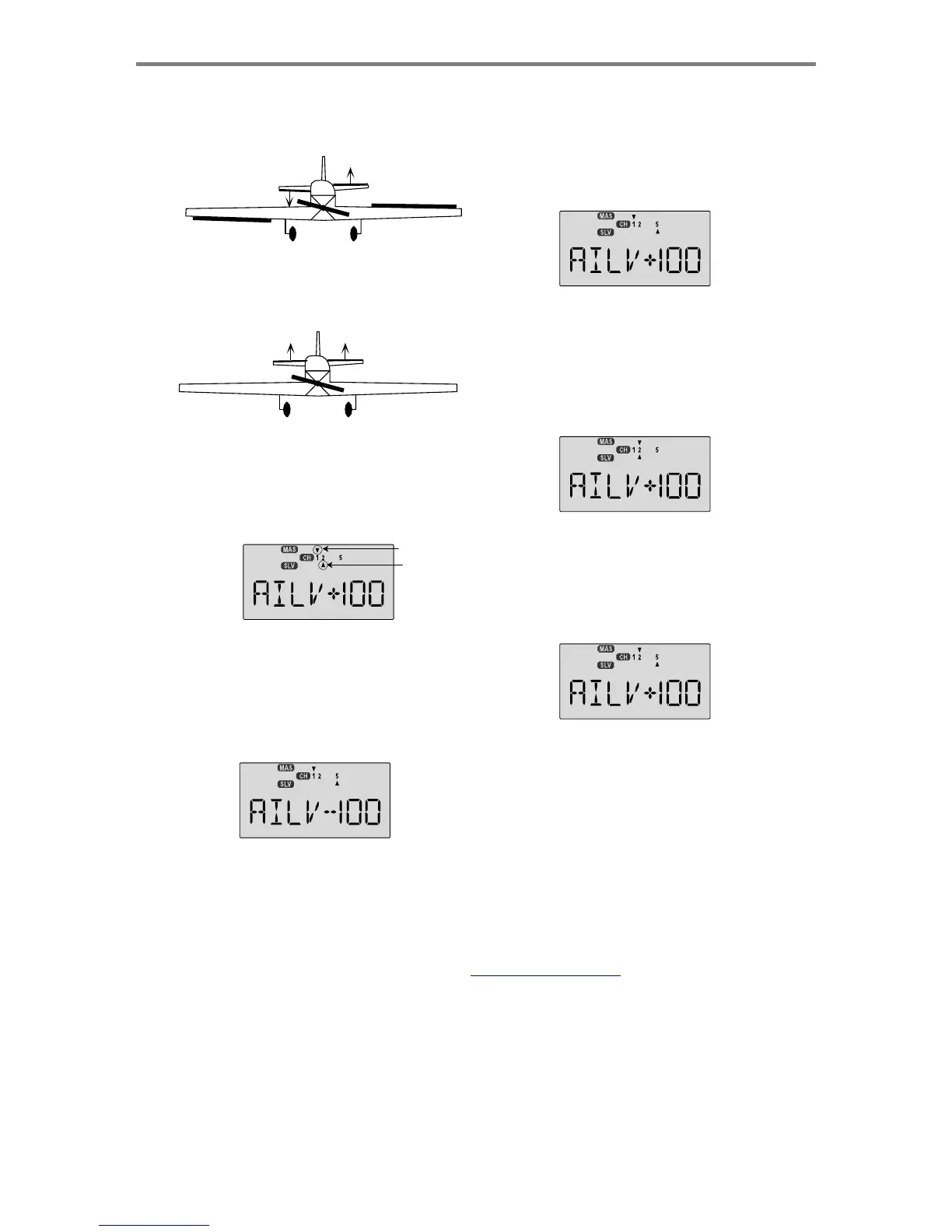
3.
Move
the
stick
to
command
aileron.
In
addition
to
the
ailero
n
servo(s),
both
elevator
servos
should
move.
They
may
mov
e
in
opposite
directions
(as
they
should)
or
the
same
direction
(instructions
for
correcting
this
are
below).
7.
If
the
elevator
servo
plugged
into
CH5
goes
the
correct
direction
with
aileron
stick,
go
to
the
next
step.
Otherwise,
press
the
Cursor
Right
key
to
get
to
the
AIL->CH5
setting
menu,
then
press
the
Data
+Increase
or
-Decrease
keys
to
change
the
sign
of
the
percentage
displayed.
If
it
is
(+),
change
it
to
(-),
or
vice
versa.
Only
change
the
sign
of
the
number,
you
can
decrease
its
value
later
if
you
need
to.
4.
Move
the
stick
to
command
elevator.
Both
elevator
servos
should
move.
They
may
move
in
the
same
direction
(as
they
should)
or
opposite
directions
(to
be
corrected
below).
8.
If
the
elevator
servo
plugged
into
CH2
goes
the
correct
direction
with
elevator
stick,
go
to
the
next
step.
Otherwise,
press
the
Cursor
Right
key
to
get
to
the
AIL->CH2
setting
menu,
then
press
the
Data
+Increase
or
-Decrease
keys
to
change
the
sign
of
the
percentage
displayed.
If
it
is
(+),
change
it
to
(-),
or
vice
versa.
Only
change
the
sign
of
the
number,
you
can
decrease
its
value
later
if
you
need
to.
5.
Press
the
Cursor
Right
key
to
get
to
the
travel
setting
menus.
The
display
shows
a
triangle
over
the
number
1
and
under
the
number
2,
indicating
you
are
in
the
AIL->CH2
setting
menu,
programming
the
response
of
the
CH2 elevator
servo
due
to
aileron
(CH1)
commands.
Master contro
l
Slave
Ch.
6.
If
the
elevator
servo
plugged
into
CH2
goes
the
correct
direction
with
aileron
stick,
go
to
the
next
step.
Otherwise,
press
the
Data
+Increase
or
-Decrease
keys
to
change
the
sign
of
the
percentage
displayed.
If
it
is
(+),
change
it
to
(-),
or
vice
versa.
Only
change
the
sign
of
the
number,
you
can
decrease
its
value
later
if
you
need
to.
9.
If
the
elevator
servo
plugged
into
CH5
goes
the
correct
direction
with
elevator
stick,
go
to
the
next
step.
Otherwise,
press
the
Cursor
Right
key
to
get
to
the
ELEV->CH5
setting
menu,
then
press
the
Data
+Increase
or
-Decrease
keys
to
change
the
sign
of
the
percentage
displayed.
If
it
is
(+),
change
it
to
(-),
or
vice
versa.
10.
Once
you
have
all
the
servos
moving
the
correct
directions,
you
can
go
back
and
adjust
each
of
the
travels
independently,
so
that
both
elevator
servos
move
up
the
SAME
amount
when
elevator
control
is
given,
and
move
opposite
the
same
amount
for
aileron
command.
You
will
need
to
decrease
the
percentage
shown
for
the
one
moving
further,
or
increase
the
percentage
for
the
one
moving
less.
A
ir
p
lane
Mode
l
F
unction
Descri
p
tion
s
-
Pa
g
e
40

Table of Contents

Other manuals for HITEC OPTIC 6

Related product manuals