EasyManua.ls Logo

HITEC OPTIC 6 - Page 21

HITEC OPTIC 6
60 pages
Print Icon
To Next Page IconTo Next Page
To Previous Page IconTo Previous Page
Loading...
For more information - www.modelflight.com.au
Sim
p
le
Transmitter
Setu
p
-
Aerobati
c
Air
p
lane
(
ACGL
Menu
)
53.
Rudder
dual
rate
setting:
press
the
Right
Cursor
key
one
time
to
get
the
little
arrows
above
or
below
the
numeral
4.
Now
set
the
rudder
dual
rates
in
the
same
way
you
set
the
ailerons
and
elevator
in
the
previous
steps.
54.
Landing
setup.
You
can
get
an
airbrake
effect
by
flipping
a
switch
to
raise
or
lower
both
flaperons
and
add
elevator
to
keep
it
trimmed.
This
high-drag
configuration
makes
the
landing
approach
steeper
to
help
make
safe
landings
in
small
fields.
This
is
an
on-off
function,
not
proportional.
55.
With
landing
mode
on,
it
is
possible
to
lose
some
aileron
effectiveness.
Be
sure
to
test
the
landing
settings
at
altitude
before
trying
it
on
a
landing
approach.
You
should
spend
some
time
fine-adjusting
the
elevator
travel
so
that
there
is
minimal
trim
change
when
the
landing
(
Flt.
Mode
(SW-4)
)
switch
is
operated.
56.
Press
one
of
the
Up
Down
Edit
buttons
until
the
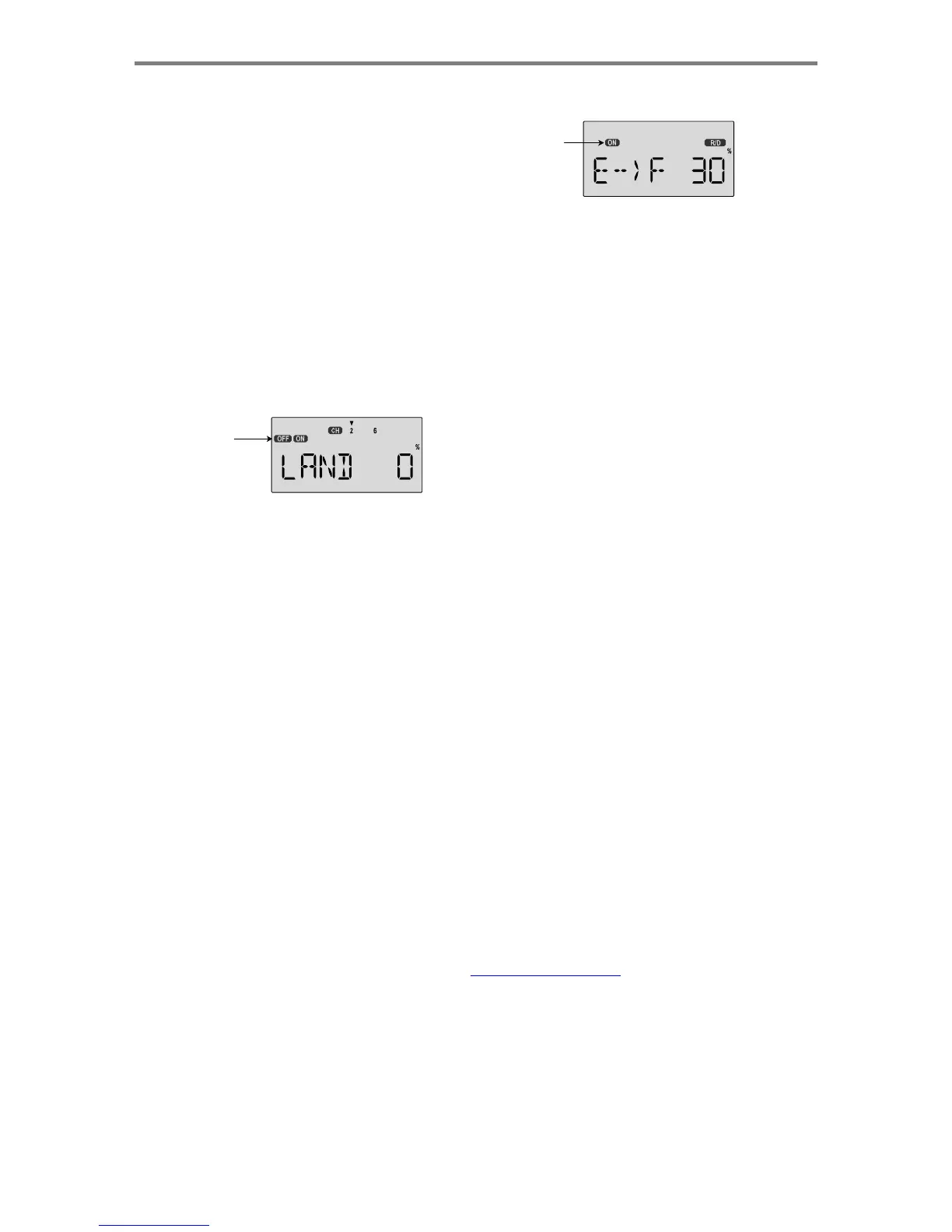
LAND
window
appears,
as
shown.
The
landing
mode
is
OFF
unless
the
Flt.
Mode
(SW-4)
switch
(upper
left
of
transmitter)
is
fully
aft
(away
from
you).
ON
or
OFF
depends
on
Flt.
Mode
switch
setting
57.
The
arrow
should
be
over
the
numeral
2.
Now
press
the
Data
+Increase
key
to
change
the
percentage
shown.
You
may
input
the
amount
of
offset
for
the
elevator
at
this
time.
This
should
be
set
from
-7%
to
-10%.
Don't
use
too
much
or
it
could
crash
your
model.
58.
Press
the
Cursor
Right
key
one
more
time,
and
you
may
now
input
the
CH6
setting.
The
rates
may
vary
considerably
for
different
models,
but
for
initial
settings
you
might
try
the
flap
rate
around
50-55%.
You
may
want
flaps
to
droop
or
rise,
depending
on
the
model
type.
59.
E->F
Mixing:
you
may
couple
or
mix
elevator
to
flaps
for
tighter
corners
in
the
elevator-to-flap
mixer.
Get
to
the
E->F
menu,
then
activate
it
by
pressing
the
Clear
key.
Press
the
Right
Cursor
key
to
get
the
percent
symbol
to
flash.
Now
you
may
input
the
percentage
of
mixing
with
the
Data
+Increase
key.
Start
out
with
10-20%
and
increase
it
until
the
corners
in
your
loops
are
square
enough.
If
the
flaps
don't
drop
when
you
pull
up
elevator,
reverse
the
sign
in
front
of
the
mix
percentage
(change
the
+
to
a
-
or
vice
versa).
60.
Be
sure
to
input
a
mixing
percentage
for
each
side
of
the
elevator
stick
motion.
ON
or
OFF
depends
on
Flt.
Mode
switch
setting
61.
Throttle
Cut.
The
TCUT
function
allows
you
to
kill
the
engine
by
pressing
on
the
ENG
CUT
pushbutton
on
the
top
right
of
the
transmitter,
commanding
the
throttle
servo
to
move
to
a
preset
position.
If
you
use
the
TCUT
function,
you'll
never
need
to
adjust
the
trim
on
your
engine
after
you've
got
a
good
idle
position!
For
safety,
the
TCUT
feature
only
operates
if
the
throttle
stick
is
below
its
50%
position.
After
about
3-5
seconds,
the
throttle
servo
responds
to
throttle
stick.
To
set
up
TCUT,
get
to
the
TCUT
menu.
Now
you
may
input
the
amount
of
throttle
servo
motion
using
the
Data
+Increase
key.
Choose
a
small
negative
number,
which
will
command
the
throttle
servo
to
close
the
carburetor
below
its
idle
position.
If
the
engine
doesn't
quit
when
you
press
the
cut
button,
increase
the
negative
percentage.
Be
careful
not
to
choose
a
position
which
stalls
the
servo.
62.
CAMBER.
You
can
use
the
CAMB
function
to
configure
your
model
to
droop
its
ailerons
and
flaps
to
get
higher
lift
for
takeoff
and
landing.
The
camber
function
may
be
turned
on
and
off
with
a
switch,
and
you
may
also
add
elevator
offset
to
keep
the
model
trimmed.
Camber
is
an
on-off
function,
not
proportional.
To
set
up
camber,
please
read
the
setup
instructions
on
page
33.
63.
Ailevator.
You
may
use
the
AILV
for
models
that
have
two
elevator
servos
to
automatically
gang
them
together
for
elevator
function
without
using
a
programmable
mixer.
In
addition,
you
may
program
in
a
response
to
aileron
Commands,
which
allows
you
to
use
them
for
3-D
maneuvers
such
as
torque
rolls.
The
AILV
function
cannot
be
switched
on
and
off
during
flight.
For
more
information
on
AILV,
please
read
the
setup
instructions
on
page
39.
64.
Aileron
differential
(ADIF)
is
a
function
that
allows
you
to
Individually
set
the
up
and
down
motion
of
ailerons
controlled
by
two
separate
aileron
servos.
The
two
servos
must
be
plugged
into
channels
1
and
5,
so
this
function
is
he
best
way
to
control
a
two-servo
model
using
a
five-
channel
receiver.
You
cannot
activate
both
ADIF
and
FLPN
functions,
you
must
choose
one
or
the
other.
We
recommend
using
FLPN
for
receivers
with
six
channels
and
ADIF
for
receivers
with
five
channels.
For
instructions
on
how
to
use
ADIF,
please
refer
to
the
setup
instructions
on
page
31.
Sim
p
le
Transmitter
Setu
p
-
A
erobatic
A
ir
p
lane
(
ACGL
Menu
)
-
Pa
g
e
21

Table of Contents

Other manuals for HITEC OPTIC 6

Related product manuals