EasyManua.ls Logo

HITEC OPTIC 6 - Dual Rate Setting

HITEC OPTIC 6
60 pages
Print Icon
To Next Page IconTo Next Page
To Previous Page IconTo Previous Page
Loading...
For more information - www.modelflight.com.au
Sim
p
le
Transmitter
Setu
p
-
Aerobati
c
Air
p
lane
(
ACGL
Menu
)
41.
To
set
the
FULL
throttle
position,
move
the
throttle
stick
all
the
way
to
the
transmitter
top
and
hold
it.
The
letters
"
R/D
"
should
appear
next
to
the
flashing
percent
sign.
[Notice
that
the
Optic
transmitter
thinks
of
throttle
stick
positions
to
the
reverse
of
the
way
it
seems,
in
that
with
the
throttle
stick
fully
forwards
-
"up"
towards
the
transmitter
top,
is
the
Down
position.]
Listen
for
a
buzzing
sound
to
indicate
the
servo
is
stalling,
and
hit
the
-Decrease
Data
key
until
the
buzzing
stops.
If
the
servo
is
not
buzzing,
leave
the
setting
at
100%
or
change
your
linkage
as
necessary
to
fully
open
the
throttle.
42.
To
set
the
RIGHT
rudder
motion,
press
the
Right
Cursor
key
until
the
indicator
moves
over
channel
4.
Now
move
the
left
stick
all
the
way
to
the
right
and
hold
it.
The
letters
"
R/D
"
should
appear
next
to
the
flashing
percent
sign.
Listen
for
a
buzzing
sound
to
indicate
the
rudder
servo
is
stalling,
and
hit
the
Data
-Decrease
key
until
the
buzzing
stops.
If
the
servo
is
not
buzzing,
leave
the
setting
at
100%.
You
may
wish
to
increase
or
decrease
this
number
depending
on
how
strongly
the
model
reacts
when
the
rudder
is
deflected.
Now
move
the
stick
to
the
left
side,
and
repeat
the
setting
procedure
for
left
rudder.
43.
In
the
same
manner
as
described
above,
be
sure
to
set
EPA
values
for
channels
5
(landing
gear)
and
6
(second
aileron),
if
you
have
either.
44.
If
you
wish
to
have
the
flaps
operate
with
the
CH6
lever, go
back
to
the
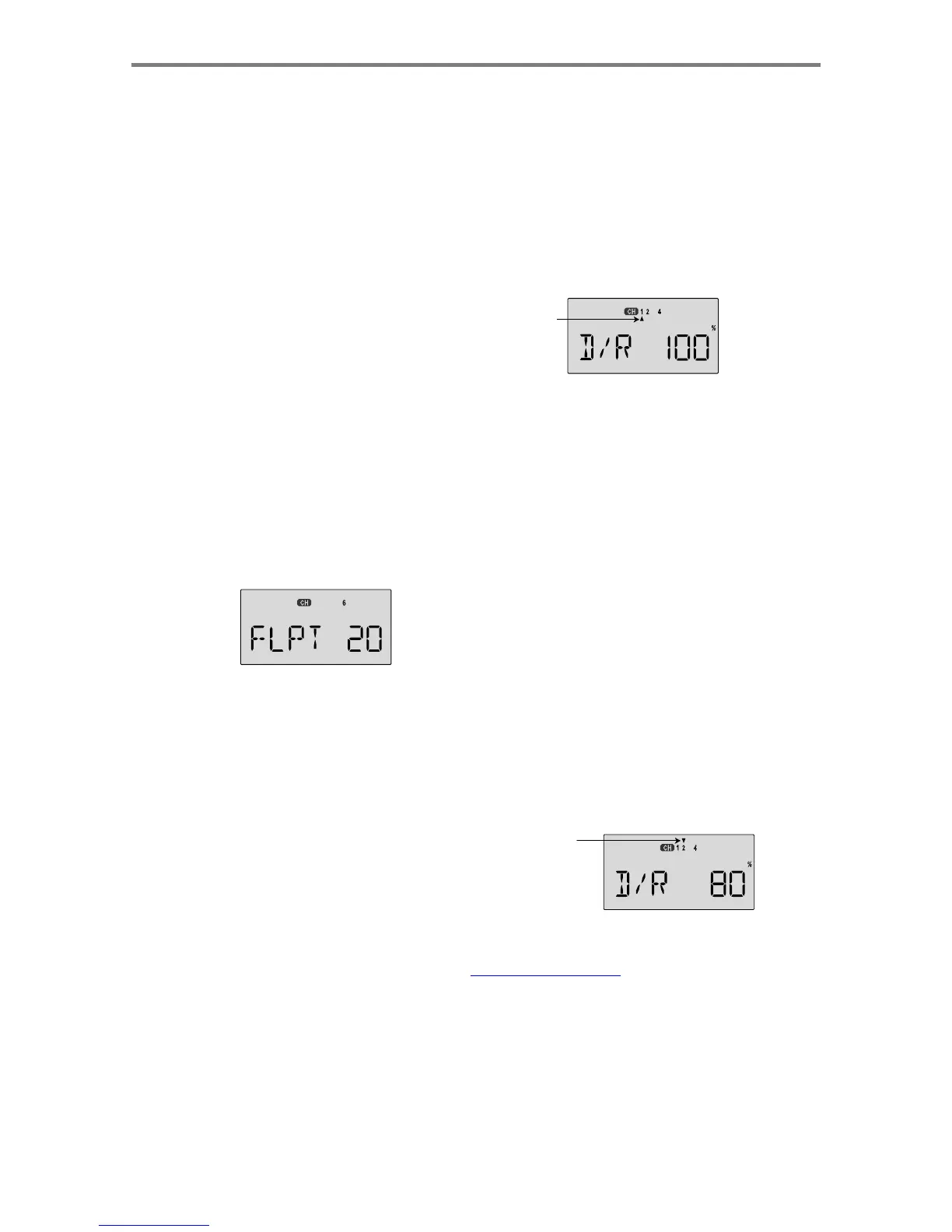
FLPT
menu
and
input
a
number
greater than
zero.
Adjust
the
number
to
get
the
desired
amount
of flap
travel
as
you
turn
the
lever.
45.
If
you
wish
to
have
differential
aileron
travel,
this
can
be
done
in
the
flaperon
menu.
First,
we'll
reduce
the
down
travel
on
the
right
aileron.
Press
the
Right
Cursor
key
until
the
little
triangles
are
both
above
and
below
the
numeral
1.
Hold
the
aileron
stick
to
the
left
and
press
the
-Decrease
Data
key
until
the
number
is
smaller.
50-75%
is
a
good
starting
point.
Watch
to
be
sure
you're
setting
the
down
travel
on
the
right
aileron.
46.
Next,
we'll
reduce
the
down
travel
on
the
left
aileron.
Press
the
Right
Cursor
key
until
the
little
triangle
moves
below
the
numeral
6
(the
second
aileron;
the
upper
triangle
should
stay
over
the
number
1).
This
time,
hold
the
aileron
stick
to
the
right
and
press
the
-Decrease
Data
key
until
the
number
is
the
same
as
you
chose
for
the
other
side.
47.
You
can
use
the
dual
rate
function
or
the
exponential
function
to
reduce
the
aileron
and
elevator
travel
in
flight
by
flipping
switches.
Dual
rates
are
typically
used
to
reduce
a
model's
sensitivity
and
cut
down
total
travel.
Exponential
functions
make
the
response
slower
around
center
and
larger
away
from
center.
You
can
use
both
but
they
are
activated
by
the
same
switch.
You
may
wish
to
use
Dual
rate
on
one
side
of
the
switch
and
exponential
on
the
other.
48.
Aileron
Dual
Rate
setting.
Get
to
the
D/R
menu
by
pressing
one
of
the
Up
Down
Edit
buttons
repeatedly
until
D/R
appears,
as
shown.
Lower
arrow
indicates
lower
switch
setting
49.
The
aileron
dual
rate
setting
automatically
affects
both
ailerons
if
the
flaperon
function
is
active.
To
set
the
aileron
dual
rate,
move
the
arrow
by
pressing
the
Right
Cursor
key
until
the
little
arrow
is
under
or
over
the
numeral
1
(the
arrow
depends
on
the
position
of
the
Ail
D/R
switch
above
the
right
stick.
Now
move
the
aileron
D/R
switch
up
or
down,
noticing
the
position
of
the
arrow.
You
can
set
two
dual
rates,
one
for
each
switch
position.
If
you
set
them, be
sure
to
note
which
switch
position
turns
them
on.
50.
By
pressing
the
Data
+Increase
or
-Decrease
keys,
you
can
add
or
subtract
from
the
numerical
value
displayed.
Note
that
you
may
pick
a
value
anywhere
from
0%
to
125%
(125%
is
larger
than
the
normal
amount,
so
if
you
do
this
be
careful
not
to
exceed
servo
travel
limits
and
cause
stalling
or
excess
current
drain).
If
you
quickly
want
to
get
back
to
the
default
100%,
press
the
Clear
key.
We
suggest
using
an
initial
value
of
75%.
51.
NOTE:
if
you
set
any
of
the
dual
rates
to
0%,
you
will
have
ZERO
CONTROL
AUTHORITY
and
LOSE
CONTROL
OF
YOUR
AIRCRAFT
when
the
switch
is
in
that
position.
DON'T
DO
IT!
52.
Elevator
dual
rate
setting:
press
the
Right
Cursor
key
one
time
to
get
the
little
arrows
above
or
below
the
numeral
2.
Now
set
the
elevator
dual
rates
in
the
same
way
you
set
the
ailerons
in
the
previous
step.
Upper
arrow
indicates
upper
D/R
switch
setting
Sim
p
le
Transmitter
Setu
p
-
A
erobatic
A
ir
p
lane
(
ACGL
Menu
)
-
Pa
g
e
20

Table of Contents

Other manuals for HITEC OPTIC 6

Related product manuals