EasyManua.ls Logo

HITEC OPTIC 6 - Page 19

HITEC OPTIC 6
60 pages
Print Icon
To Next Page IconTo Next Page
To Previous Page IconTo Previous Page
Loading...
For more information - www.modelflight.com.au
Sim
p
le
Transmitter
Setu
p
-
Aerobati
c
Air
p
lane
(
ACGL
Menu
)
29.
For
the
throttle,
we
recommend
not
setting
a
subtrim
at
this
time.
You
will
use
the
trim
tab
on
the
transmitter
for
setting
your
idle
RPM.
To
shut
off
the
motor
you
will
use
the
Engine
Cut
function.
In
this
way,
you
don't
lose
your
carefully-set
idle
position.
30.
Most
people
set
up
their
engines
to
idle
with
the
throttle
trim
near
center,
so
that
there
is
room
for
changes
due
to
humidity
and
other
factors.
31.
The
Optic
provides
a
special
throttle
trim
function
which
allows
the
throttle
trim
lever
to
work
at
low
throttle
levels,
but
disables
it
at
high
throttle.
32.
Repeat
the
subtrim
adjustment
with
the
rudder
(
CH4
),
gear
(
CH5
),
and
2nd
aileron
channel
(
CH6
).
As
before,
first
set
them
mechanically,
then
adjust
the
electronic
settings.
Be
sure
you
have
selected
the
appropriate
channel
number
each
time.
33.
Servo
EPA
(End
Point
Adjustment)
.
Now
we'll
go
through
and
set
the
servo
travels
for
each
channel.
This
is
both
helpful
and
important,
because
you
can
set
the
throw
of
each
servo,
in
each
direction,
so
that
there
is
no
binding.
Eliminating
binding
is
important
because
it
causes
very
high
current
drain,
and
can
lead
to
a
battery
dying
prematurely.
Another
use
for
the
EPA
function
is
to
adjust
the
model's
total
throws
to
match
the
recommended
control
motions
specified
on
the
plans
or
instructions
by
the
model's
designer.
34.
To
set
travels,
get
to
the
EPA
menu
by
pressing
one
of
the
Up
Down
Edit
buttons
repeatedly
until
EPA
appears.
In
sequence,
we'll
set
right
aileron
right
travel,
right
aileron
left
travel,
up
and
down
elevator
travels,
right
and
left
rudder
travels,
open
and
closed
throttle
positions,
and
left
aileron
travels.
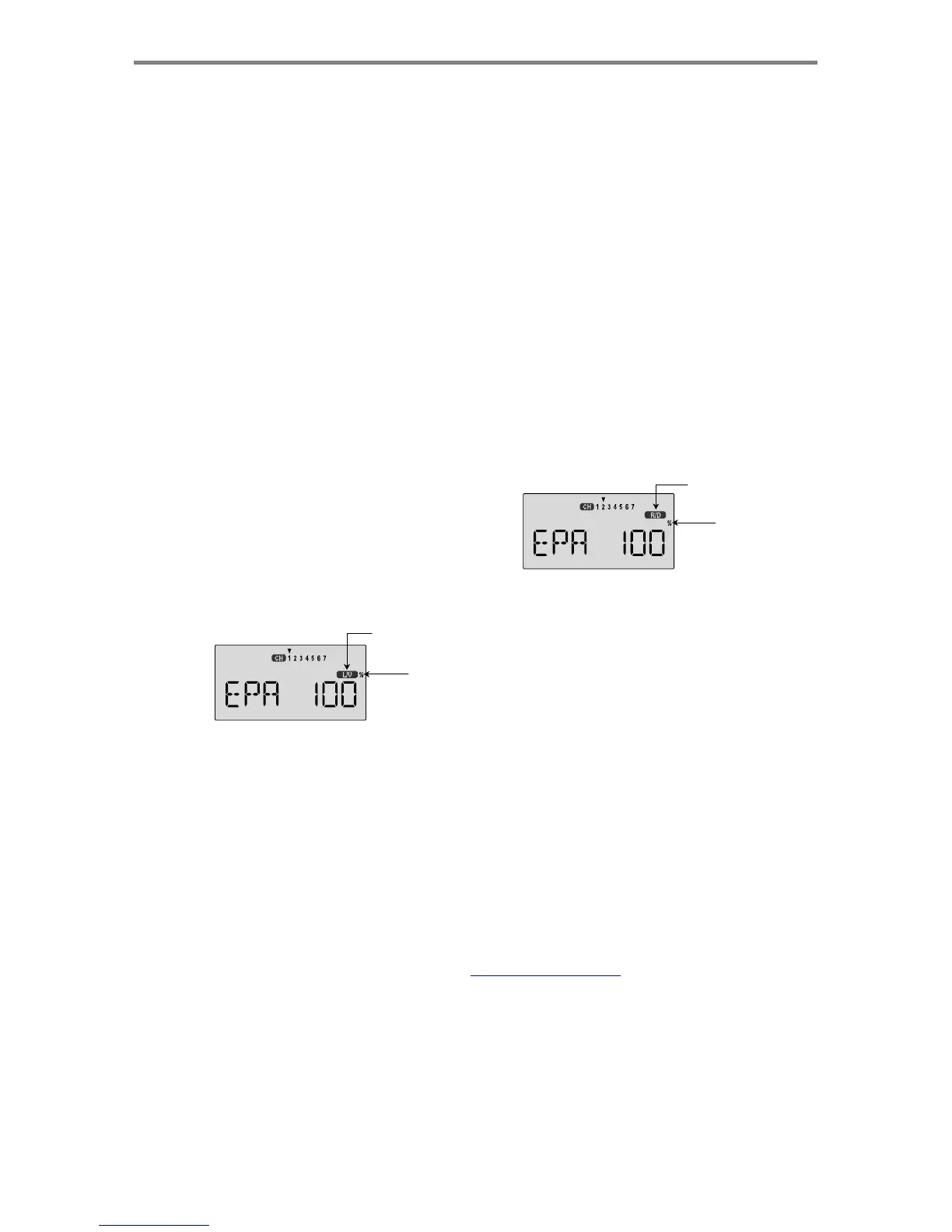
Changes
from
L/U
to
R/D
with
AIL
stick
motion
Flashing
35.
When
you
reach
the
EPA
menu,
you'll
see
the
screen
as
shown.
The
channel
indicator
is
above
numeral
1
for
right
aileron,
the
percent
symbol
will
be
flashing,
and
you'll
notice
that
you
can
change
the
L/U
indicator
to
R/D
(or
vice
versa)
by
moving
the
aileron
(right)
stick.
You
are
about
to
see
that
this
is
how
you
set
the
travel
directions
independently
for
each
stick
motion.
36.
To
set
the
RIGHT
aileron
motion,
move
the
aileron
stick
all
the
way
to
the
right
and
hold
it.
The
letters
"
R/D
"
should
appear
next
to
the
flashing
percent
sign,
meaning
you
are
setting
either
Right
or
Down
travel
(with
ailerons
it's
right
or
left
only,
but
the
display
is
set
up
to
use
the
same
indicators
for
elevator
and
throttle,
thus
the
dual
meanings
for
the
letters).
Now
if
your
servo
is
stalled
or
binding,
you'll
hear
a
buzzing
sound.
Hit
the
minus
-Decrease
Data
key
until
the
buzzing
stops.
If
the
servo
is
not
buzzing,
leave
the
setting
at
100%.
If
you
can,
choose
a
location
for
the
pushrod
on
the
servo
arm
so
that
the
throw
is
adjusted
in
the
90-100%
range.
37.
To
set
the
right
aileron's
LEFT
motion,
move
the
aileron
stick
all
the
way
to
the
left
and
hold
it.
The
letters
"
L/U
"
should
appear
next
to
the
flashing
percent
sign
(as
shown
in
the
figure
above).
Again
listen
and
hit
the
-Decrease
Data
key
until
the
buzzing
stops.
If
the
servo
is
not
buzzing,
leave
the
setting
at
100%.
(Remember,
you're
only
setting
the
right
aileron
travel.
You
set
the
other
aileron's
travel
in
channel
6's
EPA.)
38.
To
set
the
UP
elevator
motion,
press
on
the
Right
Cursor
key
until
the
indicator
moves
over
channel
2.
Now
move
the
right
stick
all
the
way
to
the
transmitter
bottom
and
hold
it.
The
letters
"
L/U
"
should
appear
next
to
the
flashing
percent
sign.
Again
listen
for
a
buzzing
sound
to
indicate
the
servo
is
stalling,
and
hit
the
-Decrease
Data
key
until
the
buzzing
stops.
If
the
servo
is
not
buzzing,
leave
the
setting
at
100%.
Changes
from
L/U
to
R/D
with
ELE
stick
motion
Flashing
39.
Repeat
the
previous
step
for
DOWN
elevator
by
moving
the
stick
all
the
way
to
the
top
of
the
transmitter,
full
"down"
elevator.
Check
for
binding
and
adjust
the
percentage
as
before.
40.
To
set
the
throttle
position
at
IDLE,
first
return
to
the
regular
display
and
set
the
throttle
trim
to
+25%.
Then
go
back
to
the
EPA
menu
and
press
the
Right
Cursor
key
until
the
arrow
moves
over
channel
number
3.
Now
move
the
throttle
stick
all
the
way
to
the
transmitter
bottom
and
hold
it.
The
letters
"L/U"
should
appear
next
to
the
flashing
percent
sign.
Listen
for
a
buzzing
sound
to
indicate
servo
stalling,
and
hit
the
-Decrease
Data
key
until
the
buzzing
stops.
Change
the
setting
to
nearly
-
but
not
completely
-
close
the
throttle
(engine
idle).
Later
you
may
increase
or
decrease
this
number
so
you
can't
accidentally
shut
off
the
engine
using
the
trim
tab.
Sim
p
le
Transmitter
Setu
p
-
A
erobatic
A
ir
p
lane
(
ACGL
Menu
)
-
Pa
g
e
19

Table of Contents

Other manuals for HITEC OPTIC 6

Related product manuals